Exit
  • Global community
    • Language:
      • Deutsch
      • English
      • Español
      • Français
      • Português
  • 日本語コミュニティ
  • 한국 커뮤니티
4

AE crash when deleting expression linked effect

Community Beginner ,
Sep 28, 2022 Sep 28, 2022
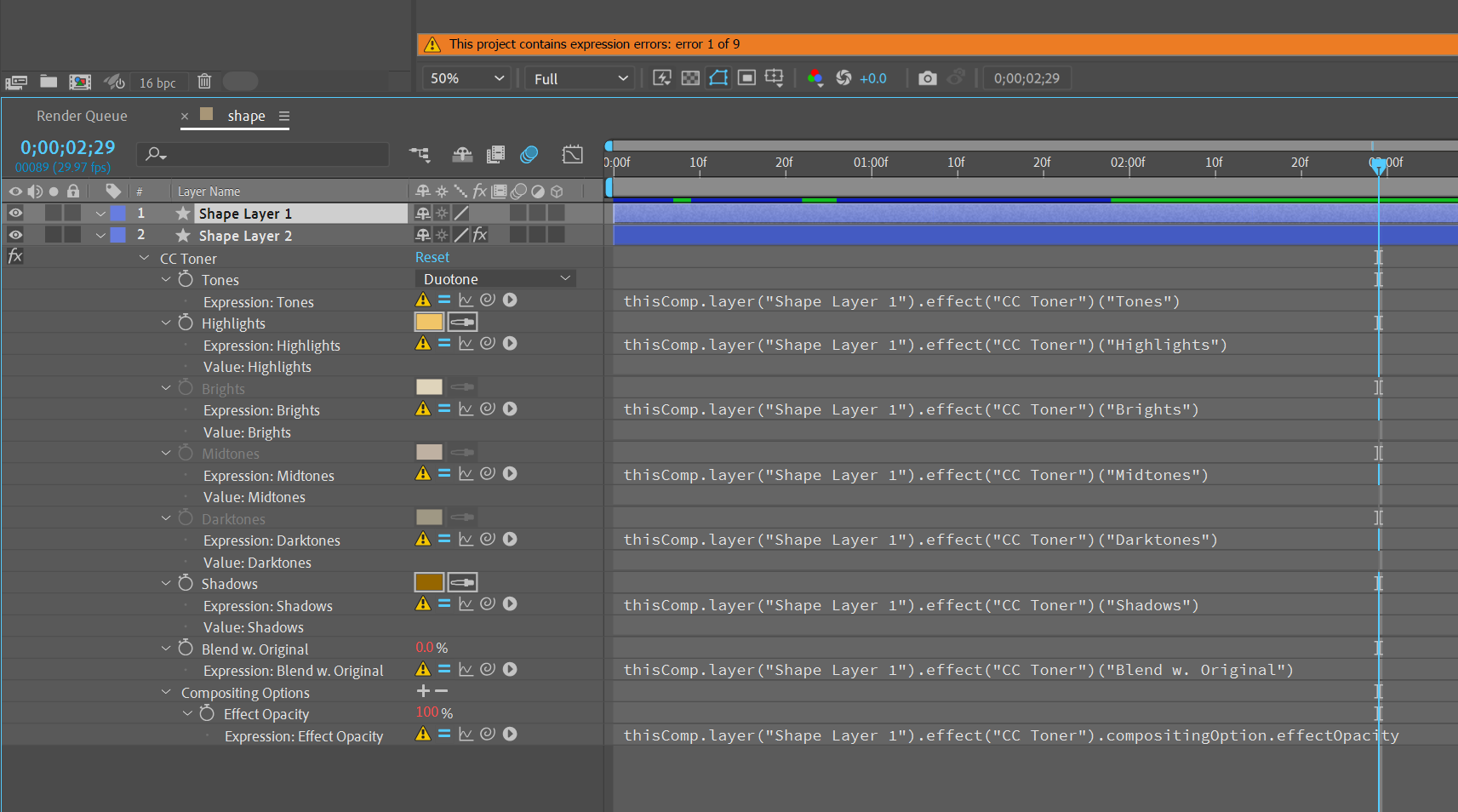
AE reports 9 expressions error but in theres only 8. If I select and delete CC Toner effect on v2 the app crash. Manually deleting each expession individually is the only way to go but during the process the expression warning message reports an astronomous amount of errors (see 2nd screenshot). Bug has been reported on multiple machine.

Bug Investigating
TOPICS
Troubleshooting
508
Translate
Report
Community guidelines
Be kind and respectful, give credit to the original source of content, and search for duplicates before posting. Learn more
community guidelines

correct answers 1 Pinned Reply

Adobe Employee , Sep 28, 2022 Sep 28, 2022
Thank you again for reporting this issue, Frederic. We are able to repro the bug with the project you've shared and are now investigating.

Thanks again,

- John, After Effects Engineering Team
Translate
4 Comments
Adobe Employee ,
Sep 28, 2022 Sep 28, 2022
Hi Frederic,

Thank you for reporting this issue. After creating a project matching your screenshots by copying the CC Toner effect via Copy with Relative Property links, we could not reproduce the behavior you've reported; only 8 expression errors were shown, and there was no crash when deleting the CC Toner effect on the second Shape layer.

If possible, could you share this project with us or provide the steps to recreate the buggy behavior? Also, what version of After Effects and what OS are you currently using?

Thanks again for reporting this issue and for any further information you can provide,
- John, After Effects Engineering Team
Translate
Report
Community Beginner ,
Sep 28, 2022 Sep 28, 2022
Thanks John for your quick reponse! I have tried both 22.2 and 22.3 of AE on PC and it provoke a "Not responding" application in task manager when I first delete the CC Toner on Shape Layer 1 and than on the second layer. I shipped the attached project to a mac user and the crash happened too. Don't know if the attachement link is working so here is a dropbox link to the project: https://www.dropbox.com/t/vCVXyooSW0slPYqP
Translate
Report
Community Beginner ,
Sep 28, 2022 Sep 28, 2022
Thanks John for your quick reponse! I have tried both 22.2 and 22.3 of AE on PC and it provoke a "Not responding" application in task manager when I first delete the CC Toner on Shape Layer 1 and than on the second layer. I shipped the attached project to a mac user and the crash happened too. Here is a link to the project https://www.dropbox.com/t/vCVXyooSW0slPYqP
Translate
Report
Adobe Employee ,
Sep 28, 2022 Sep 28, 2022
LATEST
Thank you again for reporting this issue, Frederic. We are able to repro the bug with the project you've shared and are now investigating.

Thanks again,

- John, After Effects Engineering Team
Translate
Report