

m1jackson
Inspiring
November 18, 2024
Answered

Automation Blocks - Selection Confirmation

  • November 18, 2024
  • 1 reply
  • 735 views

I'm trying to set up a script that "If" a file is selected, then do something on it, if not, I'd like to throw an error to do something else.
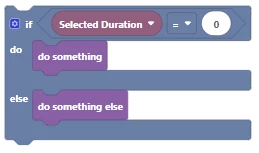
I'm setting up the variable Selected Duration that polls the duration of a selected item (for the A side of the logic), but if nothing is selected, it throws an error.

There is an alert that comes up in the library tab and in the console "execution result:"please select exactly one project item in the project panel (line 1)"". I just want to do something actionable based on this result to fix it since users might not see either of these alerts.


Problem is, I can't seem to find check if something is selected or not. Maybe I'm going about this all wrong by testing the duration of a selection, but I can't figure a way to test if something is selected or not.


Any recommendations on how to solve this would be, as always, appreciated.

This topic has been closed for replies.
Correct answer Mathias Moehl

You need to retrieve the list of selected project items (make sure to check the "only selected items" checkbox) and then check if the length of that list is equal to 1.

1 reply

Mathias Moehl
Community Expert
Mathias MoehlCommunity ExpertCorrect answer
Community Expert
November 18, 2024

You need to retrieve the list of selected project items (make sure to check the "only selected items" checkbox) and then check if the length of that list is equal to 1.

Mathias Möhl - Developer of tools like BeatEdit and Automation Blocks for Premiere Pro and After Effects
m1jackson
m1jacksonAuthor
Inspiring
November 18, 2024

Thank you. That's perfect!

And so anyone can see how it's done, here's what I came up with. For no selected footage, it runs one function block, for when one footage is selected, it runs another, and it puts up an alert dialog reporting that there is more than one footage is selected.

Mathias Moehl
Community Expert
Community Expert
November 19, 2024

Thanks for sharing your solution!
Extra tip: You can save your list in a variable to make the code more compact (and also execute a tiny bit faster, since the list needs to be calculated only once):

Mathias Möhl - Developer of tools like BeatEdit and Automation Blocks for Premiere Pro and After Effects