


Copy link to clipboard
Copied
Adobe After Effects 2015.0.1 - ver. 13.5.1.48, so it's up to date.
Issue is as it follows:
While making anything in a composition -w hen I hit crtl+z (or choose undo from menu-edit) it does work - technically - but there is some preview problem. For example:
I make a solid square, then i move it to right, and again, and again. So we have 4 steps (create, move, move, move). So let's say I'm on the last step and the square is on the right. Then i hit undo. What I get is... the layer is still in the same position, but bounding box actually goes back to the step 3 (correct reaction!).
So while undoing, the visual material stays at it's place, and a bounding box moves as it should.
Please, help as soon as possible.
Adrian


 1 Correct answer

The After Effects CC 2015 (13.6.1) bug-fix update is available. It fixes several bugs, including the one being discussed on this thread.
Details: http://adobe.ly/1QqMMc6
Let us know how things work after you have installed the update.

 127
Replies
127
127
Replies
127


Copy link to clipboard
Copied
I was uninstalling AE CC 2015 13.6 and re-installing AE CC 2015 13.5.1. In this older version everything was fine with this issue.

Copy link to clipboard
Copied
you can just do ctrl alt numpad /
it's long as well but quicker than go in edit menu

Copy link to clipboard
Copied
No one has yet to show how to uninstalling AE CC 2015 13.6 and re-installing AE CC 2015 13.5.1?? Someone please enlighten me!?!?!
- k
Copy link to clipboard
Copied
I just uninstalled After Effects in the Creativ Cloud window - Apps - After effects - clicking the small wheel besides "open" and uninstalling it. After uninstalling it , re-install After Effects CC 2015, but DON'T let it update and you should keep 13.5 instead of 13.6 (it was a little bit tricky, when it was installing until 90% it stops, while waiting I was trying to open the program After Effects and SURPRISE! it was CC 2015 13.5.05. Suddenly the installer program asks me to close AE but I was refusing it! So the program stays in the older version. Later I was going to this site: All Adobe CC 2015 Updates: The Direct Download Links for Windows | ProDesignTools
And was updating it to Release 13.5.1
now everything is fine..
Copy link to clipboard
Copied
If you'd like to help us to test the After Effects CC 2015 (13.6.1) update---which fixes this bug---you can request access to the prerelease testing program here:
https://www.adobeprerelease.com/
Choose the "Private programs" tab and click Apply to apply for the "After Effects CC 2015 (13.6.1) patch update" program.

Copy link to clipboard
Copied
Hi Todd. I've been using After Effects for the last couple hours with the 13.6.1 patch installed. So far, so good. AE's performance seems to be great, and none of the caching bugs that I encountered in 13.6 are present. Thanks for pre-releasing this patch!
Copy link to clipboard
Copied
Thanks for confirming.

Copy link to clipboard
Copied
Patch fixed the problem. Thank you very much!
Copy link to clipboard
Copied
@Todd
i've downloaded the beta. It seems to be ok.
And at least, we have the calculating previewing bar, that missing a lot before, when ae calculate an image cache !

Before, when we were moving the time head, the preview wasn't able to update or was just grey. It seems to be good as the undo command.
but i noticed after a while it doesn't appear anymore... Previewing take a little time, then appear, but there is no more this bar, and in the info panel, there is no more details of what is calculating...
Is there any reason ?
I will test a little more. thanks

Copy link to clipboard
Copied
Hi Todd,
I'm working on the 13.6 and have same issues as the others,
can i test the 13.6.1 patch and see if it work ? (it is waiting for approval)
Copy link to clipboard
Copied
Patch fixed all my problems so far, AE did not crashed, preview feel a bit long at the beginning

Copy link to clipboard
Copied
I´m waiting for my approval. Things are even worse now. Hope this patch is the end of my problems.
Does it take long to be approved?

Copy link to clipboard
Copied
Beta Patch seems to have fixed the preview/cache issue...
But AE 2015 has crashed on me about 3 times today. Cant; seemt o trace the exact actions to lead to it though.
One time I was watching a you tube clip in the background, AE wasn't even being used and it suddenly crashed....not sure if its anything to do with the beta patch could this be a graphics card thing? (GTX 970)
All I do know is AE 2014 pretty much never crashed on the same hardware

Copy link to clipboard
Copied
The patch works fine.
Windows 10 Pro
Version 10.0.10586 Build 10586
Intel(R) Core(TM) i7-5820K CPU @ 3.30GHz
Installed Physical Memory (RAM) 32,0 GB
Asustek X99-A
NVIDIA GeForce GTX 750
Copy link to clipboard
Copied
The beta version seems to have solved the undo/preview issue. AE is working smoothly again but I´m having mad trouble rendering. I tried two different heavy projects. One of them crashes every time and the other finishes with errors.
Dynamic Link doesn't work anymore as well.

Copy link to clipboard
Copied
I tested the beta patch. Preview works again, however, AE crashed after about 30 minutes of use in a 3d camera based project. (I wonder if if it had anything to do with the cache filling up?) Running Windows 7 with an I7 4470 with Nvida K5000 GPU.
Let me know if there are any other specifics that might help you pinpoint the failure that cased the crash.
Going back to CC2014 for now.
Copy link to clipboard
Copied
I gave the patch another shot with a different project. No crashes this time after 2 ours of use. The rendering is painfully slow, however. I'm noticing pretty low usage of available processing assets, as you can see in the GPU clock graph in the bottom left only spiking occasionally to it's max core clock, and the steady CPU and Ram. It's a video window project with a 3d camera pulling back from one video in window to show 16 videos in a grid. So it's processing 16 HD video tracks, but nothing that should be crazy process intensive. It should still be utilizing all my computer's processing power to do it, rather than 1/3 of it.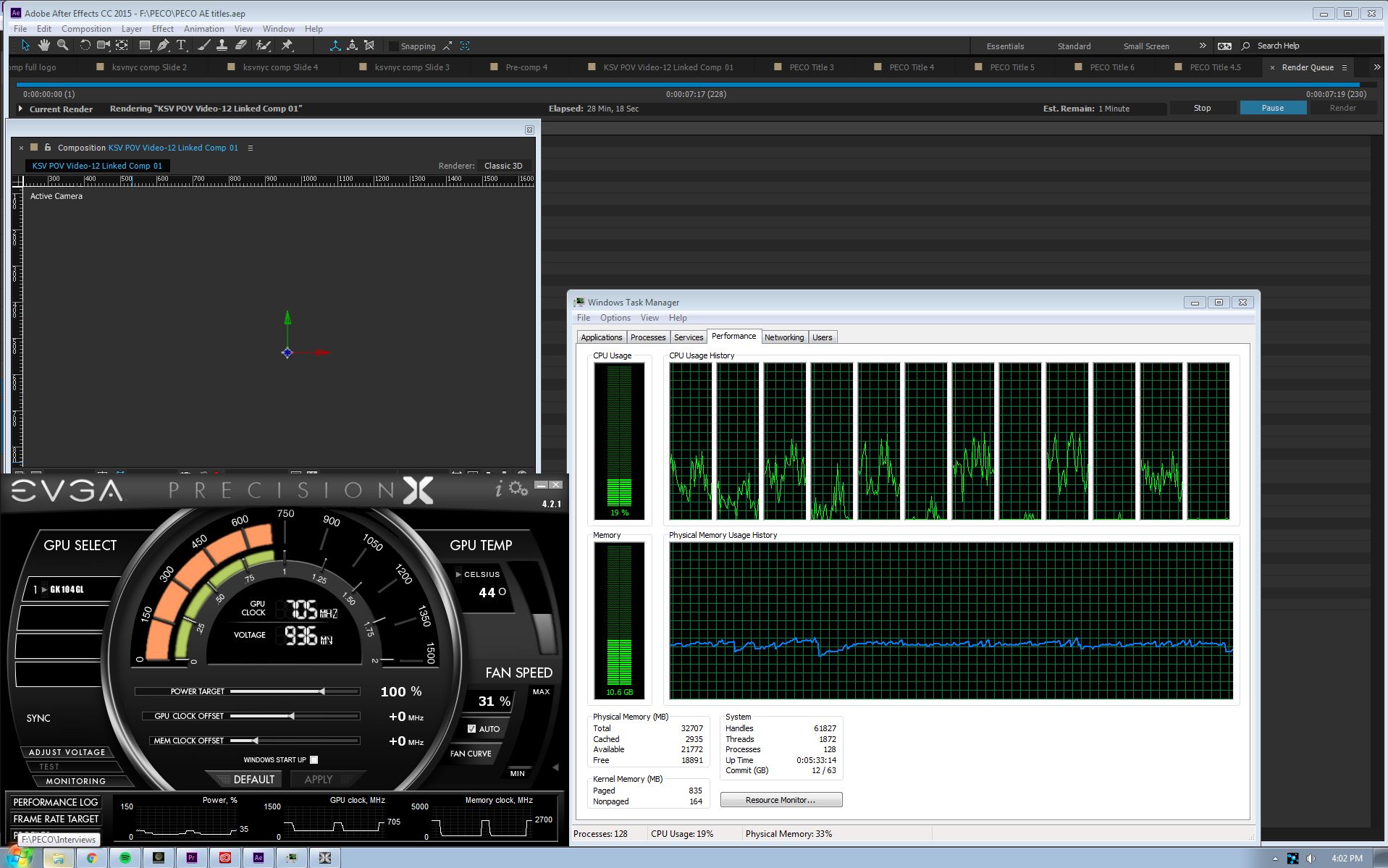
Copy link to clipboard
Copied
It works but there is a huuuuuuggggge delay before audio start with playback video. Something like more than 2 second before hearing audio...
And when it's start then it's not perfect
Previewing audio only is ok

Copy link to clipboard
Copied
Just wanted to chime in with the same problem. I have to close the program and reload if I want to undo anything (visually)....
Waiting for approval for the patch.
Copy link to clipboard
Copied
Thoses messages about bugs happen are non sense. The thing is since its creative cloud, each release is a bug corrections update and new features with new bugs. It's always a beta update. It's cool to have new features but the thing is that there is always something with bugs and that is the point.
For me audio preview is a huge problem and it's not correct for a year, and on this patch beta release it worst.
Then the new panels are cool. But I'd like bug would be correct then a new update with new features but with previous bugs corrected

Copy link to clipboard
Copied
And therein lies my point. I, like many others, don't have an audio preview problem. It could be a bug inherent in the software, or it could be something to do with your machine. It's been smooth sailing over here. Again...you try bug-crushing a program designed for an unlimited number of system configs. We'll see how far you get before you spin in your chair and melt.
Copy link to clipboard
Copied
I didn't understand the second part of your message. My English isn't good enough. But I was answering few messages witch have been move to another topic.
Copy link to clipboard
Copied
acabei de compra a versão 15.6 ainda esta com bug, CRTL Z e acaba não desfazendo nada espero que resolvam o mais breve possível, estou instalando a versão 2014 13.2 assim evito esse atrasado no fluxo de trabalho.
Copy link to clipboard
Copied
Just for the record, this is making after effects almost unusable. It is slow. You never quite know what you are looking at. Memory purge for me sometimes takes as long as 20 seconds. I'm having to purge memory every 5 minutes or so. And, of course, this problem only became apparent after I had spent a good deal of time setting up my project - too late to go back to the previous AE version. This is having a severe impact on my business work. It is very disappointing that Adobe should release a version of AE that is so fundamentally broken. Please release your fix soon!
Copy link to clipboard
Copied
Install the beta patch. It messed up my dynamic link but at least I can work on after effects.


Get ready! An upgraded Adobe Community experience is coming in January.
Learn more
 AdChoices