


Participating Frequently
May 19, 2020

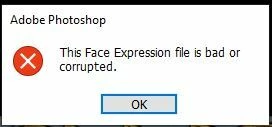
P: This Face Expression File is bad or corrupted

I keep gettting the following error when I launch Photoshop 2020 on a Windows 10 64bit machine


This Face Expression File is bad or corrupted


I assume it relates to the Default Face Expression Presets.p3f file, which a scan reveals to be OK. The application launches after I click OK but how can I get rid of the error?


I have reinstalled, tried the clean up tool and there has even been an update since it started but still it persists. Is there anywhere I can find a replacement file?


Thanks in advance


Steve


返信数 93

Participant
November 22, 2023

With the new update, I have the following problem:

In addition, when I open Photoshop, I havent the panels

Kevin Stohlmeyer
Community Expert
Community Expert
December 5, 2023
Participating Frequently
May 30, 2024

I cannot find the appdata roaminglink on my computer at all


Participant
November 20, 2023

Worked for me. Such a simple solution to an irritating problem.

Thanks so much.

Participant
November 20, 2023

I've taken the steps outlined, and it removed the error message. But now when I re-open Photoshop there's no editing tools available (i.e it looks exactly like it did when opened with the error message).


When I look at the file location, it hasn't created a new file, it's just the ".old" file. I've tried re-naming it back and forth multiple times but it still doesn't work.


Are there any other ways to fix this issue?

Images of RMNP
Known Participant
November 16, 2023

I've followed the directions for dealing with this and it works, but then a few days later the problem returns. Is there any way to stop this problem from reoccuring? 

Participant
November 16, 2023

Esse erro apareceu completamente do nada em 16/11/23 utilizando a versão 2024. Renomeei o arquivo, o erro parou. No entanto perdi todas minhas configurações de área de trabalho.

Participant
November 11, 2023

Thank you very much!

Participant
November 10, 2023

Awesome! This worked for me! Thank you!!!!

Participating Frequently
November 10, 2023

Thank you so much jane-e!

jane-e
Community Expert
Community Expert
November 10, 2023


@Fotomaker01RA wrote: I didn't know whether renaming that PSP file affected any ops related to faces (or, anything else) in Ps


The developers often suggest renaming the Photoshop Preferences file and others such as this "face" file instead of deleting them outright. The idea is that the these files get recreated with a clean copy when Photoshop is relaunched, but if the issue is not solved, the new file can be deleted and the old one can be restored by renaming it to its original name.


The developers always suggest using "old", but there is nothing magical about that word. You could rename the file to include the date or your name or your favorite color or simply move it to another location, such as the Desktop. But there is nothing wrong with "old", so I use it.


I don't know why (in your case), a new file was never created. It should have happened when you relaunched PS. Have you rebooted? You might start a new post asking if it will be an issue that the file is still missing.


To tag me so I can follow the new post, type the "at" symbol @ then my user name: jane-e.


Jane

Known Participant
November 10, 2023

Thx! It's just that some folks were talking about doing an uninstall as part of what they thought would be a fix. And, I can't do that. I did your renaming. I'm not getting the error msg popping up. But I didn't know whether renaming that PSP file affected any ops related to faces (or, anything else) in Ps. B/c when I re-ran Ps it didn't regenerate another file with the same name as the original.