

Participant
August 5, 2021
Question

Re: Cannot open eps file in Photoshop [cannot parse file]

  • August 5, 2021
  • 3 replies
  • 906 views

Hi. I tried workaround but it isn't work.
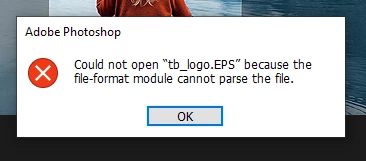


[subject edited by moderator: "Index Layer" replaced with "cannot parse file"]

 

This topic has been closed for replies.

3 replies

Jumpenjax
Community Expert
Community Expert
August 11, 2021

Can you open the file in illustrator? If so save as in a different format. Or like Jane-e said try changing the extension.

Lee- Graphic Designer, Print Specialist, Photographer
Brad @ Roaring Mouse
Community Expert
Community Expert
August 6, 2021

I'm assuming you are on Windows? Is this the latest Photoshop? (22.4.x)

What program made the EPS?

If you select Generic EPS in the Open dialog (as opposed to Photoshop EPS), does it sill error out?

Does it happen if you drag the file to the PS App icon?


Open the file with Notepad. A proper EPS file will have this somewhere in the first line : %!PS-Adobe-3.1 EPSF-3.0

It will also tell you the Creator : (program and version) a couple of lines down.

Participant
August 10, 2021

Hi. I work on windows 10 and PS 22.4.3. I tried to open different eps file, most of them exported from Corel Draw and Ilustraotor. 


If I select Generic EPS in the Open dialog I got error like above.  


Brad @ Roaring Mouse
Community Expert
Community Expert
August 10, 2021

Well that looks a proper header, so there must be some corruption further into it.

Two suggestions:

1. Do you have Illustrator? Maybe try and open it in that and resave as a new file. (the danger there is that there may be something that doesn't translate properly)

2. Open it in Acrobat, which can force it to be distilled into a PDF


I can take a look at the file to narrow down the problem in case it is an issue with PS and not the EPS itself.

jane-e
Community Expert
Community Expert
August 5, 2021

Hi @Tomasz5E4E 


I don't think you have the same issue as the thread where you posted, so I've branched it. The most likely reason for your error message is that the file has the wrong extension. Try a few other extensions (such as jpeg) and see if that works.


There was an issue that was fixed in 2018, so please tell us you OS, PS version, and computer specs if the above does not work.

https://community.adobe.com/t5/photoshop-ecosystem/re-cannot-open-eps-file-in-photoshop-index-layer/td-p/12232065


~ Jane