











Design the future of fashion, win Firefly Pro 👗✨
Announcements
Recently active
In the current Ps Beta update: Adobe Photoshop Version: 27.6.0 20260412.m.3501 2f62d66 arm64 (beta, PublicBeta) you will find a new layout of the Save for Web dialog screen.The Photoshop team has been updating many dialog screens and popups as part of an ongoing UI modernization effort, and this is one example of that work.WHY the change? Photoshop has carried a lot of creative work for a long time. But carrying that much, for that long, adds up, and some of the friction you've been feeling is the natural result of a tool that's grown enormously complex over the years.We've heard you on the micro-stutters, the slow previews, the panels that slow you down rather than speed you up. Rather than patch around those things, we're taking a bigger step like modernizing the underlying UI framework that powers Photoshop's interface. That's what this effort is about.WHAT you will see once it is complete We're rolling this out surface by surface, not all at once.Individual panels and controls wil
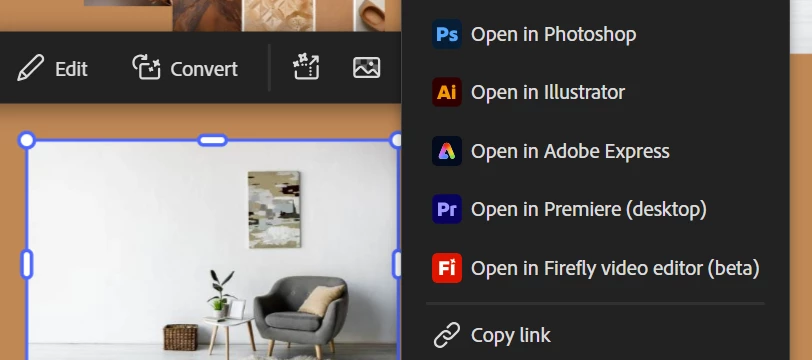
We’re excited to share that Firefly Boards is now more closely integrated with Photoshop workflows, enabling seamless ideation, organization, and round-trip editing. What is Firefly Boards?Firefly Boards is an AI-powered ideation workspace that helps Photoshop users capture inspiration, explore multiple visual directions using the latest AI models, and organize ideas on an infinite canvas. All linked assets stay synced, so updates reflect directly on the Boards canvas.Try it out:Home > Your Files > 3-dot menu > Open in BoardsShare icon > Send to Firefly Boards (PSDC files)File > Export > Send to Firefly Boards (PSDC files)Round-trip workflow from Firefly Boards → Photoshop (Adobe Firefly Boards) We’d love for you to try Firefly Boards for ideation and share your feedback!
Generative Fill 3rd party partner models such as Gemini 2.5, 3.0 (with Nano Banana), FLUX Kontext Pro, and FLUX.2 Pro can use reference images as inputs that it can "read" and apply according to your prompt instructions.The party partner model scans all uploaded images for identity, style, and structure, then matches your prompt instructions to specific parts of those images. When complete, the 3rd party partner model generates a new image that merges the subject and style from the reference images. HOW TO TEST Open an image > Select All Select > Generative Fill on Context Bar or Edit > Generative Fill Select either Nano 2.5, 3.0, FLUX Kontext Pro, FLUX.2 Pro ENTER A PROMPT in the text field (Example prompt: Replace the model’s clothing with the 6 reference images) Select the Reference Image icon (icon to the right of the model picker dropdown) Add up to 8 reference images if using Gemini 3 > Generate HOW TO PROVIDE FEEDBACK:1. Click on the Beaker Icon in the upper right
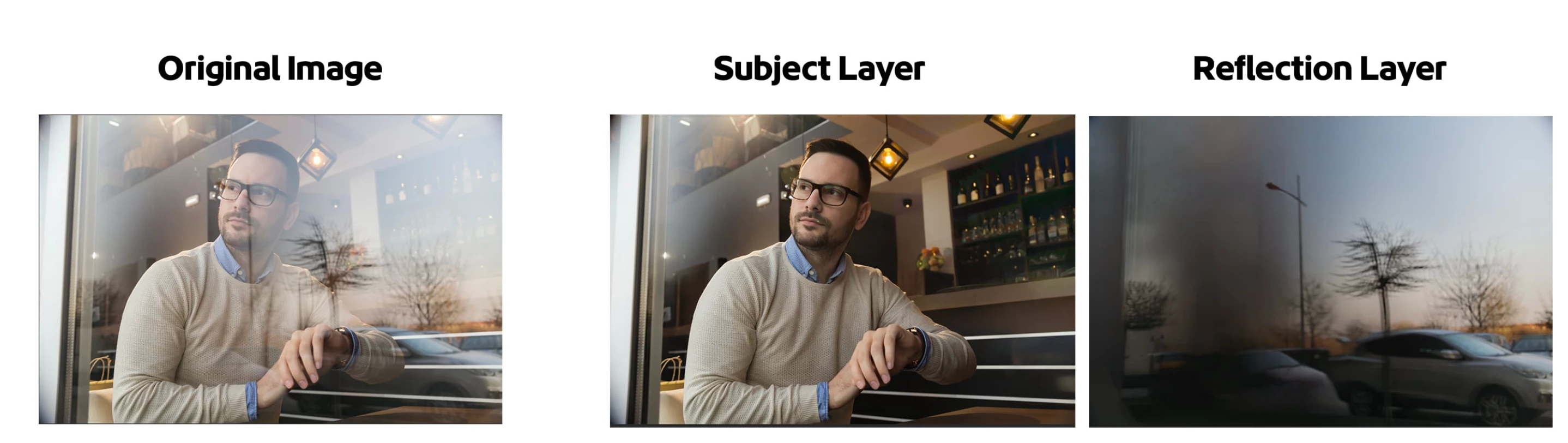
The AI-powered Reflection Removal feature lets you easily extract and remove reflections that impact the majority of your scene. The Reflections Removal command eliminates large and prominent window reflections in just a few steps, allowing your image's subject to stand out clearly. While AI-powered, it is not generative AI and does not use credits.How to:Open a file with reflections that dominate the image. Edit > Reflections Removal…The Reflection Removal Dialog appears Choose the quality of the results from the pop up. Turning on "Create separate reflection layer" will give you both the subject "Reflection Removal" layer and a layer with the extracted reflection. Click [OK] The "Reflection Removal" layer and, if checked ON, the Reflection layer appear in the Layers panel. Adjust the Layer Opacity of the subject "Reflection Removal" layer to bring back subtle reflections if desired. Adjust the Opacity slider in the layers panel to bring back subtle reflections for a natural
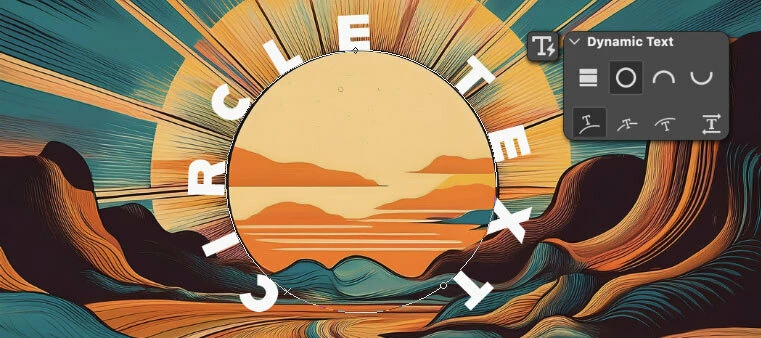
Hi Everyone, The Circle, Arch, and Bow styles of dynamic text are now available in Photoshop beta! Here’s how to use dynamic text circle, arch, and bowCreate a Point type or Paragraph type layer, and convert to dynamic circle, arch or bow using the dynamic text button menu found in the Options bar, Contextual Task Bar, or using the dynamic text section in the Properties panel. New dynamic text options For circle, arch, and bow, there are 4 options for Position (Above, Center, Below) or changing the direction of the text. Edit the start, middle, and end pointsOnce a circle, arch, or bow layer has been created, you can adjust the start, middle, and end points with the Path Selection tool. Customize your text to tasteWith dynamic text circle, arch, and bow, most other text attributes are still editable aside from Font Size. ProtipIf you know how to edit the anchor points on a path, once a dynamic text layer has been made circle, arch, or bow, you can manipulate the path with the Direct
We are excited to announce the first of many releases of the Photoshop beta. For more info on what a beta is and how you can participate, see Adobe Creative Cloud Beta FAQ. Why should I try the Photoshop beta? Be the one of the first customers to try brand-new features and directly influence the future of Photoshop Become a part of a community of Photoshop enthusiasts Share your thoughts and ideas directly with Adobe here in the beta community Participate in exclusive live sessions with design influencers and evangelists Occasionally receive financial incentives for providing feedback How do I install the Photoshop beta? Visit the Beta apps tab of the Creative Cloud desktop app and select Install next to Photoshop (Beta). How can I provide feedback on my Photoshop beta experience? Here in the Photoshop beta community, you can search and vote on any thread. If a similar thread does not yet exist, feel free to create a new bug or idea thread where others can vote.
Welcome! We're so glad you're here and want to show you around. This beta community is the place to connect with others and share your feature feedback, bug reports, and new feature ideas on the Photoshop betas directly with the Photoshop team. Get started with Photoshop beta 👉 Download the desktop Photoshop beta. See also, Photoshop beta is now available. 👉 Launch Photoshop on the web beta First thing's first, there are different types of conversations Conversation types: Discussions: Chat with other community members, ask questions, share tips and techniques. Bugs: Have a problem you need help with? Find a bug or a crash in Photoshop beta? Post in bugs so we can help! Ideas: Are any features missing from Photoshop? Have an idea to improve existing features? Share your ideas so others can vote! Featured posts Visit the Featured tab to see what features are available in the Photoshop be
Remix with Firefly Community Gallery
Thousands of free creations to fall in love with and remix in Firefly.
Already have an account? Login
Enter your E-mail address. We'll send you an e-mail with instructions to reset your password.