









Connect with our global Bridge Community.
Recently active
Hello everyone.... I'm having some issues with Camera Raw when opened through Br and I couldn't find any solutions online. When i open 30+ photos in Camera Raw and start editing them by making different adjustments with brushes, lightining or darkening parts of it, those brushes dissappear when i complete the editing and hit open in PS. So once they're open in Ps, almost none of the adjustments are visible.... For example if i lightened the whole photo, just to darken some parts of it, the photo shows up in Ps completely bright with no darkened parts.... Does anyone know the solution od this. I use Macbook but the same thing is happening on my regular desktop PC..... Help ☹
I get two or more instances of a photo in Bridge.I've had up to 20 instances of one photo and selecting any of them, then all gets selected.But now it has evolved, I have present only 2 instances of 2 photos edited in Photoshop. The unique thing now is that I can select one instance and change information such as stars without effecting the other instance.On the disk there is only one file of that photo ... What is going on ????? Bridge version 13.02636Photoshop 24.1.1Windows 11
Hello friends, After many years of lurking these forums for various solutions over the years, I have finally come across an issue perplexing enough to warrant a post. For some background info, I recently updated all my devices and CC apps and am running macOS Ventura and Bridge 13.0.2.636 I'm in the process of consolidating my iPhone photo and videos backups to iCloud to free up space on my iMac/generally making my workflow more efficient. Previously, I would use Apple Photos to import images and videos from my iPhone onto my iMac and export them as "unmodified originals" to annual archive folders. However, last year I discoverd a batch of ~500 videos from 2019 that were in a different format (.m4v instead of the usual .MOV) and they'd somehow had their metadata stripped away and replaced with an incorrect creation date - I assume this date delineates when this disaster occured. Whats more bizarre, all the photos from this period (May-September) didn't have their metadata aff
Normally I'll click the red 'X' icon in the top left of the window to hide Bridge, and the app stays open. However the latest version quits the app... similar to how After Effects treats the close button. Not exactly the end of the world, but I prefer being able to hide the app like that rather than minimizing the window... is this no longer possible?
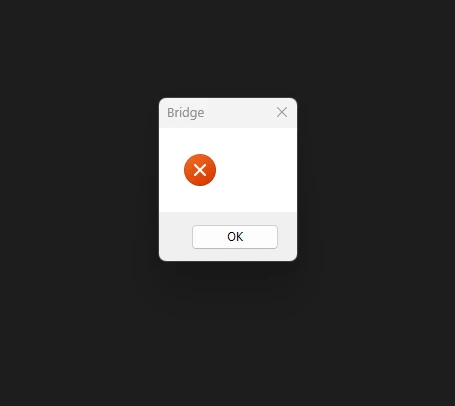
Hi guys!I use a Windows 10 laptop and today received this error message (screenshot enclosed) when I opened Adobe Bridge. I updated the display driver, but got the message again. Can you advise please? Regards, Fergal.
Seit ein paar Tagen startet Bridge nicht mehr und gibt nur diese leere Fehlermeldung.Eine Deinstallation und Neuinstallation (ohne übernehmen der Einstellungen hat nicht geholfen).Photoshop startet problemlos mit dem Hinweis auf eine nicht erkannte Grafikkarte (Geforce 210, wurde vor kurzem getauscht).
I have recently bought a new computer - Windows11Pro , and opened images in Bridge. I renamed the shots and now all I can see is a placeholder icon - no image shows. I shoot Nikon, I have purged, tried older versions of Bridge . I can 'see' images from the past(haven't tried to rename or add metadata), just can't see images from this week. after downloading a job I get an alert - Maximum tabs opened - no idea what that means. I have worked with Photoshop since PS4. I have a scratch disk and a raid drive that i put jobs on. NVIDA GeForce RTX 3070Ti. So I just did it again with the images and when I rename the files that's when the content images dissapear. I have the preview screen in the middle with content in filmstrip mode on the right. Thanks for any guidance you can provide.
I am no longer able to edit photos using Camera Raw as of a few days ago. When I select photos within Bridge and click edit in Camera Raw, I get the spinning icon, a small window then opens and closes quickly and Bridge freezes without opening Camera Raw. It shows using over 50% of my memory in task manager, and stays locked up and the only way out is to end task. I have attempted to re-install prior versions all the way back to 12.0.4 all with the same result. I have attempted both software and hardware encoding with no impact. Anyone else having similar issues or ideas?
O Adobe Bridge 2023 está a dar erro ao abrir, surgindo a mensagem que partilho ao lado. Já fiz a desinstalação, fiz limpeza de cache, desinstalei todo o software Adobe, reiniciei o MacBook Pro, voltei a instalar todo o software. Photoshop, Lightroom, Acrobat,... tudo funciona corretamente, exceto o Bridge 2023. Solicito orientação para novos procedimentos.
For users with multiple devices, it is frustrating to have to duplicate or triplicate modifications made to settings in Bridge, when you move your work in other devices. There are myriads of reasons why this is a necessary fix: most obviously photographers editing or managing their files on the road or while traveling. Having to reinvent the wheel for application consistency when Adobe Cloud exists seems unnecessary.I appreciate and respect Adobe applications and use many of them. What is the reason for hurdle?
In adobe bridge, how do you release hidden pic folders
When I move raw files between flders in bridge it is taking hours instead of mins. What the heck am I doing wrong?
Hi all,I have the latest version of Bridge, Windows 10. If I right click on an image or folder, (folder from the folder panel) select cut, then paste to a new location, the item is copied but not cut. If I right click in the content panel and select move the item is moved.However, if I do the cut / paste from the content panel it works as you would expect. Why does it work in the content panel but not the folder panel?This is completely against all application standards. Regards,Steve
Is there any way I can open up pictures from Bridge to Photoshop larger than the 1.667inches X 1.11inches that they are opening at the moment.CheersDavid
Dear ladies and gentlemen, in my research about a extended file management system I came acrosse Adobe Bridge.A required feature must be, that multiple users can work on a shared storage location and can use for example the keywords another person has created or that keywords in general are sychronized to be able to filter from all PCs with the same Creative Cloud license. My first question is, is this even possible, because I just came along some articles mentioning the shared cache option, but those were not up to date. Second question: are for these requirements other programs like Adobe Lighroom more suitable than Adobe Bridge? Thanks for your help! Yours sincerelyMichael
Several times in the last few weeks, Bridge has halted my computer using in the hundreds of gigabytes of memory. Bridge version: 12.0.1.246 My computer: MacOS 12.2.1 iMac (Retina 5K, 27-inch, 2020) Processor 3.6 GHz 10-core intel core i9 Memory 72 GB 2133 MHz DDR4 Graphics AMD Radeon Pro 5700 XT 16 GB {Title edited by Moderator }
Recien instalado Brigde, con licencia de pago, no me deja abrirlo. Me aparece una pequeña venta con una X en rojo y al aceptar me expulsa de la aplicación.
I have problems opening the application.Give me a message that it´s not possible to open it
bonjour à touslorsque j'execute un work flow j'ai systematiquement une erreur. motif : la destination ne peux pas écrire alors qu'une exportation simple fonctionne.Quelqu'un a une idée a ce sujet? Nico
I have updated my Adobe Bridge 2023, and now there is a blue thin outline that appears when I click on a panel. It is always there but will move arround depending on which panel I click. Is there a way to turn off that blue outline in settings?
Hello, I had installed version 12.X of Bridge. This worked perfectly. I initiated the upgrade to version 13.x and had the old version uninstalled. Now Bridge no longer works. I have already uninstalled and reinstalled the new version several times. Unfortunately without success. I have not installed any Navida drivers. how can I solve this? <?xml version="1.0"?><!DOCTYPE AdobeCrashReport SYSTEM "AdobeCrashReporter.dtd"><crashreport serviceVersion="4.7.0" clientVersion="4.7.0" applicationName="Bridge" applicationVersion="13.0.2" build="636" source="Windows-Client" crashType="n/a"><time year="2023" month="2" day="14" hour="17" minute="29" second="50" timeoffset="60" timezone="Mitteleuropäische Zeit"/><user guid="d7ab6925-e7db-452d-ad10-0452b4bb6d0d"/><system platform="Windows 10 Pro" osversion="10.0" osbuild="19045" applicationlanguage="de-de" userlanguage="de-DE" oslanguage="de-DE" ram="16267" machine="Intel(R) Core(TM) i7-2820QM CPU @ 2.30GH
Hello, when I classify a photo with 5 stars, and move on to the next photo, I realize that the previous photo hasn't been classified with the 5 stars I had put, how can I solve this problem?
macOS 13.2. Lastest Brige v13.0.2.636. When Bridge is open, if I save a copy of a PSD file in Photoshop as a JPEG, Bridge creates two thumbnails ... one of which is unresponsive. Note the file creation worked as only one JPEG has been created. If Bridge is closed and reopended there is only one thumbnail which is the expected behaviour. This bug was not present in the previous version of Bridge.
When I try to batch export Jpg2000 images to Tiff I get an error message "unsupported format" in Adobe Bridge. If I batch export to JPG it gives me no error and the conversion goes fine. Is this a bug?
Hallo, mein Name ist Axel und ich bin ein Deutscher Nutzer von euren Produkten.Seit einigen Jahren Nutze ich Photoshop, Lightroom und die Bildverwaltungssoftware Bridge. Führt das Synchronisierte Fenster wieder ein/ bzw. Abdockbare Fenster ein. Das Arbeiten wird so erleichtert, vor allem wenn man mit tausenden Bildern, ihm Hoch, - Querformat Arbeitet. Gruß Axel P.S: Falls es am Geld liegt, führt die Funktion/en ein und ich zahle gerne mehr. Hello, my name is Axel and I am a German user of your products.For some years I have been using Photoshop, Lightroom and the Image Management Software Bridge. Reass the synchronized window again on / or off the window. The work is facilitated, especially if you work with thousands of pictures, he works high, - landscape.Greeting AxelP.S: If it lies on the money, the function / s one and I like to pay more.
Remix with Firefly Community Gallery
Thousands of free creations to fall in love with and remix in Firefly.
Already have an account? Login
No account yet? Create an account
Enter your E-mail address. We'll send you an e-mail with instructions to reset your password.