










Connect with our global Bridge Community.
Recently active
I have the 2020 Mac with 40GB RAM, and it is impossible to work with Bridge. Start the app, beach ball, click on the photo, beach ball, switch to another favorite, beach ball, close a window, beach ball, open a picture, beach ball, change keywords, beach ball, add another keyword, beach ball, quit the app, beach ball...What the eff is this BS?That app has never been my favorite, it's deeply flawed and inconsistent, it consumes all the resources and cripples the whole system. And they feel "proud" to release another BS-Update, which brings more beach balls? I've hated Microsoft all my life since I got my first Mac back in 1984, never installed any of their products again. Adobe is priming on that world view: bad, unfinished products for users TO SUFFER.
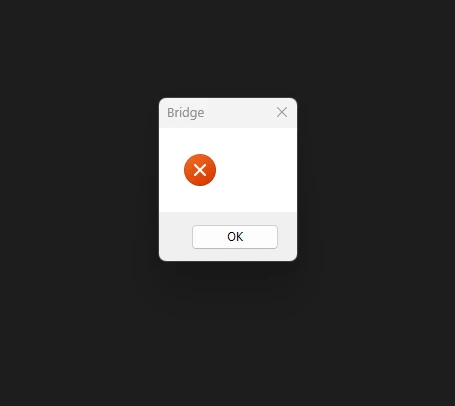
Hi Community!Since I update my Bridge to the latest one 13.0.2 appears this message:Does anyone with the same problem? To use it I uninstalled it and installed 13.0.1 and it works.
I just updated my macbook pro M1 to Montereyv12.6 and bridge keeps crashing continually. I uninstalled and reinstalled it, and it keeps crashing.
Dear Adobe, What have you done with my beloved program???? I have already spend 2 hours or more trying to get things back to my normal...imposible!!! I just want to have my filmstrip back with my thumbnails on the bottom. But now everything is floating in different tabs around my screen. It's driving me nuts!! Workflow is gone. And what up with the blue highlights???? And on top of that program keeps crashing....truly dreadfull. Hope you guys fix this soon.
Bridge is basically unusable after update. Constant crashes. Not worht it. Not sure what is going wrong here but simple tasks it's failing to complete, and crashing. Runnning on windows 11 on a build more powerful enough than it needs to be to go through 800 images.
This started happening today... When I switch between 2 custom Workspaces; "Edit 1" & "Edit 2", they shrink in size. As I continue switching between them, they continue shrinking. This does not happen with the other default Workspaces... Filmstip, Metadata, Library, etc. I tried purging the cache. Mac OS 12.6.2
Hello I can't open Bridge. I can open Photoshop and all the other programs. It says there's an issue to check my net connection. I have no problems in my net connection. Does anyone knows whta's going on?
I have batches of images that need to resized based on height only and would like to do so using Bridge/Image Processor. My height requirement is 1140px, however the original images are varied in landscape/portrait orientation and are of different aspect ratios (2:3, 3:4, etc). So far what I have had to do is filter in Bridge just the landscape images then select an aspect ratio, then plug into Image Processor the exact pixel dimensions of the resized images (that I discovered using Photoshop to resize and check the resulting pixel dimension). There has to be a more efficient way.An example of what I am running into:Image 1Original file = 5616 h x 3744 w Portrait orientationResized file = 1140 h x 760 wImage 2 Original file = 3744 h x 5616 w LandscapeResized file = 1140 h x 1710 wImage 3Original file = 4652 h x 3489 w PortraitResized file = 1140 h x 855 wFrom that example, is there a way I can plug just the height number in Image Processor (or any other Photoshop utility) so I can just
Today I no longer see the rating below each photo in Bridge CC. If I did something to remove them, I have no idea what it was. Can someone help me get this straightened out?
On the latest Bridge update File>Import from Bridge which was simplicity itself, has gone & as far as I can tell, has been replaced by the Camra Download app which is clunky & somtimes fails to work. Also Bridge itself keeps crashing. Not a good siuation. I've got an imac running Montery
the version 13.0.2 it does not work. When I open it and a windows appears with a red ERROR X !!!! I tried twice to istalled it but always the same !!!!!
Select any image (jpg, nef, tiff) > View > Full screen preview > right arrow key for next image. The previewed image flickers in size once or twice before displaying properly. On changing slowly to view the next image, the image does the same thing. On changing quickly, or very quickly, through the next 3-5 images, then stopping to view an image, the viewed image does not display properly; its brightness flickers. It is frustrating that this so-called bug fix (v13.01) did not address this widespread problem reported earlier by many. v13.01 did fix the problem of portrait thumbnails not resizing to fit into the image space in thumbnail view + grid. Thank you Adobe. Windows 11 Pro 22H2 (22621.819); GeForce RTX 2060 - Studio Driver 526.98 (11/16/22)
Maybe I'm overlooking something. In former releases of ACR I could check in preferences that ACR should remember my settings for a specific camera and evenmore the ISO and it's related noise and sharpness settings.
New Bridge user, hoping this is simple! Using Bridge as a possible replacement for FotoStation Pro. Mainly to view/export from my portable hard drive my picture archive. When I use and select an image, this works fine. But the software has to "collect" my images again and re do everything for thumbnail view. Is there a way of avoiding this re-do and keep my gallery? Grateful for help please? Basically want to view my archive & extract when needed? Also want to add new pix to my archive and for this to update in my images view. thank you
I had hundreds of files .png’s and .jpg’s I was pasting comments in the get info (command i) in Mac OS Ventura 13.1When I created folders in adobe bridge 2023 in order to organize the files it removed all my comments from the get info metadata.I have open cases with both Senior level advisor at Apple and Adobe. I recreated the test by following these steps. You can too if you have had this happen to you. -Make 2 files “Bridge Test 1.jpg” “Bridge Test 2.jpg”-I paste the comments in both files -Close the get info.-Make 1 folder in finder-Make Test folder in finder. Put “Bridge Test 1.jpg” in finder folder -Get info on “Bridge Test 1.jpg” comments are there (not deleted)-Make folder in bridge. Move file “Bridge Test 2.jpg” into folder-Get info on “Bridge Test 2.jpg” comment are there comments are gone! Is there any way to recover the comments in the get info files or are they gone forever? I was hoping it
I have released an open source package (Image Metadata Enhancer – IME) to enhance the metadata on a locally stored photo collection. The software performs reverse geocoding – that is, converting the longitude and latitude metadata into readable location metadata and populates the IPTC location fields which are viewable in Bridge. (Country, State/Province, City and Sub-location). Unfortunately, Bridge does not provide searching of these metadata fields, but it can also populate the IPTC keyword field which can be searched / used as a filter. The program produces HTML reports of metadata , and also looks for duplicates and a few other things. Metadata is written to JSON files for incorporating into workflow processes. IME is a “Console” program that works on MacOS, Windows and Linux. To try it out, I recommend you run in “read only” mode first, before doing any updating. It has been tested on JPG images only, but if there is
After replacing my desktop, which came with Windows 11, Bridge now opens at start-up. When awakening from "Sleep", Bridge opens. I uninstalled Bridge and re-installed, but it continues to open unsummoned. Bridge is fully functional, but it's rather annoying to have to close Bridge every time it decides to open itself.
I am using Image processor to batch process almost 3000 NEF files in a folder. When I run the action from Bridge, having corrected the various thing I need to in Camera Raw, using the action I have created to convert from RAW to JPG the program also creates a copy of the first file in the folder. I am only doing about 24 - 30 images at a time so it's not that I am doing huge batches.Can anyone help?
Hey guys,Lets say I have a psd file called template.psd, is there any way to open jpeg images from Bridge in that template.psd file? I dont want them to be opened in default Photoshop window but in my prepared file.Any ideas?
Hola, En la ultima actualización de Adobe Bridge 2023, la aplicación se abre y al istante aparece el mensaje siguiente:
When I convert ARW file to 16-bit srgb TIFF then Adobe Bridge 2023 (13.0.0.562) automatically adds "Rating 0" to the metadata of the file.
Hello,Is there a way in Bridge to sort by the image color(s)? For ex: All the predominately red images in your folder are grouped together. As you scroll, all the purple, blue, green etc are as well. Thanks so muchDave
Ever since Bridge 2020 was introduced, I get regular crashing of the program. I am currently using a Mac Studio M1 with Ventura and Bridge 13.0.2. It just stops responding and I have to force quit and sometimes it brings the entire computer down with it (Computer error for not enough application memory) Once I force quit, everything goes back to normal. I have a copy of Bridge 2019 loaded and it NEVER does this but there are features it lacks from 13.0.2.I have cleared caches, etc,etc,etc to no avail.Suggestions?Thanks
When I go through photos via full screen in Bridge and I do rating with my numpad, the stars disappears and I have to re-rate them twice or three times. I recorded a video for you to see. Thank you for the help.
When I open Br it loads the images, but when I want to edit camera raw, the following error image appears CAMERA RAW EDITING IS NOT ENABLED - camera Raw editing requires that a qualifying product has been licensed.I have already had the support of someone from Adobe who told me that only with the update would be possible to solve. But with version 13.01 everything remains the same!
Remix with Firefly Community Gallery
Thousands of free creations to fall in love with and remix in Firefly.
Already have an account? Login
No account yet? Create an account
Enter your E-mail address. We'll send you an e-mail with instructions to reset your password.