


- Home
- After Effects
- Discussions
- Re: Can't open Cinema 4d lite because of "Maxon Li...
- Re: Can't open Cinema 4d lite because of "Maxon Li...

Copy link to clipboard
Copied
Just started working with AfterEffects & interested in working in C4D Lite. When I open a Cinema 4D file, or use FILE > NEW > MAXON CINEMA 4D FILE, the Cinema 4d Launcher window appears. After a moment, a popup from Maxon requires me to register an account on their website. I made sure that I registered on their website with the same login as my Adobe CC account. However, no c4d files can be opened, it asks me to activate a Cinema 4D trial instead of reflecting some kind of Lite license.
I'm not finding much information online about this license manager at all. In all the tutorials that I see, there is absolutely no mention of this License registration or MAXON account requirement - they all seem to just open straight into the 3d editor.
Is Cinema 4D Lite no longer included with After Effects in v17?

EDIT: I restarted the app again, and now when I open a Cinema 4D Lite app, this very confusing screen blocks me from doing anything:



 1 Correct answer

Hey David,
I believe I have the solution for you. You don't have to do that "Setup License Server" part. This is from Maxon themselves:
"To fix this issue all you have to do is delete the C4D preferences to restore the defaults. Here's how to do that:
Open a Finder window and head to ~/Library/Preferences/MAXON via Finder's Go > Go to Folder command. Next, quit out of Cinema 4D from the Force Quit menu (this is a very important step as this process will not work if the application is running). On
...

 60
Replies
60
60
Replies
60


Copy link to clipboard
Copied
EXCEPT THAT WE USE IT ON WORK COMPUTERS WHICH ONLY ALLOW INSTALLS BY IT ADMINS AND REQUIRES A HUGE APPROVAL PROCESS. It used to just work!

Copy link to clipboard
Copied
This is exactly what solved it for me. Download the offline full installer, install it, go back into AE and create a new C4D file and you can activate the Lite License.
A bit of a hassle though that it is that complicated.

Copy link to clipboard
Copied
Can you please send the URL to download the "offline full installer" please?

Copy link to clipboard
Copied
https://www.maxon.net/en-us/try/ i believe.
Copy link to clipboard
Copied
Like heck it's "A bug w/ Adobe." It has nothing to do w/ Adobe whatsoever. It is MAXON's new, clumsier licensing protocols. The license used to be handled natively opening from After Effects, but now, you have to jump through Maxon's garbage hoops by creating an account, activating "Lite," etc. Garbage.
Copy link to clipboard
Copied
I can't get to where you are saying to go. 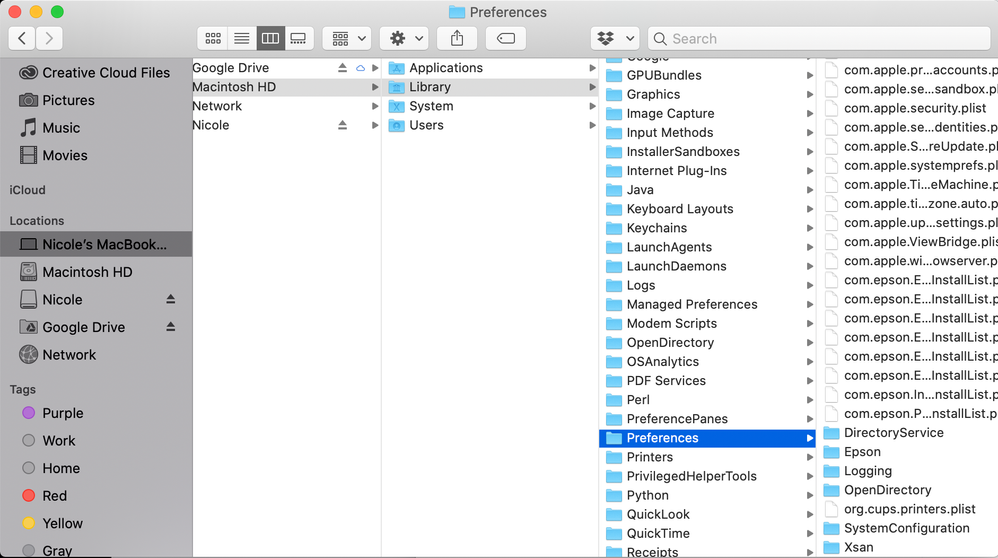

Copy link to clipboard
Copied
I Have The Same Problem On Windows 10, please Help ASAP!!!
Copy link to clipboard
Copied
"On Windows the process is the same, but the filepath is different. You'd go to C:\Users\YourUsername\Appdata\
If you followed the instructions verbatim and it still doesn't work, then I would suggest contacting Maxon support. Explain to them that you followed these exact steps, and what you see on your end after following these steps.

Copy link to clipboard
Copied
Thank you! This worked! No more pesky "Setup License Server" pop-up window with an empty "Maxon License Server" input box. They should at least pre-fill the input field or provide a link to a page that specifies exactly what to put in there, or how to solve the issue.
Copy link to clipboard
Copied
Yeah, this took a while for me to figure out. Glad this post helped you!

Copy link to clipboard
Copied
Great information. Thank you very much. It really works for me.
Copy link to clipboard
Copied
Glad to hear this is still helping others in 2026!
Copy link to clipboard
Copied
Hey davidx1,
Can you confirm whether or not this worked for you so that other people will know?

Copy link to clipboard
Copied
I'm having the same problem but there isn't a MAXON folder/file in the library/preferences folder

Copy link to clipboard
Copied
Please check
/Users/[user name]/Library/Preferences
It ’s different from
/Library/Preferences
Copy link to clipboard
Copied
The Maxon folder is showing up but the Cinema 4D folder, "machines_rb_20.prf" and the "teamrender_rb_20.prf" arent there. Also when I go to Maxon's site and create an account, how do I register for cinema 4d Lite. I can only find that it comes with after effects
Copy link to clipboard
Copied
my prompt is slightly different:
Setup RLM and it says
Server:
Port: 6112
Offline License
RLM Hardware ID ****not sure if I should list this on the forum
Copy link to clipboard
Copied
Oh, and you can close the RLM setup. You don't need to do that for Lite. You might have to hit the Home button to get back to the correct screen.
Copy link to clipboard
Copied
Hi Mark,
I actually did not see the "machines_rb_20.prf" nor the "teamrender_rb_20.prf" either. No big deal. You can just delete that Maxon folder. You are signed into Maxon, correct? do you see a button that says "Activate" next to Lite?

Copy link to clipboard
Copied
Thank you

Copy link to clipboard
Copied
after like 2h trying all the above workarounds, this tip finally it makes it works.
THANK YOU Brandon!
Copy link to clipboard
Copied
Glad to hear this helped!
Copy link to clipboard
Copied
Yes, it worked for me!

Copy link to clipboard
Copied
I downloaded after effects plug-in from the Maxon website. it worked for me

Copy link to clipboard
Copied
Be aware that Maxon on the past some bad branding practice. Like WebSite Marker 4 that after purchase it later ask additional hiding cost at the end of the workflow process. And other examples of push marketing.


Get ready! An upgraded Adobe Community experience is coming in January.
Learn more
 AdChoices