


















Design the future of fashion, win Firefly Pro 👗✨
Photoshop (Beta)
Recently active
Hi(and happy new year!) I can't find the Photoshop (beta) in my Creative Cloud Desktop.Under "Categories" I can see it all (... Video, Illustration, UI & UX, 3D & AR and Acrobat & PDF) but no Beta-category.... please see attached.Is this because I'm living in Denmark? Or do I need to sign up to the beta first?Kind regards, Jens
Photoshop (Beta) 27.6 won't update. It generally stalls or fails at 40 or 41% complete. I have plenty of space on my C:\ Drive. I’m using Windows 10.I’ve tried rebooting and retrying 27.6 update. Fail.I’ve deleted the adobeTemp folder and retried installing update to no avail.I’ve uninstalled the 27.5 Beta and failed at reinstalling the 27.5 package.I reinstalled 27.4 Beta with success and updated 27.5 with success.Beta 27.6 update still stops at 41%.The error I keep getting is this._________________________________________________Exit Code: 127-------------------------------------- Summary -------------------------------------- - 1 fatal error(s), 19 error(s), 17 warnings(s) FATAL: Error occurred in extract of package (Name: AdobePhotoshop27-Core_x64 Version: 27.6.0.3475). Error code: '127' ERROR: Path:C:\adobeTemp already existsERROR: Failed to allocate buffer for file C:\adobeTemp\ETR7B37.tmp\1\Application\Photoshop.spd of size 665063036ERROR: Failed memory allocation after sleep al
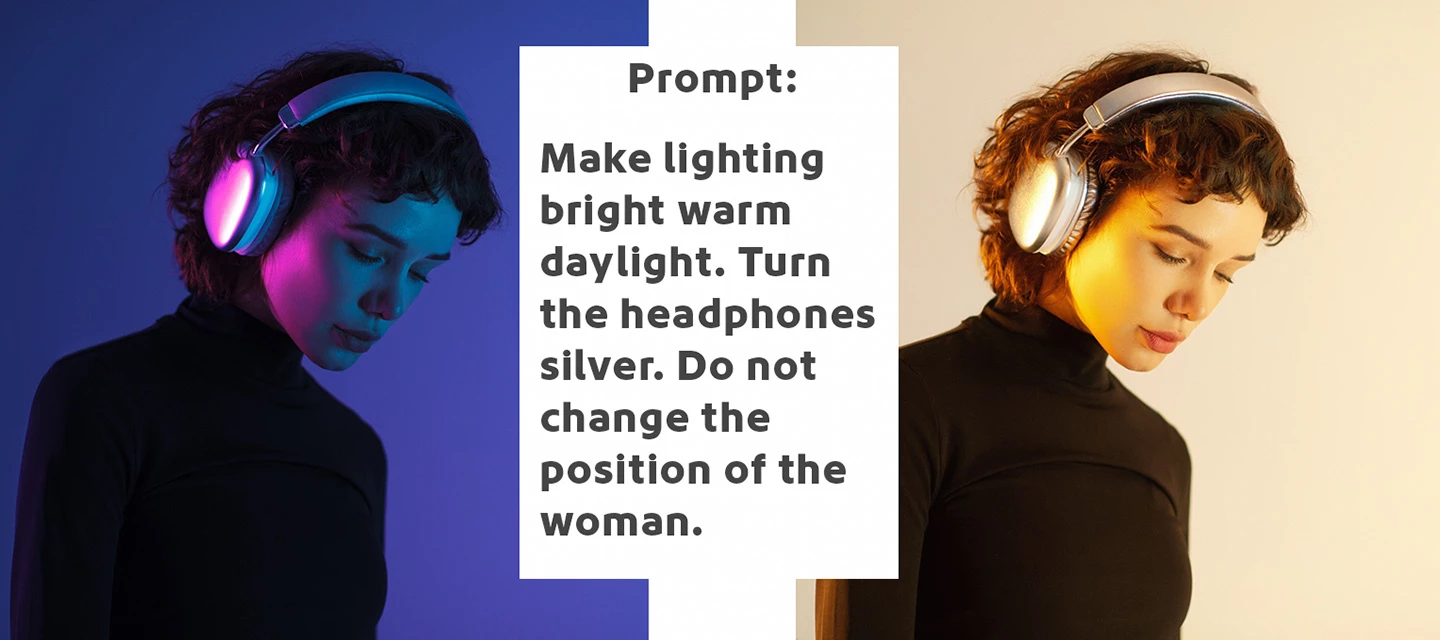
Firefly Image 5 enables a new instruction‑based editing workflow in Generative Fill and it's currently in Photoshop (Beta) for desktopFirefly Image 5 is Adobe's most advanced image generation and editing model yet; you can edit images more intuitively and precisely with just a prompt. Simply describe your edits with natural language instructions to transform the entire image—such as changing time of day or modifying a subject’s pose - making the precise changes you want with high quality results, while keeping the rest of your pixels and the details of your original image the same. How to try it:1. Open an image and select the entire canvas (Select > Select All…).(While smaller selections are supported, this beta performs best when the full image is selected.)2. Click Generative Fill in the Contextual Task Bar.3.Choose Firefly Image 5 (Preview) from the model picker in the Contextual Task Bar.4. Enter a clear, instructional prompt (for example: “change the time of day to sunset”).5.
Hello, I am having an issue with generative credits in photoshop beta. It says I have 250 credits remaining for my Photography Plan, but after trying the rotate feature in beta for 3 free times, I keep getting a pop-up stating I need to get credits. May I get support on this?
Hello, I am having an issue with generative credits in photoshop beta. It says I have 250 credits remaining for my Photography Plan, but after trying the rotate feature in beta for 3 free times, I keep getting a pop-up stating I need to get credits. May I get support on this? (Copy from other forum as I got redirected).
I would like to share feedback about the installation behavior of Photoshop Beta on macOS.I install Photoshop Beta for one reason: to test new and experimental features. I do not install it as a replacement for the stable release of Photoshop. However, after installing or updating Photoshop Beta, it appears to take over file associations that were previously assigned to the regular Photoshop application. As a result, image files that I intentionally configured to open with Photoshop suddenly start opening with Photoshop Beta instead.This is frustrating for several reasons.First, Photoshop Beta is, by definition, a testing environment. I want to try new features there selectively, not have it become my primary production app for day-to-day work. The stable version and the beta version serve different purposes, and Adobe should respect that distinction.Second, on macOS there is no simple central screen where users can restore all file-type associations at once. Reverting this behavior me
Mac OS 26.4.1Photoshop Beta 27.7After selecting a layer or selecting part of an image, the bar for “generative fill” pops up too close to the selection. I have to keep moving the bar away from the area I am working on. It interferes with my work flow. There is no need for it to keep popping up every time I make a selection. If I want to use it, I know where to find it. I think it should appear below the image or on the bottom as the “select image” bar does.
Hello, the 3D rotation tool isn’t working, I select the subject, click on rotate the object, and this message appears. What’s the problem? Thank you
Hi everyone 👋I’m new here and I’m having an issue with Camera Raw that I can’t seem to fix.I keep getting this error message:“Could not update all AI settings.”The strange thing is that this only happens with one specific preset, not with all of them. My PC is high-performance and fully optimized for heavy editing work, so it doesn’t seem to be a hardware limitation.Has anyone experienced something similar?Do you know what could be causing this or how to fix it?I’d really appreciate any help. Thanks in advance 🙏
I have plenty of credits to use, but no model to choose from.
I just installed the latest Photoshop Beta (27.0), the notes for which say that the Nano Banana image model is included. But when I attempt to use Generative Fill, the only models available in the dropdown are Firefly models 1 & 3 - no Nano Banana.
自動に背景削除をクリックすると 実施のバナーがしばらく考えてからこのメッセージがもちろんレイヤーになっています(ロックもはずしています) こんな単純な背景私のフォトショップでは簡単にできるのですが、新規に契約した新しくインストールした人のパソコンではできないのです。。どうしたらできるようになるのでしょうか??
When I am in Bridge, I have set the option to open images automatically into Photoshop Beta. When I do this the first time it seems to work fine, but when I select new images to open it fails to open them.The Photoshop Beta then fails to quit and I have to force quit and restartI’ve updated to the latest version of Bridge and Photoshop Beta, I’ve closed everything down and rebooted my system and I am still experiencing the same problems.
I can repeat this every time with this image, but I haven’t tried with other images; I’ll give that a go.I also just noticed that if I reduce the size of this image, I couldn’t repeat the issue. I’ve zipped the original version to attach it to this message so you should be able to repeat it with that.Steps to repeat:On the layer ‘Post’, CMD+click the layer to select the pixels * CMD+T to transform selection Click Rotate Object on the context toolbar You should still see the entire wooden post, now as an interactive 3D object Rotate it slightly around the Y axis using the blue handle at the bottom of the transform box Click Done on the context toolbar The wooden post disappears, leaving only the circular sign* If you don’t select the pixels, and just hit CMD+T > Rotate Object there’s a different issue: The wooden post disappears as soon as it enters the 3D editing mode. I’m on version 27.6.0, can’t see any further build references or build numbers.
想问一下那个自由打光功能什么时候上线呢?可以添加多个灯光吗?就像MAX大会上演示的那样,什么时候推出呢?
After the latest Beta update, the Beta version crashes when clicking on a photo, both with the mouse and with the Wacom drawing tablet! I have reverted to version 27.5.0 (so I am not installing the update that is currently available).
Hello, I am experiencing an issue with Generative Fill / Generate in Photoshop BETA.After selecting an area in the image and clicking Generate, the following error message appears:“There was a problem and your request could not be completed. Please try again later.”The issue happens consistently every time I try to use the feature.Could you please help identify what may be causing this issue and how to fix it? Thank you.
You have to fix again every preset-color settings - preferences etc from scratch
I’m on Windows. I have the correct update. It won’t respond when I try to remove distractions that I wanted to keep with the “-” button.
Full version PS runs fine.
LOVE LOVE LOVE the new Gen fill dialog box (Apr 7 beta).But the escape key is still disabled to cancel out of it. Is this intentional? I assumed it was a bug and was a quick fix.
once using nanao banana 3 pro once the generation has ran the prompt it decreases the quality of the original image and it’s making a high res image look like a low pixlated image
Photoshop Beta 27.6.0 keeps crashing when I drag content from one open panel to another.
Remix with Firefly Community Gallery
Thousands of free creations to fall in love with and remix in Firefly.
Already have an account? Login
Enter your E-mail address. We'll send you an e-mail with instructions to reset your password.