










『アドビコミュニティフォーラム』に質問/トピックを投稿する方法
Premiere (Beta)
新着順
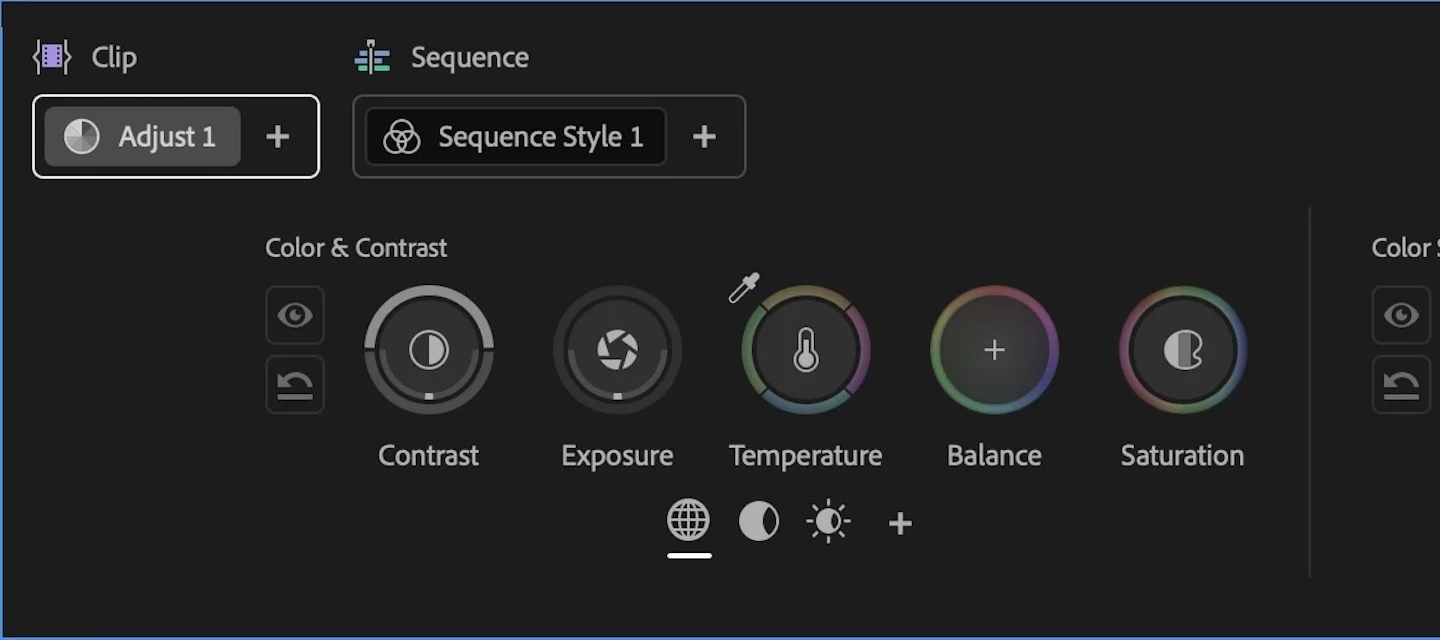
Welcome to the public beta of our brand new Color Mode! This is a colossal release that's been years in the making, months in private beta, and now we're excited to share it with you. Here's all the most important information to get you started.Resources for Learning About Color ModeGiven how new this is, we've prepared the following videos and articles to get you up to speed on Color Mode as quickly as possible. Color Mode Announcement Video Color Mode in Premiere Page Color Mode Training Course Frequently Asked Questions Videos HelpX ArticlesAbout Color ModeColor Mode is a brand new approach to color grading created specifically for the needs of editors. It's been designed to be an accessible, fast to learn, and efficient environment for making every clip in your sequence look its best right inside of Premiere. However, Color Mode has also been built to provide the full functionality necessary for users at every level to make highly detailed improvements as well as the broad stylisti
Hey everyone! We're excited to share a refinement to Ducking that just landed in Premiere Beta 26.5 (Build 12): Auto-update keyframes.This new option is enabled by default and is designed to keep your ducking in sync as your timeline evolves. No more manually regenerating keyframes every time you tweak a clip.What's New?With Auto-update keyframes turned on, Ducking now follows your clip changes automatically. As you trim, move, or swap out the audio you're ducking toward, the music ducking keyframes update on their own to match. Your mix stays in step with your latest edit decisions, without you having to think about it.Where to find itYou'll see the new toggle in the Ducking section of the Essential Sound panel, right above the Generate Keyframes button. It's on by default, but you can switch it off any time if you'd rather drive keyframe generation manually.Auto-update keyframes Why this mattersEditing is iterative. You move a clip, swap a VO take, re-time a section, and suddenly you
Masks won’t track. They just get get hung up after trying to start the track. Mac M1 Ultra. Tahoe 26.3. Premiere Beta 26.5
There was an issue processing your request. Please try again. If the issue persists, please start a new chat.
Hi!Talking about Color-Panel: In a music video I have around 400 single clips (many cuts, different cameras sceneries, light situations etc.).So e. g. I create a color group “studio, red light, Sony 7sIII” of 30 clips doing a grading as Im doing with many groups getting matched to e. g. ““studio, red light, ARRI cam”. 5 days later I’d like to change grading of just Sony footage in that specific scene: As in the overview those groups look similar after color correction, I m a bit lost how to identify the clips belonging just to Sony footage. (just one example)my trick for now: clicking at the group and over exposing extremely, so I can see the white and “damaged” in the overview. But this is a horrible work around which does not really help.So, in overview: how can I identify or/and filter clips belonging to a certain group?
I’m using a 2 screen setup. When I open new panels, they open with their control bar behind the menu bar. It’s impossible to move or control the panel window
O comando CTRL+\ (expansão/ tela cheia) parou de funcionar com a última atualização do Premiere Pro (Beta).
I am experiencing a problem with the new AI Assistant in Premiere Pro Beta.The Assistant panel loads correctly, I can create new chats, and messages are sent successfully. However, every prompt immediately returns the following error:"There was an issue processing your request. Please try again. If the issue persists, please start a new chat."The error occurs with every prompt, including very simple requests that do not require media analysis.Examples:"What version of Premiere Pro am I using?" "What can you do?" "Give me an example of what you can do."The error appears almost instantly after sending the prompt.System Information:Premiere Pro Beta 26.5.0 (Build 42) Windows 11 Creative Cloud Pro subscription Generative AI features included in plan Adobe Firefly works normally in the browser Creative Cloud Desktop is up to date System Compatibility Report shows "No conflicts to report"Troubleshooting already performed:Signed out and back into Adobe Creative Cloud Created multiple new Assi
Steps to reproduce: 1. Tried to get AI to resize a 16:9 sequence to 9:16 - it created a new sequence, but then said it couldn’t change the sequence settings.Then asked it to resize the clips to the new sequence size, so as they filled the frame proportionally. Result: As reported by the AI tool itself:I don't have a tool to file a bug report directly — that's something you'd need to raise through Adobe's feedback channels yourself. But if you do, the specific issue worth flagging is that `setEffectParameters` returns a success response (`{}`) even when the write is silently rejected (e.g. an out-of-range value), making it impossible for an agent to distinguish a successful write from a no-op. That's the core reliability problem here.And yes — you're absolutely right, and I should have seen it earlier. `copyTrackItemAttributes` with `motion: true, videoEffects: false` would have been the correct approach from the start:1. Set Scale to 88.89 on one clip correctly2. Use that clip as
The object detection in Object Masking tool is getting an upgrade. If you are using the latest Beta, you are already using it. We wanted to share what's changing.When you move your cursor over the Program Monitor with the Object Mask tool active, colored overlays snap to objects in the frame before you click. That instant preview is meant to be fast, confident, and complete. It works great for common foreground subjects. But for many other things you might have found yourself reaching for the rectangle or lasso fallback more often than you'd like.What's changingWe've upgraded the underlying model powering object detection. The new experience is meaningfully better across three dimensions:More objects detected. The new model surfaces roughly twice as many selectable objects per scene. Objects that were previously invisible to the object detection pipeline- props, background elements, layered subjects with props, now light up.More complete object boundaries. Mask boundaries are more accu
Ever since the update 4~ days ago premiere becomes so laggy when editing 4k files especially in color mode, the scopes become useless. I have the footage on one internal NVME gen 4 m2 ssd. the cache and scratch disks on another and the the cpu on another. all NVME g2m4. will attach other specs below. help would be great.Using Premiere Beta v26.5
I have been editing my projects with the official release (26.3) and opening them on Premiere Beta to do the color grade using the new Color mode (saving the project with a new name so I can still open the ungraded project on the official release if something happens). The color mode recently became unusable. It is very very very slow. Every click on a tool takes seconds to open the scope and then it takes a few seconds to show any change when I move the mouse. I noticed I was using the 26.5 version. I tried for hours but got very frustrated and installed the previous beta version (26.3) and I’m once again able to grade my footage. It’s slow but workable. I don’t know what happened with the 26.5 version but I hope it gets fixed so I can use the latest version.
The newest Beta (26.5.0 Build 36) is crashing with motion array transitions. Worked on the previous build until I updated today (June 18)slicer AND shifter both fail
Pretty self-explanatory… Command+\ no longer hides the header bar in the latest beta.Working on a 14” MacBook I need all the screen real estate I can get. Please fix!
Cuando activo el comparison view desde el click derecho en la pantalla, al desactivarlo seleccionando "Composite Video" , no se van los boton de "Original", "Curren" y "Swap Sides". Tambien me ha pasado que selecciono un highlight zone, pero al mover la exposición, este no se afecta de ninguna manera
We have heard your feedback: Those of you that have your own transcripts, already complete with proper spelling and punctuation, or in a language we don’t support, don’t want to re-transcribe using Premiere’s Speech to Text feature just so you can use captioning and Text-Based Editing. Captioning and Text-Based Editing requires Premiere Pro to have timecodes for every word. We are publishing a JSON spec format that supports word-level timecode for captioning and Text-Based Editing. Developers can now build support for exporting to this spec, or write scripts to translate from other transcript formats to this JSON spec. (JSON spec is attached to this post.) Guidance for non-developers While developers are adding support for this new format to their transcription tools, we’ve found that modern LLMs can do an excellent job of converting existing transcripts into this JSON format. Every LLM is different and their capabilities are always changing, so this advice is generalized
Hi all,This version definitely has too many display problems: the menu and interface freeze, and the software is slow. Sometimes I have to force-quit the program…Fabrice Laptop HP Omen 16CPU intel I9_14900HXRAM 32 GOGPU Nvidia Geforce TRX 4080 Laptop and DRIVER Studio Nvidia 596.36iGPU intel disableHD 1To Microsoft Windows 11 Famille (64 bits)25H2 (10.0.26200)
Hello!I’m not sure if this is the right forum for a bug report on the beta release of Premiere, but it seems that the latest build (build 30) crashes much more often in the color panel than the earlier builds did. This could be due to my getting more comfortable, and therefore ambitious, with the new toolset. Now when I apply a mask (rectangle or oval) and try to track it, the program locks up almost every time. If this needs to go to another fourm, please let me know.Thanks!System:Windows 11Core I964gig RAMRTX4060TI
Some transitions in Production Crate’s LaForge Suite cause instant crash when applied. I thought it was a “me” problem till i saw someone else’s post saying also motion array’s transitions cause insta-crash:I concluded that it’s a bug by testing the same transitions on the latest stable release (26.3) crash doesn’t happen there. Sapphire and BCC transitions seem to be working fine as well, but there is definitely something going on and needs to be looked into.System info Application: Premiere Pro (Beta) v26.5.0.37 OS: Windows v10.0.26200, RAM: 31.82 GB GB, CPUs (logical): 24
I am testing out the new Assistant. I have a bunch of text layers in my sequence with two different text assets in them. The first text asset that appears in the list in the Properties panel needs to be moved upwards on the Y axis, from the current value of 2032 to a new value of 2005. I asked Assistant to do this for me on a selection of four clips before running it across my entire sequence. It says it ran, but when it was done the values of the Y position had not changed, and now my text is just blank. My convo with Assistant: Results:
Export freezes while "Preparing Content Credentials”Exporting as usual and the first loading screen while exporting says “Preparing Content Credentials” and is stuck at 100%. I’ve tried toggling Content Credentials on and off. I’ve cleared my cache. I’ve tried moving on and out points, I’ve tried rebooting, I’ve tried exporting different codecs. If I export with Credentials on, it says "Applying Content Credentials” and also freezes at 100%. I’ve verified my identity and credentials. I’ve tried media encoder with things toggled on/off and multiple codecs. I’ve also tried other project files. I must export.
Beta versions of Premiere, After Effects, and Media Encoder now natively support Canon Cinema RAW Light files from the following Canon cameras: EOS C50 EOS R6 Mark III EOS R6 V EOS C400, with 3:2 / Open Gate firmware installedThis update allows you to import and edit raw files - up to 7K Open Gate - from these cameras. In addition, Premiere, After Effects, and Media Encoder continue to support raw video files from other Canon cameras. Raw settings - including Color Temperature, Tint, Exposure, Color Space, and Gamma - can be viewed and modified via Effects Controls > Source. If you have any questions or comments about this update, please let us know below. If you experience any performance issues or bugs, please share your OS, hardware specs, and specific camera recording settings.
Issue:Premiere Pro incorrectly detects silences in Transcript / Text Based Editing. The detected silence regions are visibly offset from the real audio waveform, so the silence markers do not line up with the actual pauses. Because of this, removing pauses is unreliable and sometimes cuts into spoken dialogue instead of only removing real silence.This happens in both Premiere Pro Beta and the regular Premiere Pro release, so it does not appear to be limited to one version branch.Steps to reproduce:1. Import a video clip with spoken dialogue and natural pauses.2. Create a sequence from that clip.3. Open the Text panel and create a transcript using Text Based Editing.4. Let Premiere detect pauses / silences in the transcript.5. Compare the detected silence block positions against the actual waveform in the timeline.6. Notice that the detected silence regions are offset and do not match the real silent areas correctly.7. If you use the remove pauses function, Premiere may remove the wrong
The scopes in color mode often don't render. It's just a black box instead of the actual scopes. Happens more with larger projects, or when it's been open for awhile.PS, an opacity slider for the scopes would be nice, because they cover up a lot of the image.
Description: I’m experiencing a bug in the current Premiere Pro Beta (version 25.6.0) related to manual masking and keyframe animation.When I draw a mask using the Pen tool or shape tools and attempt to animate it using Mask Path keyframes, the mask does not respond to changes. Even after enabling the stopwatch and adjusting the mask on different frames, the animation does not register—both keyframes remain identical, and the mask stays static.I’ve confirmed this behavior in multiple projects and tried the following workarounds:Toggling the Mask Path stopwatchManually adjusting the mask shape on different framesUsing different effects (Gaussian Blur, Lumetri Color)Resetting workspaces and preferencesNone of these resolved the issue. It seems the new masking system in the Beta is not properly linking manual mask adjustments to keyframe animation.System Info:Premiere Pro Beta v25.6.0Windows 11 Pro 64GPU: Nvidia GeForce RTX 3080 LaptopThis bug is blocking my workflow, especially for subtl
Remix with Firefly Community Gallery
Thousands of free creations to fall in love with and remix in Firefly.
すでにアカウントをお持ちですか?ログイン
Enter your E-mail address. We'll send you an e-mail with instructions to reset your password.
申し訳ございません。このファイルは、ダウンロードしても安全かどうか、内容を確認中です。数分後にもう一度お試しください。
申し訳ございませんが、当社のウイルススキャナは、このファイルをダウンロードすることは安全ではないと検出しました。