






















Design the future of fashion, win Firefly Pro 👗✨
Photoshop (Beta)
Recently active
Whatever has taken place of "Actions" is much less useful. Steps aren't visible nor are the controls at the bottom. Apparently the normal Actions is now considered "Classic Actions" and is hidden behind an obscure menu item which I wouldn't have found on my own. If we must have whatever this new thing is, make it a fully separate item. They seem to be for a different audience and it's just confusing for people who rely on Actions.
Issue summary: The ‘Export As’ window won’t open on my primary display.Product and version:Adobe Photoshop Version: 27.9.0 20260616.m.3575 199f0a1 x64 (beta, PublicBeta)Operating system: Operating System: Windows 11 64-bitSteps to reproduce:1. Open an existing document.2. Choose File > Export > Export As.3. The Export As window will keep open up at the second screen4. Attemped to move the Export As window to the Primary Screen and close the windowPS refuse the remember the last close location and will return to stat 3 and open at my second screen agaginremark : Problem only after i update my PS from the last beta to current beta System informat as below
La opción “Dispositivo” as seleccionar la herramienta Quitar aparece como no disponible, a pesar de que mi sistema cumple con todas las especificaciones exigidas para activarlo.Mi sistema: Versión de Adobe Photoshop: 27.7.0 20260514.r.11 fa4476d x64 (final: Release)Número de inicios: 1053Sistema operativo: Windows 10 64 bitsVersión: 10 10.0.19045.7291Arquitectura del sistema: Intel Familia CPU:6, Modelo:7, Versión:1, AVX2, AVX-VNNI, HybridCPU(8:8), HyperThreadingCantidad de procesadores físicos: 16Cantidad de procesadores lógicos: 24Vel. del procesador: 3418 MHzMemoria incorporada: 32548 MBMemoria libre: 20864 MBMemoria disponible para Photoshop: 25015 MBMemoria usada por Photoshop: 70 %Controlador de bloqueo: AdobeDCX Version: 9.22.0SAM SDK Version: 15.1.0ACP.local Status: - SDK Version: 5.11.0 - Core Sync Status: Reachable and compatible - Core Sync Running: 7.8.10.1 - Min Core Sync Required: 4.3.66.28Versión de SDK de cliente de edición en directo: v6.1.1Adobe Firefly: Utilice cua
Cuando intento reducir el ruido, no manualmente sino por AI, el sistema me da un mensaje de error y se bloquea el programa.Esto me sucede tanto en Photoshop ACR como en Lightroom.He actializado la BIOS de mi ordenador, así como también verificado que tengo actualizada la última versión de mi tarjeta gráfica Nvidia Geforce GT 1030 y a pesar de ello, el problema persiste.Qué puedo hacer al respecto? La única solución posible es cambiar la tarjeta gráfica?Gracias por anticipado.Cordiales saludos Gerardo
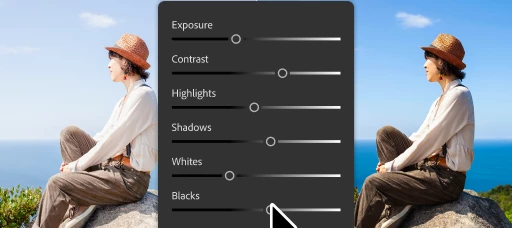
We've upgraded the classic Brightness/Contrast adjustment layer into Light, bringing more powerful, non-destructive lighting controls directly into your layer-based workflow. With the new Light adjustment layer, you get:Exposure Contrast Highlights Shadows Whites BlacksA few important notes:• Brightness/Contrast has NOT gone away. It's now part of the Light adjustment layer and remains available through the Legacy controls menu.• Existing actions & plugins that use Brightness/Contrast will continue to work as expected. You can update them at any time to take advantage of the latest high-quality controls.• It is available for 8-bit and 16-bit RGB images. For all other color modes, Brightness/Contrast continues to work exactly as it does today.The goal is to give you more precise control over all lighting adjustments while preserving compatibility with your existing workflows.We'd love to hear your feedback as you try it out in Photoshop Beta.
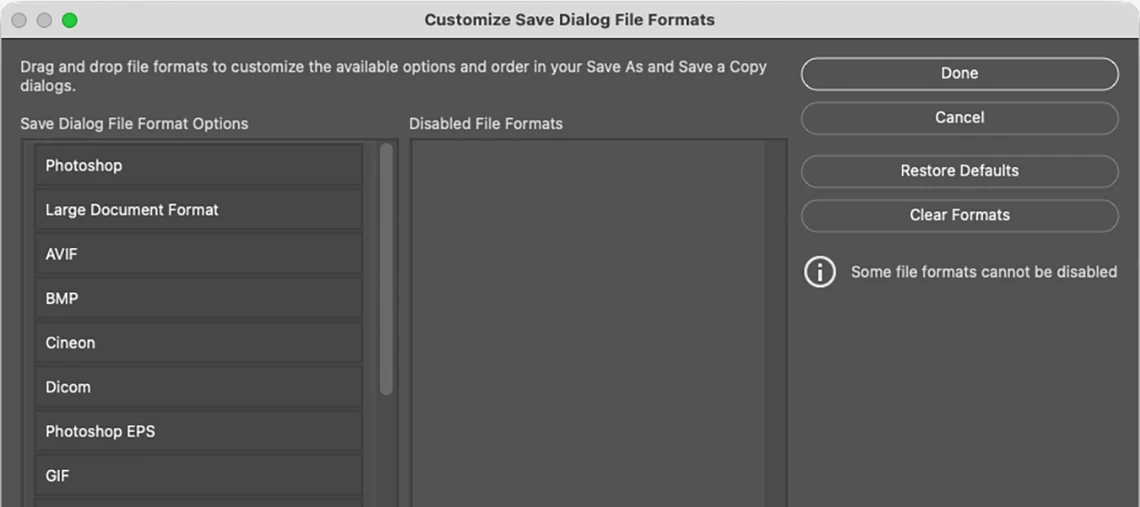
Save As and Save a Copy now let you customize your file format list.When you choose Save As or Save a Copy, Photoshop shows every supported format, all 25 of them. Most people only ever use a handful, and scrolling past formats you'll never need slows you down.With this feature, you can trim that list down to just the formats you actually use, so finding the right one takes seconds instead of a search. How to access: Edit > Customize Save Dialog File Formats…Default view:Drag a File Format to the Disabled File Formats column:After dragging the Cineon File Format to the Disabled File Formats column:After dragging multiple File Formats to the Disabled File Formats column:
sous photoshop beta, quand sur une photo, je demande une transformation avec gemini , la demande échoue, mais des points sont retirés de mon compte ?
Hi! I've been getting this message for a while (Photoshop Beta and 2026) when I try to use the object selection tool.I already tried to reinstall photoshop, to reset the reset the PS preferences, to update graphics card and to change image processing (faster/more stable). Nothing fixed this problem. This tool just doesn't work anymore.Any solutions?Thank you.
The new Light Adjustment tool only shows it's adjustments (contrast, etc.) when between two other adjustment layers, or between an adjustment layer above and pixel layer below. Why??? Is this a problem? Shouldn't it always show it's adjustments no matter what is above or below it in the layer stack?
Adobe Photoshop Version: 27.9.0 20260616.m.3575 199f0a1 x64 (beta, PublicBeta)Number of Launches: 170Operating System: Windows 11 64-bitVersion: 11 or greater 10.0.26200.8655System architecture: Intel CPU Family:6, Model:7, Stepping:1, AVX2, AVX-VNNI, HybridCPU(8:16), HyperThreadingPhysical processor count: 24Logical processor count: 32Processor speed: 3187 MHzBuilt-in memory: 65186 MBFree memory: 41807 MBMemory available to Photoshop: 51125 MBMemory used by Photoshop: 70 %Crash Handler: AdobeDCX Version: 9.22.0SAM SDK Version: 15.1.4ACPL.next Status: - SDK Version: 5.11.5 - Sync Engine Status: Reachable and compatible - Sync Engine Running: 4.0.0 - Min Sync Engine Required: 4.0.0Live Edit Client SDK Version: v6.1.1Adobe Firefly: Please use any generative AI feature to view the latest version.OpenColorIO version: 2.5.2C2PA library version: Adobe CAI SDK: adobe_api/1.66.1NGL Version: 1.42.0.5Chalkboard: Enabled.Chalkboard Doc Create: Disabled.D3D12Warp renderer: Disabled.Precise Color
I keep getting this prompt"There is not enough memory for the allocation of the image buffer" when trying to apply a parametric filter even after deleting and re-downloading.
I’ve noticed since downloading the latest Beta (27.9) using Win 11 that dialog boxes or windows which open are almost off the edge of the screen and whilst they can be moved back, it quickly gets tiresome! I’ve just opened PS 27.7 which is the latest version to check if this also has the issue and it doesn’t so it seems to be limited to beta 27.9. It wasn’t an issue with 27.8.Has anyone else noticed this please?
The Remove Tool just got even easier to use. It now includes a dedicated Contextual Task Bar (CTB) that brings the most important controls right to your cursor—so you can stay focused on your image, not the options bar.Distraction Removal Brush + Brush - Remove After Each Stroke on/off Create New Layer on/offWhat’s newKey controls at your fingertipsQuickly access the most-used Remove Tool options without moving your cursor across the screen. Distraction removal drop-down Choose Distraction Removal with the drop-down list. Add & Subtract brushes Easily refine your selection by adding to or subtracting from the target area. Auto-apply after each stroke Toggle whether Remove runs automatically after every brush stroke. Create on new layer Choose to make edits non-destructive with a simple on/off toggle. Quick feedback button Share feedback on results in just a click—this helps us improve the tool for you. Dynamic action buttonsRemove and Cancel appear when you n
Hi, why can't I use removal tool on-device on Photoshop beta 27.7.0 Release (the device option is dimmed) even I meet the requirements, the GPU I currently used is Geforce RTX 5070 Ti 16GB and have enough HD space ?
Since the most recent update to Photoshop beta (ver: 20250504.m.3064) I get the following error that prevents the application from launching:"Catch in IPhotoshopApplication, exception encountered: create_directories: Access is denied.: "C:\ProgramData\Adobe\PINF" "The standard version of Photoshop (26.6.0) continues to work properly, however. This problem only affects the beta version. Are there any reports about why this error is occurring in the beta version?I am running Photoshop on Windows 10 64 bit Professional (10.0.19045 Build 19045), 32GB RAM, Xeon W-2123 processor, NVIDIA GeForce RTX 3060, Samsung SSD 870 EVO 4TB.
When using the Path tool, the created path appears active, but clicking on it or choosing “Make Selection” does nothing. The selection cannot be activated.
I am a college instructor in the art department and there needs to be a way to detect if Generative AI has been used to create an image or if we can disable that feature in the software, as my college and many other educational art programs will be prohibiting the use of AI generated work of any kind. Also, I understand that currently Photoshop Beta cannot be used for commercial use, however when it does get out of Beta, what will be done for consumers of art who do not want AI generated artwork? Will there be a watermark, or file info or something that will tell us in any file format that AI has been used? I was able to save a .psd and .jpeg file with AI generation and besides the purposely poor quality of the image on my end, nothing is showing that I used AI to create it, or is preventing me from printing the image or selling it online as an independent artist(which of course I will not be doing as I was just testing the capabilities). If these concerns are not being addressed, plea
Ahora aparece un error al tratar de usar la herramienta de curvas. Los errores son consecutivos. ¿Qué pasa?
As above. My Samsung Tab S9 Ultra has higher spec than my phone (S23 Ultra) but I still can't get access to the app.It's absolutely bizarre that you are restricting it to small screen devices only!
What happened to the Recent Files window in Photoshop Beta?Normally, hovering the mouse cursor over a file name would display the file path, allowing you to easily locate it in its directory on your PC.But since the last update, it simply shows "On this computer." It doesn't give you any option to see its physical location.I already know it's on my computer.But I want to know which directory.Is there any way to recover that context menu where hovering over a file would show its physical location? Is there any way to reactivate it? Now I can no longer find out which physical folder the file is in. The option of opening the file and saving it later doesn't work for me, because sometimes the link path is broken (when the file is moved from a folder outside of Photoshop), and then it's no longer possible to recover it because the file disappears from the list immediately. Photoshop deletes the file immediately without giving you any other option. It also doesn't give you the option to acce
Why are no changes visible on the image when using the 'Block Touch' curves option in Adobe Photoshop version 27.9.0?
photoshop Beta
Since a few days impossible to make modifications or simply use fonctionalities. Everything is in gray
The View/Proof Set-up is allowing a profile to be selected (in this case Working CMYK) but the Proof Colors menu item doesn’t act globally and switches itself off between every image. I’m not sure what Default profile it’s imposing but it’s very washed out and looks about 4 stops over-exposed. I must manually click the Proof Colors back on for every subsequent image. This certainly wasn’t the behavior in the previous version.
Hi, I have a Creative Suite. Adobe Photoshop (Beta test).I’d like to select an area of a book which sits on a coffee table and use my reference image in Firefly as a composite reference rather than a style reference (When I use the style ref, it gets confused and messes up the text and image from the book design). Basically I want the flat graphic (ref) to create a book on the table (I cant add any Prompts in the message window by the way, I guess this is normal). Is Adobe Photoshop able to do this?lister
Remix with Firefly Community Gallery
Thousands of free creations to fall in love with and remix in Firefly.
Already have an account? Login
Enter your E-mail address. We'll send you an e-mail with instructions to reset your password.