













Design the future of fashion, win Firefly Pro 👗✨
Photoshop (Beta)
Recently active
When logging a new bug report, it's helpful to the Photoshop team when the information in the report includes steps describing how they can reproduce the bug experience. Once we can reproduce an issue, then we can start to investigate a fix. Note: If after a bit of troubleshooting we find that the bug report is in-fact not a product bug, the bug report may be moved out of Bugs and over to Discussions. Use the template below as a guide for posting the most meaningful bug reports for the team. Bug report template: Issue: Photoshop version: OS: Steps to reproduce: ... ... ... Expected result: Actual result: Anatomy of a great bug report: Issue: Provide a succinct one-line issue statement (i.e. Photoshop beta does X when using a tool or plugin) Provide Photoshop version: Help>System Info>Copy the top line with Photoshop version Provide OS and version: macOS 11.4 Issue: Provide good steps
When switching to mask mode to paint properly in white or black, the color selection (black or white) no longer works;for example, when you select white, it paints in black on the mask, and it is impossible to change this (and vice versa).
When I am brushing in or out on a masked layer, after one or two switches between black and white, it stops switching and I can only brush in or out. It makes it impossible to use masking on my layers. It doesn’t happen every time, but probably about 75% of the time.
Critical Bug Report – Photoshop Beta 27.12 and 28.0: Move Tool Auto-Select IssueIn Photoshop Beta 27.11 / 27.12:When using the Move Tool (V) with Auto-Select: Layer enabled, clicking once on an object correctly selects its corresponding layer, as expected.However, when holding down Ctrl and dragging a rectangular selection box around multiple objects to select multiple layers, the layers are not selected as they should be.This issue first appeared in version 27.12, and even after updating to the latest version, 28.0, the bug still has not been fixed.Please investigate and fix this bug as soon as possible. This is a critical issue because it significantly disrupts the workflow, makes Photoshop more difficult to use, and negatively impacts productivity.Thank you for your attention to this important issue.
Adobe Photoshop Version: 28.0.1 20261014.m.3714 ae936ff x64 (beta, PublicBeta)Operating System: Windows 11 64-bitVersion: 11 or greater 10.0.26200.9711System architecture: AMD CPU Family:15, Model:4, Stepping:0, AVX2, AVX-VNNI, AVX-512, Built-in memory: 62885 MBMemory available to Photoshop: 49284 MBName: NVIDIA GeForce RTX 5080Driver version: 32.0.16.1742 Clicking on a color picker box in the left toolbar, character color, or layer options (anywhere) makes PS Beta freeze for 10-20 seconds. I thought it was completely dead and was about to kill it when the box finally popped up! Subsequent uses are not any faster to open, which makes this release a total slog to use.It’s also missing the Web Colors Only option, which I liked - but that may be a design choice. The 10-20 second freeze is the real killer.
If i safe back a Smart-Object into the PSD/PSB-File, Photoshop Beta imediately completely crashes. Every time since a vew updates/weeks. There is not more to say, sorry!
When placing a linked smart object, the properties panel is now resizing to fit the full path of the linked item instead of truncating it like before. This is forcing the Properties panel to sometimes expand to half the width of my screen and is not resizable.
als ik kleuren wil met en corrigeren binnen curven en gebruik de option toets om te klikken gebeurt er niks moet handmatig op het punt daarna op de stip klikken en kan dan aanpassen middels de naar boven on naar beneden toets op het toetsenbord
I’ve created 2 AI variations of a layer in my document in PS Beta 27.12.0. The image size is 2960x2844 RGB. Nothing unusual or big (I’m on a PC, Windows 11, with 128GB RAM and 24GB VRAM). If I have the Properties Panel open and click to toggle the visibility of a layer, it takes ~5 secs to update the image. If I close the Properties Panel, it updates instantly. I have 2 AI-generated layers in my image. If I delete those layers, showing/hiding any layer updates instantly. I have 5 layers in the image (2 are AI-generated). Annoyingly, even if I close the Properties Panel, if I do any kind of AI stuff, it pops open again and spoils the party by slowing everything down again.Quitting and relaunching PS, and reloading that same document did not change anything - the problem still persists.
Photoshop (Beta) v 28.0Windows 10Since the update none of the submenus for the tools display properly and if you mouse over them they scroll directly between the top and bottom options, which you can select, but nothing in-between.I reverted back to v 27.12 and everything worked fine again. So I updated to v 28.0 once more only for the same issue to occur.
Photoshop version: 28.0.1 20261014.m.3714 ae936ff, x64 (beta, PublicBeta)Operating system: macOS 15.7.7Hardware: Intel Mac, 16 GB RAM, Intel Iris Plus Graphics 655Steps to reproduce: In the main Photoshop toolbar, select tools within tool groups, such as the Brush Tool in the Brush/Pencil tool group. Open Select and Mask. Exit Select and Mask and return to the main Photoshop workspace. Check the tools displayed in the main toolbar. Expected result:Each toolbar group should retain the tool selected before entering Select and Mask.Actual result:The tool selections are reset across the toolbar. Each group displays the last tool in its flyout list instead of the previously selected tool.Frequency: Every time I use Select and Mask.The change is visible after returning to the main workspace. I cannot determine exactly when it occurs because Select and Mask has its own toolbar.
Select Type tool, type some text. Select it & try and change the color with the text color picker. The text just flashes with no color change. Using the eyedropper from the same color picker gives the same results.
Recently they removed firefly 3 as an option, and told me the replacement was Firefly fill and expand. Since the update generative fill feels like it was send back 2 years. Before the update firefly 3 had almost seamless edges and fill and expand dit hair better. Now fill and expand comes nowhere near close to filling things the way firefly 3 used to. Are there any plans to roll back firefly 3 or any updates to fill and expand coming? This combined with the errors while using generative fill (server to busy) make the tool almost unusable in a daily workflow for product photography editing.
a link image makes the properties panel extend (to show the path) and it can't be resized
In Photoshop Beta 28.0.1, when selecting a color, the HEX field remains empty instead of displaying the corresponding hexadecimal code.Furthermore, the new Color Picker is significantly more confusing and less intuitive than the previous version.It is unacceptable that Adobe redesigns such a fundamental tool only to make it less practical and efficient. Instead of improving the user experience, this change introduces unnecessary complications into a basic, everyday task.Please fix the missing HEX value and restore the usability of the previous Color Picker.Updates should make professional workflows easier, not more frustrating.
Today, we’re introducing the first phase of a refreshed Photoshop interface in Beta, with updates to the Toolbar, Tool Options, and select panels.It’s the beginning of a broader effort to make Photoshop more modern, accessible, consistent, and easier to use while keeping the workflows you know and rely on familiar.A cleaner, clearer workspaceYou’ll notice refinements throughout the interface designed to reduce visual noise and make Photoshop easier to navigate. The Toolbar and Tool Options have been updated to make tools and their controls easier to find and understand. Refined spacing makes the Toolbar easier to scan, improved icons and clearer labels help communicate what controls do, and stronger contrast makes the selected tool easier to identify. We’re also making tool groups more discoverable. Instead of relying on long-press and the small triangle that traditionally indicated additional tools, you can now hover over a grouped tool to reveal the other tools available within it. I
ok guys the title says it by itself. changing text or shapes colors was so easy - just clicking on it then in the color was enough to change it but now I have to click on the propeties panel and I just want to ask WHY??? why making so difficult something that was so sIMPLE?? Im using beta, by the way.please, just give me my SIMPLES THINGS BACK 😭
Hello, my name is Alex.I would like to report that the harmonise function is not working properly.After I click on the harmonise button, the process starts, but it is interrupted and a yellow box pops up with the message ‘There was a problem and your request could not be completed. Please try again later.’I have been trying to use this function for several days, but it has not worked once. What could be the problem and how can I solve it?This is a very useful function that will save many hours of work, and I would be very grateful if you could help me.Thank you in advance.Best regards,Alex
Opened two documents from Bridge (both jpg pictures of 8.5x11 documents with perspective issues bottom to top). Cropped images to remove non-relevant areas Selected Perspective Warp from the Edit menu Corrected perspective issues with a single grid expanding top to match bottom size to square the picture of the document. Cropped final image at the boarders with RTM tool Crashes First time the application crashed to the desktop and upon relaunch the recovered file was presented. The second time, the screen went blank and the system was non-responsive (no response to ctrl-alt-del or any other user input). It was necessary to restart the system. Upon relaunch of Photoshop beta, the recovered files where opened. I have done this operation with past releases for pictures of signage etc. with no issues. I have included the “System Info” from Photoshop in the attached TXT file, and I have included Windows System Eventlog error just prior to restarting the system in a zip folder.
while working on my character 2d layers for rigs, I choose the right shoe layer. I click on “fx” at the bottom menu in the layers menu and then a spinning loading symbol appears to freeze up the application. Then between 3 to 15 seconds the whole application crashes. Most of the time without a recovery file when this occurs. This happens whether i double click the layer to add the ‘fx’ for the color overlay persay, as well as the selection of the ‘fx’ symbol in the menu area.
select any part of the image, use Generative fill… then look at the screen for 20 to 30 seconds while the software does nothing.. then.. the “options” appear…. try to see the other 2 options you can see they are there.. but when I click on the arrow to go to the next, it takes another 20 seconds to switch, every time… going trough 3 generations gave me the time to go make a coffe...
today i update photosho. After updating to Photoshop Beta 27.12 3700, when I use AI features like gen fill, harmonise, ai denoise, ai sharpen etc, Photoshop becomes extremely slow. It is running very slowly.
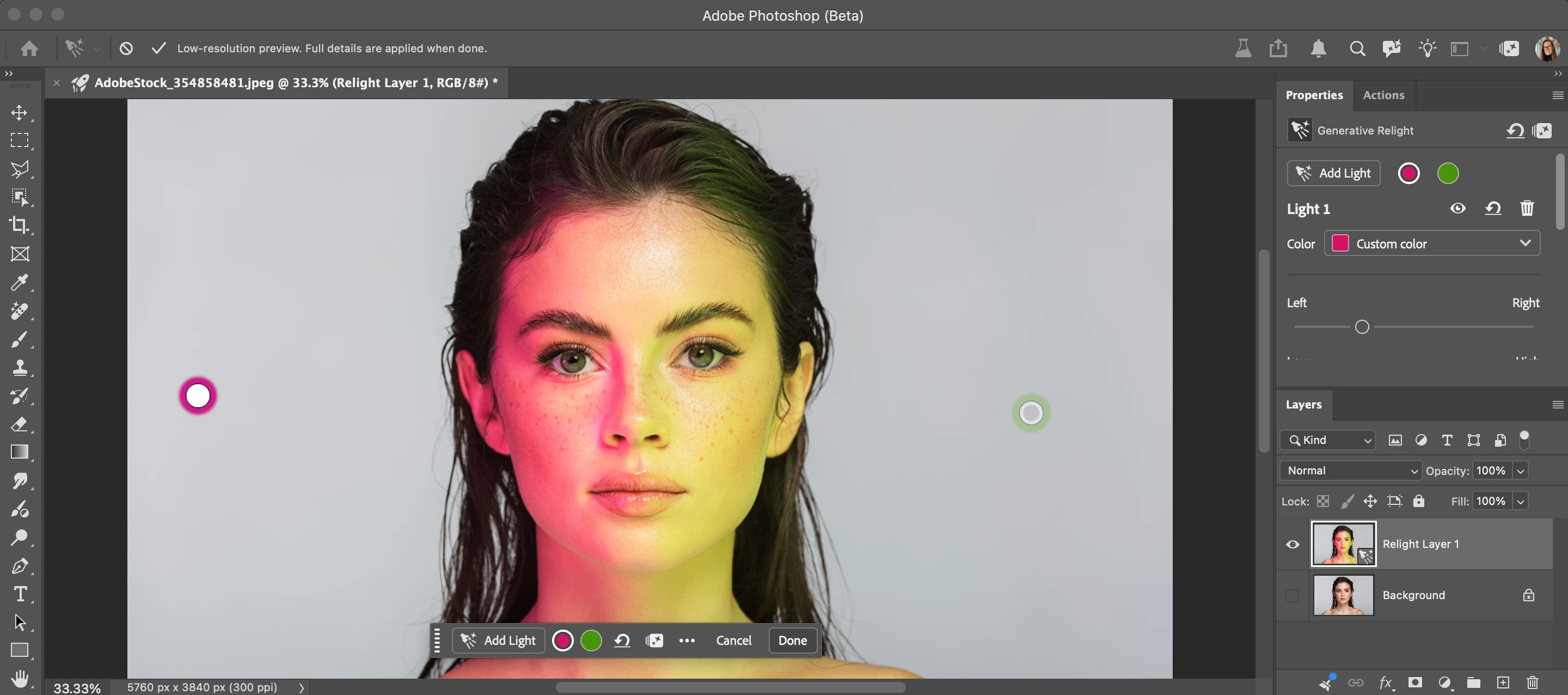
Relight is a new Generative AI feature in Photoshop Desktop that lets you add up to 3 interactive, non-destructive lights and adjust their position, intensity, color, and diffusion (Beta version: 27.12.0 20260927.m.3691 available on 9/28/26). Relight feature with default light added in low-res preview mode. Relight feature with 2 lights added. Select done to commit (30 credits) and upscale.HOW TO TEST Update and launch the latest Beta Build (Version: 27.10.0 202600802.m.3625) → have an active Internet connection Open or place an image Select an unlocked Pixel, Rotate Object, or Smart Object layer. Go to the app Layer menu > New Relight layer... Note you can also go to the Layers Panel flyout menu New Relight layer… A new default (white) light will be added in the middle of the image. You can click and drag the light around on the canvas (inside or outside the image - above the bottom edge of the image). Relight removes the existing lighting in the image and re-creates i
Photoshop + Photoshop Beta: Bei Verwendung des Remove-Tools erscheint nach längerer Wartezeit die Meldung: "Programm konnte nicht ausgeführt werden, weil ein Programmfehler aufgetreten ist" Dieser Programmfehler tritt nun bereits seit mehreren Wochen auf.Ich muss seither zum Entfernen “Generative Fill” verwenden, was nicht Sinn und Zweck ist.
Remix with Firefly Community Gallery
Thousands of free creations to fall in love with and remix in Firefly.
Already have an account? Login
Enter your E-mail address. We'll send you an e-mail with instructions to reset your password.