






Design the future of fashion, win Firefly Pro 👗✨
Photoshop (Beta)
Recently active
Hello, my name is Alex.I would like to report that the harmonise function is not working properly.After I click on the harmonise button, the process starts, but it is interrupted and a yellow box pops up with the message ‘There was a problem and your request could not be completed. Please try again later.’I have been trying to use this function for several days, but it has not worked once. What could be the problem and how can I solve it?This is a very useful function that will save many hours of work, and I would be very grateful if you could help me.Thank you in advance.Best regards,Alex
Opened two documents from Bridge (both jpg pictures of 8.5x11 documents with perspective issues bottom to top). Cropped images to remove non-relevant areas Selected Perspective Warp from the Edit menu Corrected perspective issues with a single grid expanding top to match bottom size to square the picture of the document. Cropped final image at the boarders with RTM tool Crashes First time the application crashed to the desktop and upon relaunch the recovered file was presented. The second time, the screen went blank and the system was non-responsive (no response to ctrl-alt-del or any other user input). It was necessary to restart the system. Upon relaunch of Photoshop beta, the recovered files where opened. I have done this operation with past releases for pictures of signage etc. with no issues. I have included the “System Info” from Photoshop in the attached TXT file, and I have included Windows System Eventlog error just prior to restarting the system in a zip folder.
while working on my character 2d layers for rigs, I choose the right shoe layer. I click on “fx” at the bottom menu in the layers menu and then a spinning loading symbol appears to freeze up the application. Then between 3 to 15 seconds the whole application crashes. Most of the time without a recovery file when this occurs. This happens whether i double click the layer to add the ‘fx’ for the color overlay persay, as well as the selection of the ‘fx’ symbol in the menu area.
select any part of the image, use Generative fill… then look at the screen for 20 to 30 seconds while the software does nothing.. then.. the “options” appear…. try to see the other 2 options you can see they are there.. but when I click on the arrow to go to the next, it takes another 20 seconds to switch, every time… going trough 3 generations gave me the time to go make a coffe...
today i update photosho. After updating to Photoshop Beta 27.12 3700, when I use AI features like gen fill, harmonise, ai denoise, ai sharpen etc, Photoshop becomes extremely slow. It is running very slowly.
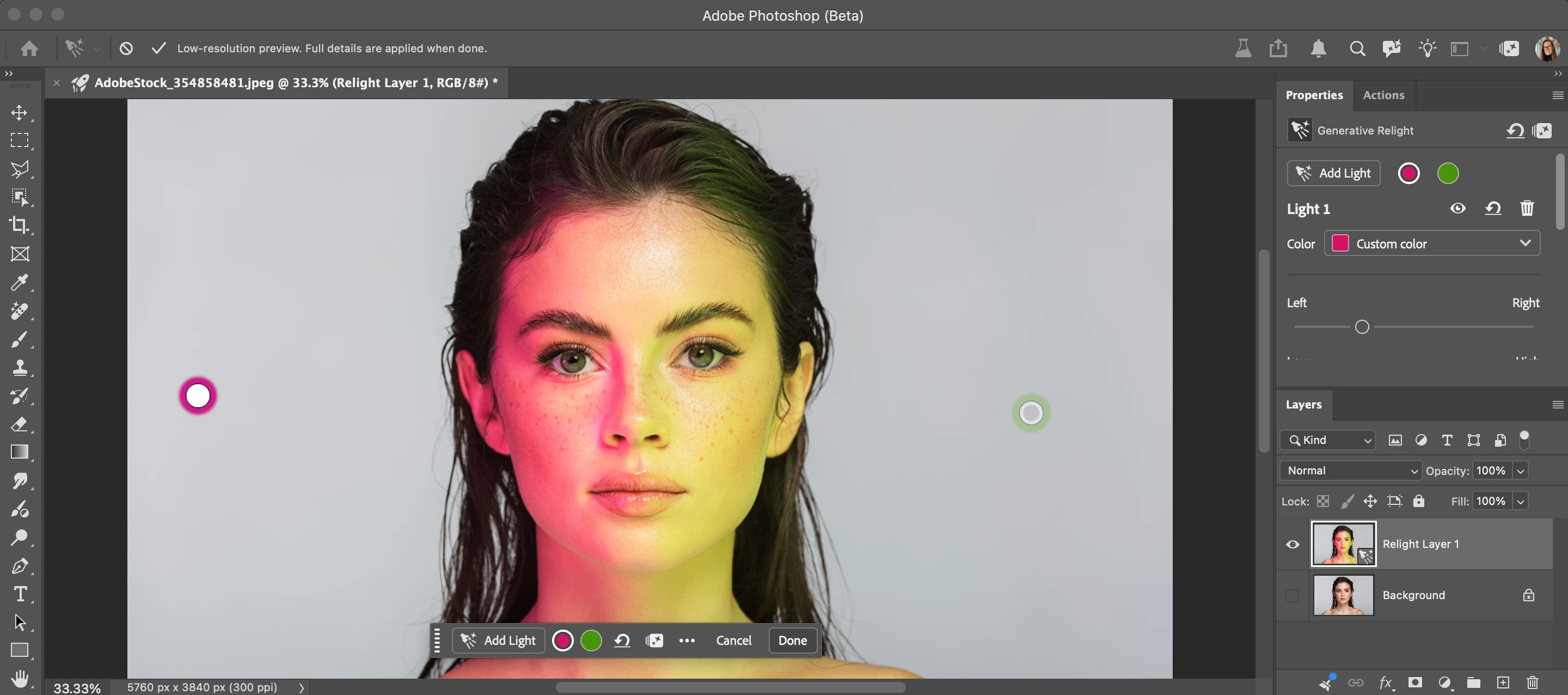
Relight is a new Generative AI feature in Photoshop Desktop that lets you add up to 3 interactive, non-destructive lights and adjust their position, intensity, color, and diffusion (Beta version: 27.12.0 20260927.m.3691 available on 9/28/26). Relight feature with default light added in low-res preview mode. Relight feature with 2 lights added. Select done to commit (30 credits) and upscale.HOW TO TEST Update and launch the latest Beta Build (Version: 27.10.0 202600802.m.3625) → have an active Internet connection Open or place an image Select an unlocked Pixel, Rotate Object, or Smart Object layer. Go to the app Layer menu > New Relight layer... Note you can also go to the Layers Panel flyout menu New Relight layer… A new default (white) light will be added in the middle of the image. You can click and drag the light around on the canvas (inside or outside the image - above the bottom edge of the image). Relight removes the existing lighting in the image and re-creates i
Photoshop + Photoshop Beta: Bei Verwendung des Remove-Tools erscheint nach längerer Wartezeit die Meldung: "Programm konnte nicht ausgeführt werden, weil ein Programmfehler aufgetreten ist" Dieser Programmfehler tritt nun bereits seit mehreren Wochen auf.Ich muss seither zum Entfernen “Generative Fill” verwenden, was nicht Sinn und Zweck ist.
After updates on Beta & regular Photoshop, when I am editing an image it will shift to a darker tone for a while & go back to original tone. It does this continually. How do I make it STOP!? It even does this when working with layers! I set image profile (the gray gamma) & made sure images is converted to same profile, however my images continue to go dark & back to original version.
In PS 28.01 there appears to be a minor issue in how the color channels are displayed in both Levels and Curves layers in their new layout; RGB displays correctly as a multi colored circle, the red channel is displayed as a blue circle, green is correct as a green circle and the blue channel is displayed as a magenta circle. I'm seeing this on a Win 11 PC, I dont know if its a Mac problem too?This just appears to be an icon display issue as the channels are in their usual order
beta 28 - crashes when trying to flatten imagine with multiply layers. Always when at least one layer curves with mask, sometimes with different layer configuration. Mac OS 27.0.1, mac book pro with M2MAX
cant get hands-on tutorials to work on photoshop
does not open dng files from lightroom classic if to original raw dng file in lightroom classic ai denoise applied
28.0.0 Photoshop Beta on Mac M4, Crushes several times a day. Mostly, looks like, on the Saving (Smart object update or regular file saving, or random thing).Before update, crush happens once in a few month or less.
When I select an embedded Smart Object layer that contains layer comps, I cannot toggle the layer comps through the Properties window.
Sorry to hijack your thread, what started as a simple reply became me finding the cause of the issue for myself, which may be related to your situation, or not…---------------------Yup, even worse is that they pushed the bug into the release version of photoshop. The colour picker shows just how bad it is, where #00FF00 looks almost yellow. So many reports, but been waiting for quite some time for the issue to get fixed. Just realized I also had 26.11.7 installed which doesn’t have the issue, but missing the new features sadly, specifically generative upscaling which I wanted to use… One relevant thing that I don’t know if the situation is the same for yourself, but I have dual monitors, and it only happens on the one monitor, the laptops primary display (which Photoshop identifies as SDR) and doesn’t happen on the secondary display (which Photoshop identifies as HDR). If I disable HDR on the second monitor, it also displays the colors incorrectly just like the primary display. THATS
Hello, I’m experiencing a recurring bug in the latest version of Photoshop (Beta) on macOS. When I add a Hue/Saturation adjustment layer, the Properties panel does not display the usual Hue, Saturation, and Lightness sliders. Instead, it only shows: “No mask selected” — even though the white thumbnail (the adjustment layer, not the mask) is properly selected in the Layers panel. This bug does not happen in the stable version of Photoshop, nor in a different open document within the same session. Steps to reproduce: 1. Open or create a new document 2. Add a Hue/Saturation adjustment layer 3. Click the white thumbnail of the adjustment (not the mask) 4. The Properties panel incorrectly shows only mask options (“No mask selected”) System details: • Photoshop Beta version: 26.6.0 • macOS version: 15.3.2 • Chip: Apple M3 Pro
macOS has an OS-level mechanism that uses an app’s bundle ID to determine which app is launched by default. One example of such an ID is com.adobe.Photoshop.By default, the OS uses the latest installed version as the default app. In Finder’s Get Info panel, users can also select an app at a different installation path to open their files, even if it shares the same bundle ID.However, this Finder setting often reverts to the latest version when a new version is installed.This causes a problem with the standard release and beta versions of Photoshop.Both use the same bundle ID, com.adobe.photoshop. As a result, even if I use the standard release for my work, installing the beta can cause files opened in Finder to launch the beta instead.Illustrator uses different bundle IDs for its standard release, beta, and prerelease versions, so it does not have this problem. For example, Illustrator Beta uses com.adobe.Illustratorbeta, while Illustrator Prerelease uses com.adobe.illustratorPreReleas
ik heb een foto openstaan binnen photoshop als ik dan even klik op een openstaand browser venster sluit photoshop Beta plotseling af! Mac Os versie.Beta versie: 28.0 m.3706
I’m reporting a reproducible issue in Photoshop 28.0.1 involving TIFF files exported from Cinema 4D.Expected behavior:TIFF files should open directly in Photoshop when TIFF handling is disabled in Camera Raw preferences.Actual behavior:Affected Cinema 4D TIFFs unexpectedly open in Camera Raw despite TIFF handling being disabled. I have reproduced this in Photoshop 28.0 and 28.0.1. The same files do not trigger this behavior in an older Photoshop version.Tests performed: Resaving the affected document in Photoshop: the issue persists. Copying the image into a new Photoshop document: the issue disappears. Deleting the alpha channel: the issue disappears. Adding only ExtraSamples=2 (unassociated alpha), while retaining all four channels: the issue disappears. Removing only the Photoshop alpha-channel name resources (IDs 1006 and 1045): the issue persists. Technical findings:The affected original TIFF has these properties: Dimensions: 2560 × 3840 PhotometricInterpretation: RGB
Bonjour à tous, malgré qu’il est noté que la dernière Beta de Photoshop est compatible avec ma machine, elle refuse de se lancer.J’ai passé une heure avec l’assistance : résultat aucune réponse malgré qu’ils ont pris la main sur ma machine à distance. Ensuite rien, aucun message.Ce service d’assistance au mauvais et inutile !Vous avez eu des soucis pour lancer la Beta sur macOS 13 sur i7 ?
Hello everyone. Although it is stated that the latest Photoshop Beta is compatible with my machine, it refuses to launch (the icon appears with a strikethrough).I spent an hour with support—they even took remote control of my machine—but the result was no solution. Afterward, nothing; not a single message.This support service is terrible and useless!Has anyone else experienced issues launching the Beta on macOS 13 using an i7 processor?
Why has Photoshop Beta's toolbar been changed to revert to default instead of remembering last tools used whenever Photoshop is re-launched? It looks to me like another example of some university graduate deciding to change something in Photoshop just for the sake of it. I've looked in the tools settings in Preferences, and can't find anything that allows me to retain the tools as I left them. It's infuriating now to have to keep going through the tools on the toolbar and re-setting them to what I need most often. This problem (and also some infantile stylistic changes to the toolbar - again born of the “let’s find something else we can change” mentality) only afflicts Photoshop Beta. The release version of Photoshop is not affected by this problem (not yet anyway).
HiI’m using PS Beta and would like to try out the AI prompt feature for image editing. I’m logged into my school account and have enough AI credits available.However, whenever I enter a prompt, I get the following message:Your request is on its wayYou’ll hear from your administrator soon. If your request is approved, you’ll receive an email with instructions on how to use your applications and services.Does anyone know what this means and how I can make the AI image editing work?Any help would be greatly appreciated. Thank you very much!
Masked adjustment layers keep blinking in and out when I am editing the mask of another adjustment layer. Happens with multiple projects that have many adjustment layers. I think this may have happened with the introduction of the new adjustment layers (Light) but am not 100% sure.
Hi everyone! Can somebody help me with this Topaz Gigapixel issue in Photoshop?Topaz Gigapixel used to work perfectly fine in my Photoshop, but now it keeps showing an error whenever I try to use it.Here’s what I’ve already checked and tried: ✅ Checked compatibility — everything seems fine. ✅ Updated my graphics card drivers. ✅ Updated the applications. ✅ Checked my internet connection and storage space. ✅ Tried uninstalling and reinstalling. ✅ Tried logging out and logging back in. The weird thing is that my friend tried using my account on their PC, and Topaz Gigapixel worked perfectly fine there. However, it still doesn’t work on my PC.I can’t figure out what’s causing the problem since it works on another computer using the same account.Has anyone experienced the same issue or knows how to fix it? Could it be a problem with Photoshop, my PC settings, or something else?I’d really appreciate any help or suggestions. Thank you! 🙏
Remix with Firefly Community Gallery
Thousands of free creations to fall in love with and remix in Firefly.
Already have an account? Login
Enter your E-mail address. We'll send you an e-mail with instructions to reset your password.