













All things Enterprise & Teams.
Recently active
TL;DRIf the AI Assistant in Acrobat for Microsoft Teams has stopped generating meeting summaries, or the transcript list in the Acrobat Teams Personal App is empty, a likely cause is a Microsoft Teams admin setting called Transcript API access. Microsoft now ships this setting off by default, which blocks Acrobat, along with any other third-party app, from reading Teams meeting transcripts through Microsoft Graph. This is a Microsoft-side change, and Adobe cannot enable it for you. Your organization's Microsoft 365 or Teams admin needs to enable it. Who this affectsOrganizations using Acrobat for Microsoft Teams (web connector or Teams Personal App) Anyone relying on the AI Assistant to summarize Teams meeting transcripts in Acrobat If your tenant already has Microsoft Graph access enabled for the transcript API in the Teams admin center, no action is needed What ChangedMicrosoft added a new admin control, Transcript API access, that governs whether any third-party app, not just Acroba
Missed an update? It happens. We’ve got you covered.Welcome to ICYMI, a quick way to stay in the loop on the latest updates from Enterprise and Teams.Hit ‘Subscribe’ at the bottom of this page to bookmark this thread for easy reference. July 2026 Post | What's new: Search for inactive users by first name, last name, and username(Admin console | Enterprise and teams | User management)Admins can now search for inactive users in the Admin Console using their email address, username, first name, or last name. This makes it easier to locate a specific inactive user when you don't have their exact email on hand. Learn more Post | Global Admin Console: Support for Multiple Paid ETLA Contracts is Now Live(Admin Console | Enterprise | Contract management)Global Admin Console now supports multiple paid ETLA contracts within a single organization. Global admins can allocate products across more than one ETLA contract in a GAC hierarchy, and Aggregated Reporting now lets you select which contra
Not currently supported: web services such as Acrobat Sign, Adobe Assets, and Adobe Libraries, mobile applications, Acrobat Reader, and Dreamweaver. What this feature does: This enterprise-level configuration lets you set the authentication mechanism for Creative Cloud desktop applications, including Acrobat Pro Desktop, at the device level. Pair it with your company's device deployment process so that when a user signs in, they're automatically redirected to your organization's identity provider for the claimed domain, instead of landing on Adobe's generic sign-in screen. Before you start: To use this, your company must first claim the relevant domain in the Adobe Admin Console. You can claim more than one domain, but on any single machine the policy must resolve to one claimed domain. If you've claimed multiple domains, you can direct different users on different machines to different domains. Why configure this:Users are automatically redirected to your company's identity provide
How to generate a HAR fileGenerating a HAR file would be helpful if you need detailed information about network requests within the user’s browser for troubleshooting. This article helps you know how to generate a HAR file in Chrome, Firefox, Edge, and Safari. Google ChromeThe following steps show how to use the developer tools in Google Chrome.For more information, see Chrome DevTools.In the Chrome browser, navigate to the step prior to where the issue occurs. Press F12 to launch the developer tools. You can also launch the tools from the toolbar menu under More tools > Developer tools. By default, the browser keeps trace information only for the page that’s currently loaded. Set the following options so the browser keeps all trace information, even if your repro steps require going to more than one page: Select the Console tab, select Console settings, then select Preserve Log Select the Network tab, then select Preserve log. On the Network tab, select Stop Recording network lo
TL;DRGlobal Admin Console now supports multiple paid ETLA contracts within a single organization. Global admins can allocate products across more than one ETLA contract in a GAC hierarchy, and Aggregated Reporting now lets you select which contract's data to view and export. Now generally available: the Global Admin Console (GAC) supports multiple paid ETLA contracts within a single organization. What's new:Global admins can allocate products seamlessly across more than one ETLA contract within a GAC hierarchy Aggregated Reporting in GAC now supports contract selection, giving admins more control over the data they view and export GAC is now contract-conscious throughout the UI, with richer contract-level visibility and more granular allocation controls Go to Admin Console Why it matters:Previously, GAC did not support seamless allocation across multiple Standard ETLA contracts within a single org, and admins could only pull the provisioning report for a single contract at a time. Thi
TL;DR Admins can now search for inactive users in the Admin Console using their email address, username, first name, or last name. This makes it easier to locate a specific inactive user when you don't have their exact email on hand. Why this matters Previously, finding a specific inactive user required knowing their exact email address or manually paging through the Inactive Users list, which is impractical for organizations with a high volume of inactive accounts. This has been a frequently requested improvement from admins managing storage governance at scale. With this update, the search field now accepts email addresses, usernames, first names, or last names. Once you locate the user, you can act on their folder using the same options available today. What you need to know Search by email, username, first name, or last name is available directly from Storage > Individual user folders > Inactive Users. Search may return no results in a few specific cases: if the user's inf
TL;DRFederated Guest Access (FGA) is now generally available. It allows enterprise customers to onboard external partners, agency staff, vendors, consultants, as federated users, without requiring ownership of their email domain. This feature is available to organizations that purchased an enterprise plan directly from Adobe and have at least one active federated directory. If that's not your setup, this capability won't appear in your Admin Console yet. What changed Previously, creating a Federated ID user required your organization to own the user's email domain. That meant you couldn't add anyone using a non-claimable domain, such as gmail.com, or a domain claimed by another organization as a Federated ID user. In practice, this blocked a common scenario: bringing an external vendor or consultant into your Adobe environment under the same SSO and authentication policy you use for employees. FGA removes that restriction. You can now add a user with any email address as a federate
TL;DR: Admins can now create content retention policies to manage the lifecycle of Creative Cloud Projects stored in Adobe cloud for business. Define how long completed projects are retained before they're permanently deleted. This capability is available through the Adobe Admin APIs for Storage Management. Go to Admin Console What are the requirements?Your organization uses Adobe cloud storage for business with Creative Cloud Projects You have admin access to the Admin Console An authorized external system, such as a project management or workflow tool, is configured to signal project completion via the Adobe Admin API Why should admins set up WIP content retention?Admins can create one or more content retention policies to define how long Creative Cloud Projects are retained after being marked as complete, before they are permanently deleted. With WIP content retention, admins can:Create one or more retention policies for WIP content within an organization Modify policies at any time
TL;DR:What: Adobe Express Photos is a screenshot-capture and image-editing tool included with Acrobat Studio at no extra cost. Platform: Windows only. How: Deploy a new Acrobat (26.1) Managed package via Admin Console Packager Open Admin Console to create a package What are the requirements to deploy Adobe Express Photos?For organizations with an active Acrobat Studio or Acrobat Express for enterprise plan, Adobe Express Photos can be deployed in two ways: Admin-managed deployment (available now): Adobe Express Photos is included in the Acrobat enterprise installer. Administrators can deploy it using the same packaging and distribution methods used for Acrobat through the Admin Console and enterprise management tools. Learn more. Note: Administrators can deploy an Acrobat package that includes Adobe Express Photos to any Windows user in the organization, regardless of which Acrobat product each user is assigned (Studio, Express, Pro, or Standard). Auto-install (coming early June):
Applies to: Windows · Acrobat Studio or Acrobat Express · Auto-update enabledTL;DR Adobe Express Photos will auto-install on Windows for Acrobat Studio and Acrobat Express users starting early June 2026. To opt out, set a registry key before the next Acrobat update. If it's already installed, uninstall it and then set the key to prevent reinstallation. Starting early June 2026, Adobe Express Photos will install automatically on Windows devices for certain enterprise Acrobat users with auto-update enabled.Adobe Express Photos is a lightweight Windows desktop app that gives end users two everyday creative tools in one install: essential photo editing and a built-in screenshot tool for capturing and annotating their screen. It also integrates with Adobe Express for users who need more advanced design capabilities. Learn more about Adobe Express Photos.To prevent installation, you must opt out by following the steps below. Open Admin Console to create a package Who is affectedAutomatic ins
Applies to: Firefly for Creative Cloud for Teams TL;DR:Three new Firefly Creator offers for teams: Firefly - Pro (4,000 credits), Pro Plus (10,000 credits), and Premium (50,000 credits). Go from text prompts to polished, business-ready images, graphics, and videos using Adobe Firefly, Adobe Express Premium, and Photoshop. No full Creative Cloud plan needed. Add a plan from the Admin Console by selecting Buy more.Firefly Creator for teams is an AI-first creative toolkit built for small teams and businesses to go from idea to polished, business-ready visuals faster, without needing a full Creative Cloud plan.How to add a Firefly Creator plan for my team?On the Overview page in the Admin Console, select Buy more and add one of the Firefly plans below. Plan Generative AI feature type access Monthly generative credits Firefly Pro for teams Standard and Premium 4,000 for premium generations Unlimited access to standard generations Firefly Pro Plus for teams Standard and
We’re introducing a new way to manage Adobe Express Marketplace add-ons using roles in the Admin Console. This update provides improved control, flexibility, and a simplified experience for administrators.Admins can now manage add-on access at both the organization and user level using predefined and custom roles. Go to Admin ConsoleWhy this mattersWith this update, add-on access is managed through roles, helping organizations:Control access to Adobe Express add-ons Enable specific add-ons using custom roles Assign permissions at scale using user groups Avoid over-permissioning Improve governance, especially for K-12 environments Align with role-based user managementAdmins can manage add-on access from Users > Roles in Admin Console by assigning predefined or custom roles to users or groups. Roles define access to Adobe Express capabilities, including add-ons, with permissions adjustable where applicable.Access varies by organization type (enterprise or K-12), and
We’re delighted to announce that Admin Console Audit Logs via Adobe I/O Events is now available for Enterprise customers. This update enables organizations to automatically fetch their Admin Console audit logs via API and integrate them into their monitoring and storage systems.With this release, customers can extend audit visibility beyond the Admin Console and retain audit data for longer periods to support compliance, governance, and incident response needs.Go to Admin ConsoleWhy this mattersWith this release, we have enabled programmatic access to Admin Console audit logs via Adobe I/O Events, allowing enterprise organizations to automate the collection of audit logs directly into their own storage or security tools, gain visibility into who changed what and when, and retain this data beyond the current 90-day limit.This allows organizations to:Integrate audit logs with SIEM and security monitoring tools Retain audit data for long-term compliance and regulatory requirements Invest
We’re excited to extend Org Name Change to Enterprise organizations and those within a GAC hierarchy. System Admins can now update their organization name directly through a self-service workflow in the Admin Console.Admins also have control over end-user email notifications during these updates. Notifications are disabled by default, can be enabled at the time of each change, and apply only to admin-initiated updates.Go to Admin ConsolePrerequisitesThis feature is available only if your organization meets one of the following criteria:You purchased a Teams or enterprise plan directly from Adobe. Your Admin Console is part of a Global Admin Console hierarchy.If your organization does not meet these criteria or if your plan was purchased through a reseller, admins must contact Adobe Customer Care to request changes. Why this mattersEnterprise Org Name Change gives admins direct control over organization identity, eliminating the need for manual support requests and reducing operational
Shared credits (formerly Generative credit pool) provide access to organization-level Operations, enabling continued use of Firefly-powered features after users exhaust their individual monthly generative credits. Users consume their individual credits first. Once those credits are exhausted, eligible Firefly-powered actions automatically draw from the organization’s Operations for users who are assigned access. Users can now request access to shared credits once their individual credits run out. System administrators can review and approve these requests or automate access using assignment rules in the Admin Console.Go to Admin ConsoleWhy this mattersThis update helps organizations manage generative AI usage more efficiently while maintaining administrative control.With Shared Credits, organizations can:Extend access to Firefly-powered features after individual credits run out Enable users to request additional generative credit access when needed Simplify management using automatic
We’re excited to introduce User Roles for Firefly and Partner Generative AI Models in the Admin Console. This update allows system administrators to manage access to Adobe Firefly and partner generative AI models through predefined roles and custom roles.With these updates, administrators can assign roles to users or user groups, customize permissions, and manage generative AI access alongside other Adobe app capabilities within the Admin Console. Go to Admin ConsoleWhy this mattersThese updates help organizations manage generative AI access using role-based permissions. System administrators can assign specific roles to users or user groups to control who can access Firefly and partner generative AI models.Using roles helps administrators: Grant appropriate access without over-permissioning Delegate responsibilities safely without giving full administrative privileges Simplify user management by assigning roles to user groups Manage permissions across Adobe Express, Firefly, and
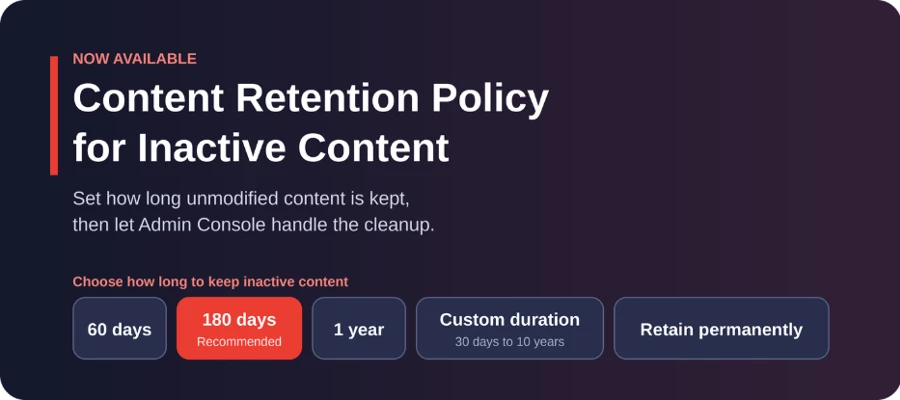
We’re excited to announce the Content Retention Policy for Inactive Users in the Admin Console. This feature allows administrators to set automated retention timelines for inactive user content, after which it is permanently deleted. This helps improve storage management and supports compliance across enterprise and education environments.Go to Admin ConsoleWhy this mattersThis feature helps enterprise and education organizations manage digital assets responsibly, control storage growth, and maintain compliance with legal and regulatory requirements. By automating retention timelines, IT teams can reduce manual oversight while ensuring consistent policy enforcement across the organization. Where to Find ItGo to Admin Console > Storage > Individual User Folders > Retention policy settingTo configure the policy:Navigate to Individual User Folders and select Retention policy setting. Choose to retain inactive user folders permanently or set a custom retention period between 30 da
We’re excited to announce the release of IdP-initiated login for Adobe Enterprise users. This enhancement adds support for IdP-initiated authentication as an additional SSO flow, alongside the existing SP-initiated login, giving organizations more flexibility and a smoother sign-in experience for their users. Go to Admin Console OverviewWith IdP-initiated login, users can launch Adobe apps directly from their IdP portal (such as Azure AD, Okta, or Google) with a smoother, one-click experience. This reduces login friction, standardizes enterprise workflows, and improves overall usability.This feature is:Supported for both new and existing SAML directories Available for all SAML identity providers Fully additive and does not impact existing SP-initiated login flowsAdmins can also optionally configure RelayState to control where users land after signing in, such as Adobe Home, Adobe Express, Experience Cloud Home, Workfront, or Adobe Experience Manager.Why this mattersThis update signific
We’re pleased to roll out an exciting new enhancement to Self-Service Policies in the Adobe Admin Console for Enterprise customers, introducing the “Enforce Auto-Update” option! Go to Admin ConsoleBeforePreviously, IT admins could enable the Auto-update option for users in the Creative Cloud desktop app. However, users still had control over whether to keep this setting turned on or off. This meant admins needed to rely on users to maintain the auto-update setting correctly, or manually manage updates across individual devices, often leading to inconsistencies in app versions, delayed updates, and additional administrative effort. NowWith the Enforce Auto-Update policy, admins can easily keep Creative Cloud apps up to date. Once enabled on a product profile, all end-user machines linked to that profile automatically receive the latest updates without any manual effort.When this policy is enabled: Users will no longer be able to disable auto-updates in their Creative Cloud desktop app.
We’re introducing a way for admins to receive email notifications whenever the help page Domains to be allowed for Adobe apps & services to function correctly is updated. Keeping your allowlists current ensures uninterrupted access to Adobe apps and services in your organization.We’ve also added a What’s new section on the page so you can easily see where the latest updates were made.We’re currently setting up this capability. Once it’s live, you’ll be able to follow the page to receive update notifications. If you’d like to stay informed about when this capability becomes available, please follow this post. We’ll share an update here once it’s ready. ✅ Update: This feature is now available.You can now subscribe to receive email notifications whenever the Allow required domains for Adobe apps and services page is updated.Subscribe here.Subscribers will receive email notifications when changes are made to the network endpoints list, helping administrators stay informed about updat
We are excited to announce access to enterprise trials for ETLA (Enterprise Term License Agreement) customers; designed to simplify trial access, drive adoption, and accelerate conversion to paid licenses. Activate a trial or a special offer Why enterprise trials matter:Enterprise organizations often need a scalable way to evaluate new tools before committing to licenses. Adobe’s enhanced trial experience ensures efficient discovery, activation, and management of enterprise trials directly within the Adobe Admin Console. Key features and benefits: Immediate trial access: When a trial or special offer becomes available, Adobe notifies all system administrators of eligible organizations via email, and any system admin can activate the trial or offer from the Admin Console. Automated and self-start options: Admins can activate trials with automatic assignment rules, while users can also self-start or request access. User notifications: Automated email alerts keep teams informed and e
IT Roundtable – October 2025 Edition, #Adobe MAX Location: J.W. Marriott, Los Angeles, CaliforniaFormat: Hybrid – Join live in person or virtually The Adobe IT Roundtable is a dedicated space for IT administrators to connect directly with Adobe product managers and peers. Join James Lockman (Principal Product Manager) and Lori DeFurio (Principal Technical Evangelist) live from Adobe MAX 2025 as they share: Takeaways on Adobe MAX, including announcements and product updates Admin Console updates Security & Deployment updates Whether attending live or joining remotely, this hybrid session invites everyone to engage in a live Q&A, gain insights, and stay ahead of the curve on Adobe product developments. Register here: IT Roundtable Not registered for Adobe MAX 2025 (October 28-30) yet? Register here: Adobe MAX Stay informed! Explore all the latest updates & releases on our ICYMI page! Have q
We’re introducing IP-based access control to give enterprise admins greater control over users’ access to Adobe products and services. With this feature, you can restrict sign-ins and app usage to trusted public IP addresses, helping prevent unauthorized access from unapproved networks. Go to Admin Console Why use IP-based access? Enhanced security: Limit Adobe product access only to trusted public IP addresses. Prevent unauthorized sign-ins: Block users from logging in or switching profiles from unapproved networks. Centralized control: Apply IP-based restrictions across all directories and products in your Adobe Admin Console. (Note: These restrictions apply to all ID types — Adobe ID, Enterprise ID, and Federated ID.) How it works Admins can add to the IP allowlist to define which public IPv4 addresses or subnets are permitted. Any attempts to sign in or use Adobe apps outside of these approved ranges will be restricted. Supports multipl
Remix with Firefly Community Gallery
Thousands of free creations to fall in love with and remix in Firefly.
Already have an account? Login
No account yet? Create an account
Enter your E-mail address. We'll send you an e-mail with instructions to reset your password.