











Photoshop (Beta)
Recently active
When logging a new bug report, it's helpful to the Photoshop team when the information in the report includes steps describing how they can reproduce the bug experience. Once we can reproduce an issue, then we can start to investigate a fix. Note: If after a bit of troubleshooting we find that the bug report is in-fact not a product bug, the bug report may be moved out of Bugs and over to Discussions. Use the template below as a guide for posting the most meaningful bug reports for the team. Bug report template: Issue: Photoshop version: OS: Steps to reproduce: ... ... ... Expected result: Actual result: Anatomy of a great bug report: Issue: Provide a succinct one-line issue statement (i.e. Photoshop beta does X when using a tool or plugin) Provide Photoshop version: Help>System Info>Copy the top line with Photoshop version Provide OS and version: macOS 11.4 Issue: Provide good steps
I’ve created 2 AI variations of a layer in my document in PS Beta 27.12.0. The image size is 2960x2844 RGB. Nothing unusual or big (I’m on a PC, Windows 11, with 128GB RAM and 24GB VRAM). If I have the Properties Panel open and click to toggle the visibility of a layer, it takes ~5 secs to update the image. If I close the Properties Panel, it updates instantly. I have 2 AI-generated layers in my image. If I delete those layers, showing/hiding any layer updates instantly. I have 5 layers in the image (2 are AI-generated). Annoyingly, even if I close the Properties Panel, if I do any kind of AI stuff, it pops open again and spoils the party by slowing everything down again.Quitting and relaunching PS, and reloading that same document did not change anything - the problem still persists.
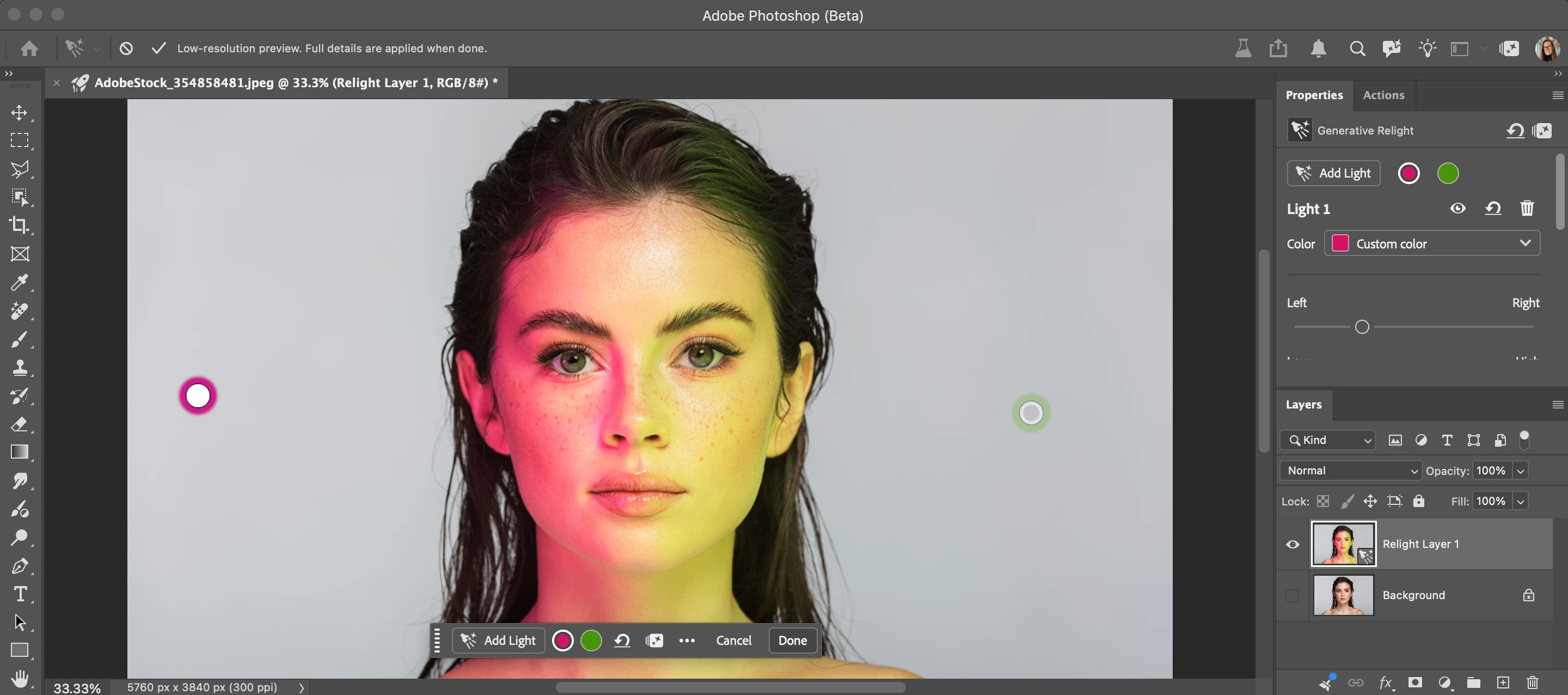
Relight – Changing any light setting resets Intensity and Diffusion to 0%EnvironmentPhotoshop Beta [exact version from Help > System Info], updated on October 7, 2026 macOS [version], Apple Silicon Mac System language: French (French number format, comma as decimal separator)Steps to reproduceOpen an image and select an unlocked pixel layer. Go to Layer > New Relight Layer. Select the light and set Intensity to any value (e.g. 60%). Change any other setting of the same light: Diffusion, or the position (left/right, up/down, front/back).Expected resultEach setting keeps its value, so Intensity and Diffusion can be adjusted together.Actual resultAs soon as any setting is changed, Intensity and Diffusion jump back to 0%:Adjusting Intensity resets Diffusion to 0%. Adjusting Diffusion resets Intensity to 0%. Moving the light in any direction resets both to 0%.This makes it impossible to get a correct preview before clicking Done. Since each render costs 30 credits, I can't validate a
27.12.0 20261005.m.3700) on WIndows 11 Pro. The spinning wheel when selecting a variation and the missing green progress bar during mask creation and Remove
In 27.12, when using ai generative fill, or remove - the usual 3 variations are created. However, the cursor flashes between working and ready - and the image will not update when chosing between them - unless you minimise the Properties window which displays the variations. So, you have to select a variation, then minimise the panel and the main image will change to show the variation, if you try to do this as it used to be - it just wont update. AI tools are also very much slower than they used to be
Title: Photoshop Beta — Ctrl-drag with Move Tool does not select layersPhotoshop Beta version: 27.12.0 20261005.m.3700 e7185eb x64 (beta, PublicBeta)Operating system: Windows 11Auto-Select checkbox: OFFAuto-Select target: LayerSteps to reproduce: Open a document containing multiple visible layers. Select the Move Tool (V). Set the Auto-Select target to Layer and leave the Auto-Select checkbox OFF. Hold Ctrl and click-drag from an empty area of the canvas to draw a selection box around several layer objects. Check the selection in the Layers panel. Expected result:The layers inside the selection box should be selected.Actual result:The layers are not selected when I perform this action.This interrupts my wedding album layout workflow. Please investigate this behavior.
The color of the sample ring for the Eyedropper tool is incorrect.27.12.0 20261005.m.3700 and 27.11.0 20260929.r.26 26.11.8 20260911.r.318 As you can see, the sample color does not match the color of the sample ring.The sample color display is also incorrect in the HUD color picker. macOS Golden Gete 27.0.1,MacBook Pro M5 Pro
today i update photosho. After updating to Photoshop Beta 27.12 3700, when I use AI features like gen fill, harmonise, ai denoise, ai sharpen etc, Photoshop becomes extremely slow. It is running very slowly.
Photoshop Beta 27.11 / 27.12Move Tool (V) → Auto-Select: LayerSingle-click on objects selects layers normally.Dragging a marquee around multiple visible unlocked layers shows the marquee, but layers are never selected. Tried with only unlocked layers present, with some locked, with background canvas layer, without it. On new PSDs or existing ones. Any solution/workaround?
Hi everyone! The Block style of dynamic text is now available in Photoshop beta! Dynamic text is a new form of type layer that automatically resizes and adjusts your text to fit the shape of the text boundary, and enables you to easily create different looks and layouts by resizing the type layer's boundary rectangle. How to make dynamic textCreate a Point type or Paragraph type layer, and convert to dynamic text using the new button found in the Tool options bar and Properties panel or from the Type menus. You can customize the spacing between words or lines using the Word gap and Line gap options in the Dynamic text section of the Properties panel. Try Dynamic text & Share what you create! Please try Dynamic text: Block, share what you create in this forum thread, and let us know if you encounter any issues or have thoughts on how we can improve this feature! Known issue Dynamic text: Block doesn't quite work wel
Harmonize not working. Harmonize Button is present, Photoshop thinks while processing, then provides three options of the exact same image with no harmonization applied. I have used Harmonize before so I believe I’m doing it correctly, but no change is happening recently when I try to use it.
1. Select Move Tool (V)2. Enable Auto-Select: Layer3. Drag marquee on empty canvasExpected: layers inside marquee get selectedActual: nothing selected - Beta 27.12.0 Win11
Hi Adobe team,I’ve been incredibly impressed with the new cloud-based background removal and subject selection tools in Photoshop Beta — they work amazingly well! While using these features, I thought of an idea that could greatly improve workflow for designers and photographers:Feature Idea: "Add Shadow" ToolI’d love to see a dedicated button or option called "Add Shadow" that automatically generates a realistic shadow for a cutout object based on a selected light source.How It Could Work:After cutting out an object, users would click "Add Shadow" in the properties panel or toolbar.The tool would provide options to define the light source direction, intensity, and softness.Photoshop would intelligently generate a natural-looking shadow that responds realistically to the object's shape, contours, and position.Bonus features could include controls for shadow opacity, blur, and color tint to better match environmental lighting.Why This Feature Would Be Valuable:It would save designers si
Issue: Photoshop version: 27.11.0 20260830.m.3655 ceb0621 x64 (beta, PublicBeta) OS: Windows 11 Pro 2H52 Build 26200.9168 GPU: Nvidia RTX 4080Steps to reproduce:Open a document Start editing Entire screen flickers at random intervals (couple of times per minute roughly, but it’s irregular). Notes:Sometimes it happens when I’m doing nothing. Just looking at the screen. Doesn’t happen when Photoshop is running in the background. Only when the application is in focus. Didn’t happen on 27.9 Beta or the release candidate with the exact same hardware. On a previous test, I noticed it happening in the 27.10 Beta also. Happens with GPU acceleration ticket and unticked
l’aggiormento di Photoshop beta non funiziona su ventura 13.7.8
a link image makes the properties panel extend (to show the path) and it can't be resized
Hugh / saturation:The selectable colours shifted 1 to the leftyellow = redgreen = yellow….Example: select the yellow button and the red slider appears. The colour red changes in saturation or lightness, depending on the slider used.In the released version 27.10, red is the first button (correct) In the ßeta 27.11, yellow is the first button, but it changes still redIt's very confusing to use.
select any part of the image, use Generative fill… then look at the screen for 20 to 30 seconds while the software does nothing.. then.. the “options” appear…. try to see the other 2 options you can see they are there.. but when I click on the arrow to go to the next, it takes another 20 seconds to switch, every time… going trough 3 generations gave me the time to go make a coffe...
Photoshop + Photoshop Beta: Bei Verwendung des Remove-Tools erscheint nach längerer Wartezeit die Meldung: "Programm konnte nicht ausgeführt werden, weil ein Programmfehler aufgetreten ist" Dieser Programmfehler tritt nun bereits seit mehreren Wochen auf.Ich muss seither zum Entfernen “Generative Fill” verwenden, was nicht Sinn und Zweck ist.
while working on my character 2d layers for rigs, I choose the right shoe layer. I click on “fx” at the bottom menu in the layers menu and then a spinning loading symbol appears to freeze up the application. Then between 3 to 15 seconds the whole application crashes. Most of the time without a recovery file when this occurs. This happens whether i double click the layer to add the ‘fx’ for the color overlay persay, as well as the selection of the ‘fx’ symbol in the menu area.
Photoshop Beta 27.9 on Apple MBP M1 Max running OSX Tahoe 26.5.2When I look at an image in Lightroom it looks as it should, however when I open it in Photoshop it appears very bright, as if a curves or gamma has been applied to it. If I open the “covert to profile” menu the preview looks normal. If I turn proof colors on it appears as it should. However with proofing off it returns to it’s very bright state. Same as with anything that shows a preview, preview looks normal. I tried Sony ARW raw files and tif’s, no difference.It was ok on Friday, problem started with open today, July 13th.See attached screenshots Any advice on how to resolve this would be greatly appreciated. Thanks!
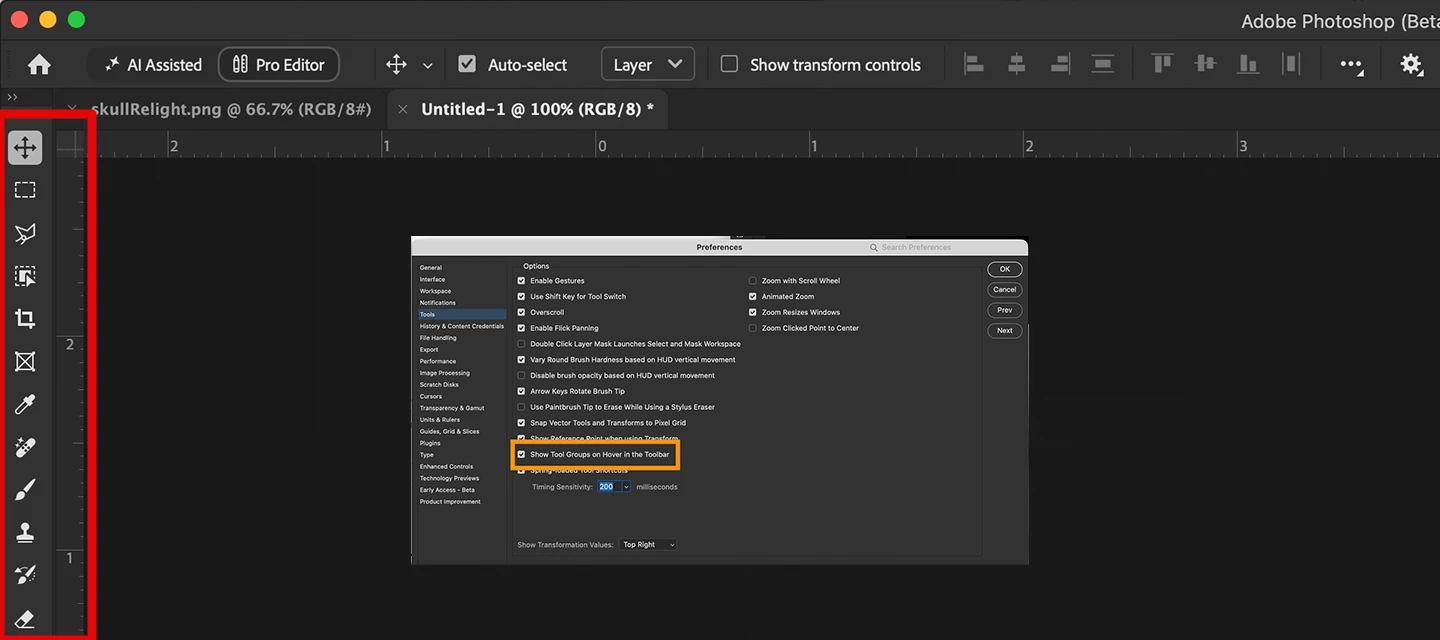
Hi everyone, You can now hover over a tool icon in Photoshop to see the other tools in that group, without right-clicking. Once the flyout opens, click the tool you want to use.Here's a quick look: Turning it on or off In Preferences > Tools, check Show Tool Groups on Hover in the Toolbar to turn it on. If you'd rather not have the flyout open when you hover, uncheck it. Available in Photoshop (Beta) 27.12.0, build 20261005.m.3700 - TODAY, October 6!Let us know how it feels in your day-to-day work. As always, we would like to hear your thoughts and help to work through any issues you find. Thanks!The Photoshop Team
Relight is a new Generative AI feature in Photoshop Desktop that lets you add up to 3 interactive, non-destructive lights and adjust their position, intensity, color, and diffusion (Beta version: 27.12.0 20260927.m.3691 available on 9/28/26). Relight feature with default light added in low-res preview mode. Relight feature with 2 lights added. Select done to commit (30 credits) and upscale.HOW TO TEST Update and launch the latest Beta Build (Version: 27.10.0 202600802.m.3625) → have an active Internet connection Open or place an image Select an unlocked Pixel, Rotate Object, or Smart Object layer. Go to the app Layer menu > New Relight layer... Note you can also go to the Layers Panel flyout menu New Relight layer… A new default (white) light will be added in the middle of the image. You can click and drag the light around on the canvas (inside or outside the image - above the bottom edge of the image). Relight removes the existing lighting in the image and re-creates i
When I try to open an image from Adobe Camera Raw by hitting the "OPEN" button it doesn't open in Photoshop Beta) anymore. Please advise.
downloaded PS Beta 27.12. imported jpeg file, unlocked layer I wanted to play with, color is RGB and set to 8 bit. still greyed out. made a selection of layer, still greyed out. Reloaded, rebooted, nothing works. running on windows 11
Remix with Firefly Community Gallery
Thousands of free creations to fall in love with and remix in Firefly.
Already have an account? Login
Enter your E-mail address. We'll send you an e-mail with instructions to reset your password.