











Master Photoshop with the help of our global community.
Recently active
Regarding brush options, is there a way to link the settings for the sample layer to each layer individually?(For example, I want to fix “Current Layer & Below” for Layer A and “Current Layer” for Layer B, and switch between them while working.)
When im working on a large image (5m x 2m) layers just wont merge. the grey circles go round and then nothing happens, nothing is merged. Its only on large files, why is this a problem ive never had before? I updated photoshop to the latest version and still the same. Its incredibly frustrating, i cant have all these stray layers.
I recently noticed these lines appearing under my text when typing in a text box in photoshop. I find them incredibly annoying and want to know how to permanently get rid of them. Someone in another forum suggested using Ctrl + H, which only works for a second and then the lines return. Using Windows PC, Photoshop 25.12.3. Thank you!GS
Just installed the new Photoshop app for iPhone. Loaded an existing PSDC from the cloud created by desktop Photoshop 26.11.0. Select a text layer, tap layer properties, and Text Options and Edit Text are grayed out. The rest of the icons are useable (Blend, etc.). If I create a new file with a simple plain text layer, I can edit text on iPhone, no problem. So... there's something in the properties of the text layer I created by desktop Photoshop that's stopping Photoshop on iPhone from being able to edit the text. I can't figure out what is stopping it from being editable. No effects, no grouping, I right clicked the layer and selected "clear layer style", that didn't help. But some text layers are editable in the same file, layers that have bevel/stroke/glow styles set. This really puts a crimp in any workflow from desktop to iPhone if I can't even edit text in all my text layers. Any idea what it is? It's not a font issue... layer font is available on iPhone... I also checked o
Please add select by color, color range ) thank u
I found an old thread from 2020 about this issue, but nothing in there helps me. All the buttons at the bottom of the layer mask panel do not work. Layer mask, adjustment layer, group, new layer and delete. I click on them and they do nothing. I have Adobe CC all apps, the latest PS version 26.3 updated 6 days ago. I have windows 11, last updated 09.02.2025
Olá, a janela de ferramentas ajustes, abre mas não aparece nenhuma rerramenta (curva, nivel, saturação...) NADA... com resolvo?
I can't really use Affinity Photo. Lacking scripting and automation a lot there . But I always wonder why there is basically no difference 8, 16 pr 32 bit the document is there. While in Photoshop anything like 4k image and 16 bit is instantly painfully slow vs 8 bit ? Especially with smart objects containing higher res images inside ? Seems good GPU vs noGPU gives no influence on this at all. Is there any tricks to improve performance for 16 bit image editing? Special formats for linked smart objects maybe? I noticed pngs are slow . Maybe something extra?
Thanks to all who took part in our previous 'What goes up' challenge. This week something a bit different. I heard the phrase 'Poison Pen' in a TV drama recently and my thoughts arrived at the image below. Made in 3D, the objects on the 'desk' are from Substance 3D assets, which I textured, along with the desk, in Substance Painter. The background was AI generated in Photoshop, using Firefly, and blurred to match the image before taking into Blender prior to rendering. Finishing was in Photoshop. So we have our starter image, what will you do with it? You could use any or all of the objects, or make something using the entire scene. When you post your response can you add just a few words on how you went about it. It may help others see the potential of different approaches, software, and tools to such a challenge. The “rules”: Use the starter image as at least part of your own image entry. Anything goes, as long as it meets the forum rules on decency, c
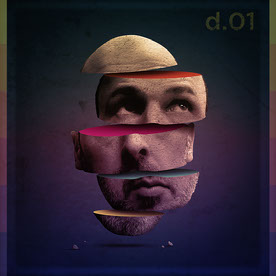
Thanks to all who took the time to participate in our last 'Poison Pen' challenge. There were some great ideas and images.This week we have something different, thanks to an idea suggested a couple of weeks ago by @Trevor.Dennis . Growing up, I always liked buying record albums and I loved the cover art that contained the record, sometimes as much, and occasionaly more, than the record itself! There were iconic images such as Hipgnosis' graphical prism on Pink Floyd's 'Dark Side of the Moon', or Richard Corben's fantastic graveyard bike on Meatloaf's 'Bat out of Hell', and who can forget Peter Blake and Jann Haworth's cover for the Beatles' Sgt. Pepper's Lonely Hearts Club Band.So the challenge for this week is to think of an album you liked and come up with your own cover design for it. There is no real starter image but I have attached a simple grey square 2500 x 2500 pixels in sRGB to use as a format. When you post your response can you add just a few words on what the alb
Tried contacting customer service and was told no there is no compatability with Windows 8. It is not possible for me to update the OS.I would LOVE to get Photoshop 2018 CC, but I'll take any at this point. Anyone have any ideas? I'll even BUY an older version if anyone can tell me where i can get it. Help, and thanks to any replies.
With most documents in Mac, you see a black dot in the upper red dot that shows the file needs to be saved while you are working on it. I don't see that with Photoshop. So if you do a save, how to you confirm or know the image is saved? Also, each image I bring into PS comes in tabs, ,to drag over a layer from one file to another i have to undo/ seperate tabs, fine. But then now both images sometimes go to (what call it when not it tabs and tucked into the grey backdrop?).. ie. How d o I get an image that is floating in it's own window back into the (can't remmber terminology) the gray background? How insert it back there. Thanks!
I have a large widescreen monitor - 34" — I like -- need -- to have the main document I'm working on centred on the screen.Photoshop does not respect this. Every time I do an operation - save, resize etc. - the window is snapped to the extreme left.Stop doing this!!!!!! Leave the bloody window alone!!!!!
Tengo la version 26.10 de Photoshop sobre Windows 11. Quiero quitar el desenfoque producido por movimiento de la cámara. Busco en la ayuda de Photoshop y me dice que vaya a Filtro > Perfilar > Estabilizador de imagen. Voy a mi ordenador y en el menú "Filtro" no aprece el submenú "Perfilar" ¿Alguna solución?
HiI have a file size 3000x3000px. When I drag and drop a 500x500px image onto the workspace, how does the image automatically fit the size of the workspace?I have a file size 3000x3000px. When I drag and drop a 500x500px image onto the workspace, how does the image automatically fit the size of the workspace?Currently the way it is working is that the image that I drag and drop is smaller than the canvas size and off the center of the canvas. I would then have to Ctrl T to resize the image if I wanted it to fit on the canvas. So if I drop multiple images of the same size 500x500px I will have to edit each one.I want to resize the image to fit the canvas, not resize the canvas, so Trim doesn't work
Can someone tell me if this item will be back one day? Because I can't dowload it
Hello, I’ve been experiencing an issue when trying to use the Generative Expand feature. Every time I attempt it, whether I enter a prompt or leave it blank, I receive the following error message: Error 25: Expected: ). Line: 1 Could you please help me resolve this issue?
I have been regularly importing layered Photoshop files into After Effects. But now the Photoshop fella has done something to make the layers into footage, that appears and disappears at certain points in time.I cannot find a way to completely remove any animation/timeline/footage aspect from these new photoshop files so that they import normally.Usually layers show up as purple elements in the After Effects timeline, and QT movies as tiel. Now these new Photoshop files have layers showing as tiel in After Effects, just like QT movies. I want them normal again!How do I convert these 'timeline/animation' PSDs back to just plain ole image PSDs?
I've been a Creative Cloud member since 2017. At the time, I subscribed to the basic photography plan which included Photoshop, Lightroom and Adobe Portfolio. I'm only getting 250 generative ai credits per month. According to the information I can find via Adobe, I should be getting 500 credits per month. If this is so, who do I contact about getting my proper allotment of credits?
I updated Beta today and this new problem is both on Beta and the original Photoshop. I removed them from my pc, clened it up and did new install but it still remain. As soon as I try to save the picture it freezes and I have to do a ctl,alt, delete to remove it. EDIT: The ptoblem turned out to be the folder I used to save all my pictures in. When I changed that to a new folder the problem was gone. I am very dosapointed with Adibe who responded asking for more info and then never returned to this post! You can see yourselfs further down...
I am trying to blend photos - I have hte two photos open in Photoshop - I can see the two tabs. When I drag one of the photos on to the onbe that is already open, the second photo opens as a new file and I cannot drag onto the first photo - I am sure it is something in prefrences or the Window menu - Thanks
A number of tools have disapeared from my tool bat, like the Saturation tool and others.How do I get them back?
Is Photoshop v 22.2 still available? I have Photoshop v 25.9 downloaded, but when I click to see "Other Versions" there are no options available? I have the Photography Plan - does that limit the versions?
Les icones de mes fichiers n'apparaissent plus dans l'affichage des fichiers wous Win 11
Wie die Überschrift schon sagt, habe ich bei der Wiederherstellung nicht mehr daran gedacht, CS6 zu deaktivieren. Ich hoffe, ich darf diese Frage hier stellen.Usprunglich habe ich CS2 mit Upgrade auf CS3 gekauft und später das Upgrade auf CS6. Ich muß also immer alle Versionen installieren. Bei CS2 & 3 hat das alles reibungslos geklappt, aber bei CS6 kommt immer nachfolgende Meldung. Früher gab es für solche Fälle mal eine Telefonnummer, die man dafür anrufen konnte, wie kann ich das denn heute machen? Ich finde auf der Adobe Hilfeseite nichts oder ich suche falsch.
Remix with Firefly Community Gallery
Thousands of free creations to fall in love with and remix in Firefly.
Already have an account? Login
No account yet? Create an account
Enter your E-mail address. We'll send you an e-mail with instructions to reset your password.
