































Master Photoshop with the help of our global community.
Recently active
The July 2026 update to Adobe Photoshop (version 27.9.1) introduces faster creative exploration, smarter AI-assisted image generation, and improved productivity tools to help designers, photographers, and creators work more efficiently and stay in flow. What’s NewPhotoshop 27.9.1 introduces several enhancements designed to streamline creativity, improve productivity, and make everyday tasks easier. You can now send layers directly to Firefly Boards for faster ideation and creative exploration, making it simple to compare concepts and develop new directions from existing Photoshop content. Editing workflows are now more efficient thanks to expanded Remove tool controls in the Contextual Task Bar, giving you quick access to options such as Find distractions, Add to, Subtract from, and Remove after each stroke without interrupting your workflow.Font management has become more reliable with the ability to save and restore your favorite fonts, ensuring your curated font lists remain availab
A realistic shadow helps your subject feel grounded in the scene. In Photoshop, there are several ways to create one, depending on your subject and lighting. Based on workflows shared by experts in the Photoshop community, we've brought together a few of the most effective techniques here. Choose the method that best fits your workflow. Method 1: Using Generative AIAI can speed up the setup, but you will still get the best results by refining the shadow yourself.Use Select Subject or Remove Background to quickly isolate your object. Use Generative Fill to extend the surface where the shadow will fall. Learn more. You can also use Harmonize. It analyzes the lighting, color, and tone of the scene, and can also generate a matching shadow to help the subject feel more naturally integrated. Learn more. Refine the generated shadow manually using one of the methods above for the most realistic result. Method 2: Drop Shadow EffectThis is the quickest way to add depth and separation to elemen
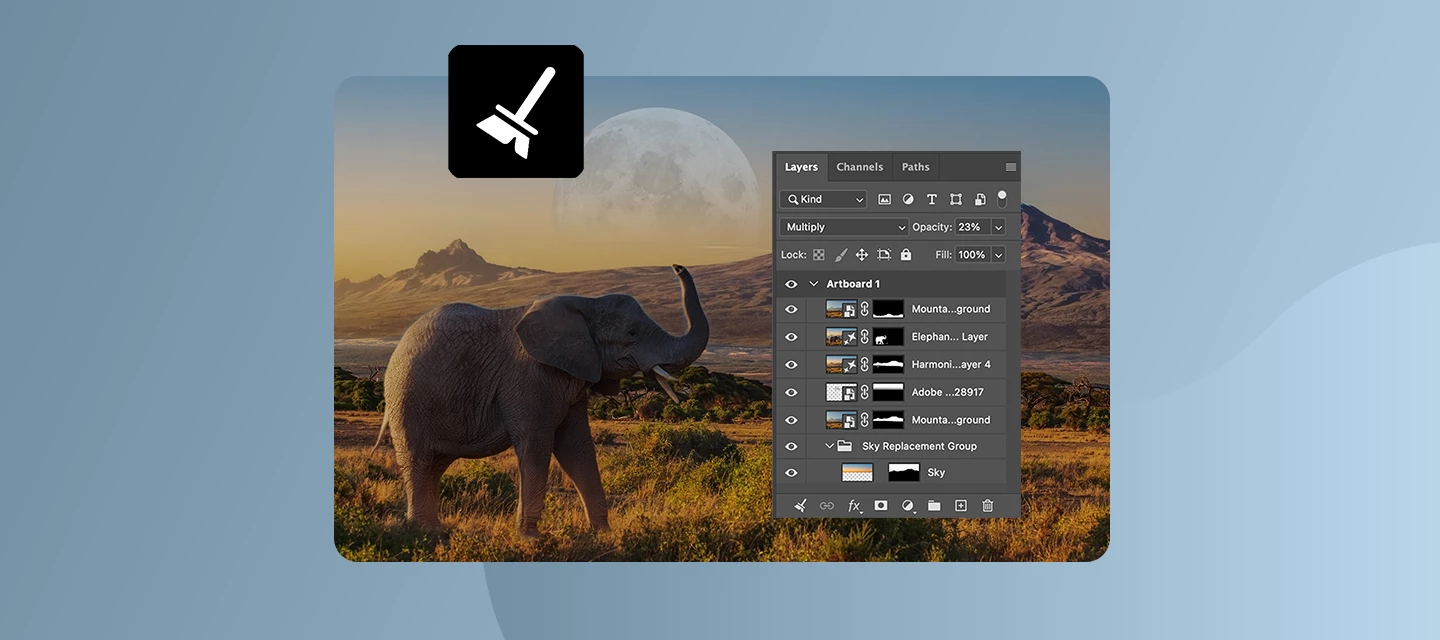
Keeping your Layers panel organized just got a whole lot easier. Layer Cleanup in Photoshop 27.6 and above automatically deletes empty layers and renames layers based on their content, so you can focus on creating, not housekeeping. With a single action from the Layers panel, Photoshop scans your document and removes blank pixel or text layers that tend to pile up during exploration. At the same time, it can intelligently rename layers, giving them clear, descriptive names that reflect what’s inside, so you no longer have to guess what “Layer 37 copy 2” contains. You’re in control of how much cleanup happens. Run it across the entire document for a full reset, or apply it only to selected layers when you want to tidy up as you go. Here is a quick tutorial demonstrating this feature. Why this mattersFaster navigation in complex files Cleaner handoffs when sharing PSDs with teammates Less friction when revisiting older projects Better layer discipline without manual effortWhether you’r
Thanks to all who took part in our previous ‘Where there’s smoke’ challenge. There were some great images based on the Victorian pipe.This week, we go to Lindisfarne, also known as Holy Island. It is situated just off the Northumberland coast of England, and reachable by a causeway. This view of the castle, which was built in the 16th century, is from the rugged rocks of the beach. In its day, it must have been a formidable castle to breach. Of course, with the power of image manipulation, you can show us how it might be done.The “rules”:Use the starter image as at least part of your own image entry. Anything goes, as long as it meets the forum rules on decency, copyright, etc. Anyone, and everyone, is welcome to have a go, whether you are a complete beginner or a Photoshop expert. This is not just for our forum “regulars”. The challenge is not limited to Photoshop. Any Adobe software can be used. There are no prizes apart from the chance to practice, show off your skills, or bring a
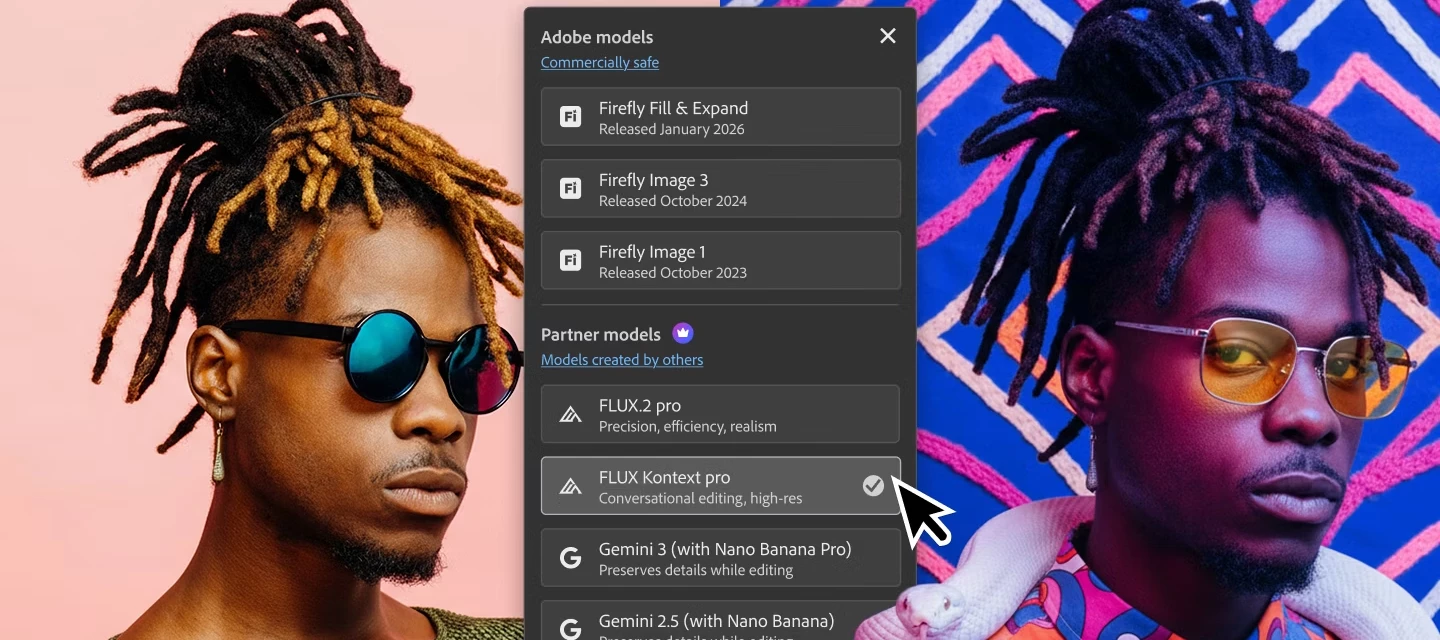
The June 2026 Photoshop update is here, bringing more creative choices and meaningful workflow fixes. What’s newThis release expands creative choice in Generate Image with access to custom‑trained AI models, similar to what you’ve seen with Generative Fill. You can now choose from Adobe and partner models, including Firefly Image 5, Flux.2 Pro, and Gemini, making it easier to explore different visual styles, achieve stronger photorealism, and get results that stick closer to your prompts. Whether you’re experimenting with concepts or polishing production‑ready visuals, having multiple models at hand gives you more control over how your ideas come to life. Bug fixes — thanks to you!Your feedback continues to shape these updates. In this release, we’ve addressed several customer‑reported issues to make everyday workflows more reliable:Canvas size relative mode fields display incorrect default values, reject zero and negative values, and use incorrect increment steps. Add support to renam
Thanks to all who took part in our previous ‘Fixer Upper’ challenge. As always, there were many interpretations of the image and the brief.This week, we start out with a simple object. This Victorian pipe can be found in Adobe 3D assets. I made the wrap-around wood materials using Adobe Substance 3D Designer and then added them to the surface using Adobe Substance 3D Painter, before rendering in Blender 3D.So, now we have our starting image. What can you make with it?The “rules”:Use the starter image as at least part of your own image entry. Anything goes, as long as it meets the forum rules on decency, copyright, etc. Anyone, and everyone, is welcome to have a go, whether you are a complete beginner or a Photoshop expert. This is not just for our forum “regulars”. The challenge is not limited to Photoshop. Any Adobe software can be used. There are no prizes apart from the chance to practice, show off your skills, or bring a bit of humour and fun. Don't be shy, join in and have a go!
We've split the Photoshop community into two dedicated spaces so you can find the conversations, tips, and apps that fit how you actually work:🖥️ Photoshop (Desktop & Web)📱 Photoshop Mobile Two focused communities mean more relevant content, better discussions, and an easier way to connect with creators and experts who work the way you do. Were you part of the Photoshop Ecosystem community? That space has been renamed Photoshop and is now home to all Desktop and Web conversations. To jump in, head to the App Communities page and select Photoshop. You'll find desktop-first editing techniques, inspiration, and a place to share your creations. On mobile? Drop into the new Photoshop Mobile community to explore the space and connect with fellow mobile creators. We'd love to hear from you. Does separating Desktop & Web from Mobile make it easier to find what you need? Explore the new spaces and let us know how they're working for you in the comments.
We’re rolling out newer, more capable generative models in Photoshop to help you create with greater realism, speed, and control. As part of this evolution, Firefly Image 3 is being retired from Generative Fill and Generative Expand workflows, starting with the Photoshop 27.6 release. Going forward, we recommend using Firefly Fill & Expand, an actively supported model designed to deliver improved results for these workflows. What’s changingThis update is happening in two phases to give you time to transition. Phase 1: Starting April 28, 2026, Firefly Image 3 is removed from the model picker in Photoshop 27.6, though it will remain temporarily available and functional in versions 26.0–27.5 until August.Phase 2: In August 2026, Firefly Image 3 will be fully removed from service across all versions and plans. What to use insteadFor Generative Fill and Generative Expand tasks, Firefly Fill & Expand is the recommended alternative. It’s optimized for these workflows and continues to
Thanks to all who took part in our previous ‘Jewel in the Crown’ challenge. There were some great creations made from the starter object.This week, we have something different. Our starter image this week is a guest house building in the grounds of Fountains Abbey in Yorkshire, England. The abbey and grounds, which are a UNESCO World Heritage Site, are well worth a visit. These guesthouses were built in the 12th century but fell into ruins in the 16th century when Henry VIII dissolved the monasteries.The challenge for this week is to use your image skills to restore these guesthouses and make them suitable for habitation again.The “rules”:Use the starter image as at least part of your own image entry. Anything goes, as long as it meets the forum rules on decency, copyright, etc. Anyone, and everyone, is welcome to have a go, whether you are a complete beginner or a Photoshop expert. This is not just for our forum “regulars”. The challenge is not limited to Photoshop. Any Adobe software
Ever open a photo and notice one thing that just doesn’t belong, a passerby, a wire, a random object stealing focus? The Remove tool in Photoshop makes those distractions disappear in just a few strokes, so your subject stays front and center.With the Remove tool, you simply brush over what you want gone, and Photoshop fills the space intelligently to match the surrounding area. No complex selections, no cloning gymnastics, just clean results that blend naturally into your image. Flexible AI, your wayThe Remove tool gives you control over how AI helps with your edit:Auto lets Photoshop decide the best method for the job Generative AI on uses AI to produce more context-aware results (with cloud or on-device processing) Generative AI off keeps things classic when you want full manual controlIf you prefer keeping things local, you can also run the on-device model, which processes removals directly on your machine after the model is downloaded—great for faster edits or working offline (sys
We've been working on a significant evolution of Photoshop's core systems — and are eager for your input. We're evolving Photoshop to be faster, smoother, and with the focus on helping you be more productive by giving you greater creative control. We’re actively listening to your needs, and are taking action to modernize the technologies that power Photoshop. This isn't a single feature update, it's a long-term effort to upgrade Photoshop's core systems: how it performs on complex documents, how it takes advantage of the latest hardware, and how it opens the door to new capabilities made possible by AI. This is a long-term investment in the future of Photoshop, and we're excited to start sharing more of where we're headed. As we continue to make progress, we'll share updates along the way and invite your feedback to help shape the experience. What we're buildingThe first major milestone is a new compositing engine — powered by the GPU — that brings real-time performance, non-destructi
Moodboarding shouldn’t mean exporting a dozen files, renaming versions, and losing the thread of your ideas. In Photoshop v27.5 and above, you can now send your work directly to Firefly Boards, so exploration, comparison, and concept-building stay connected to the file you’re actually designing. What’s new in this flowWith the new integration, you can move from “editing” to “ideating” without breaking momentum:Share any Photoshop document to Firefly Boards straight from the Share panel or the Export menu, add it to an existing board, or start a new one. Firefly Boards now shows up in the Variations panel, making it a natural destination when you’re comparing AI-generated directions. When you generate image variations using Ideate in Firefly Boards, you can open them in a preconfigured board layout built for exploration and iteration. New guided workflows help you create moodboards and visual concepts, plus jump quickly into branding/marketing assets and social content exploration. Wit
Photoshop 27.7 brings smarter performance, deeper AI flexibility, and smoother everyday workflows, so you can stay focused on creating, not managing complexity. This release sharpens how Photoshop responds to your hardware, gives you more control over AI‑powered tools, and streamlines common tasks to keep documents cleaner and faster. The result is a more responsive, flexible experience that supports both quick edits and deep creative work. What’s newYou can now use an on‑device AI model for the Remove tool, giving you the choice to process object removals locally without relying on the cloud. Sharing and ideation also get a boost with direct integration between Photoshop and Firefly Boards, making it easier to move from creation to moodboarding and comparison in one flow. On top of that, managing your account is simpler with a Unified Account Menu right inside the Edit workspace, alongside several workflow and performance improvements across the app. Enhancements you’ll noticeThe Sav
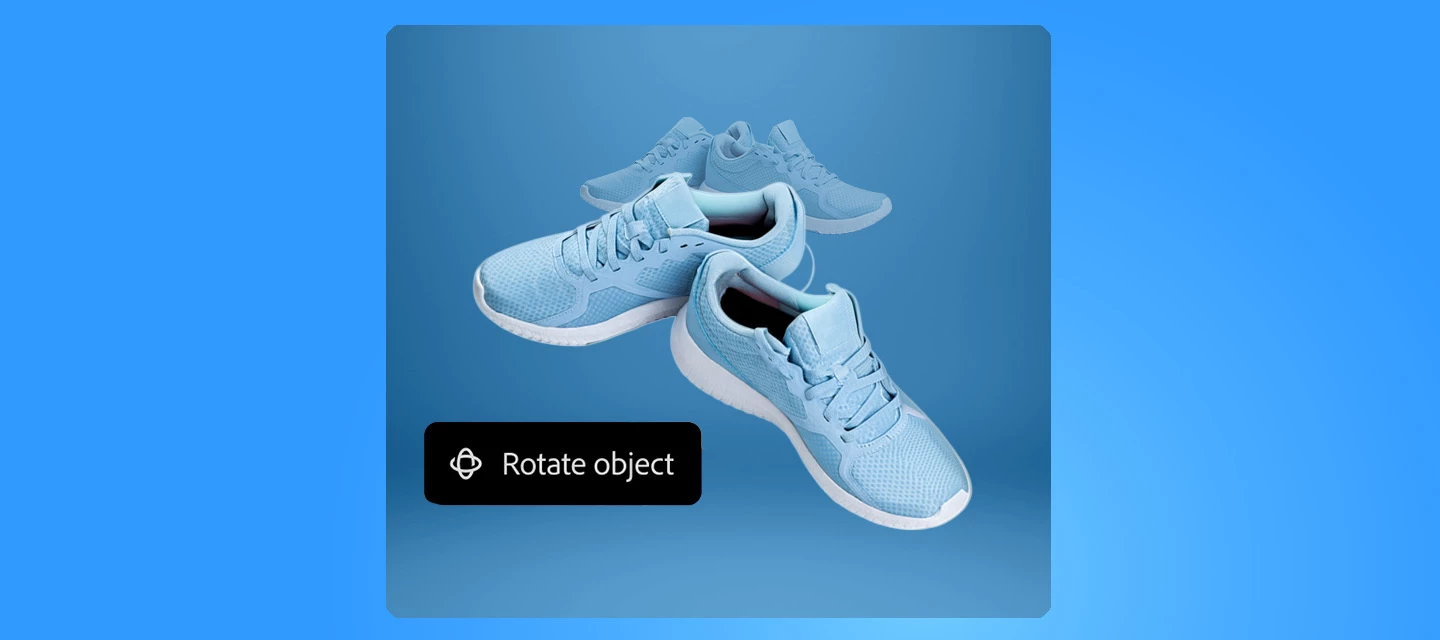
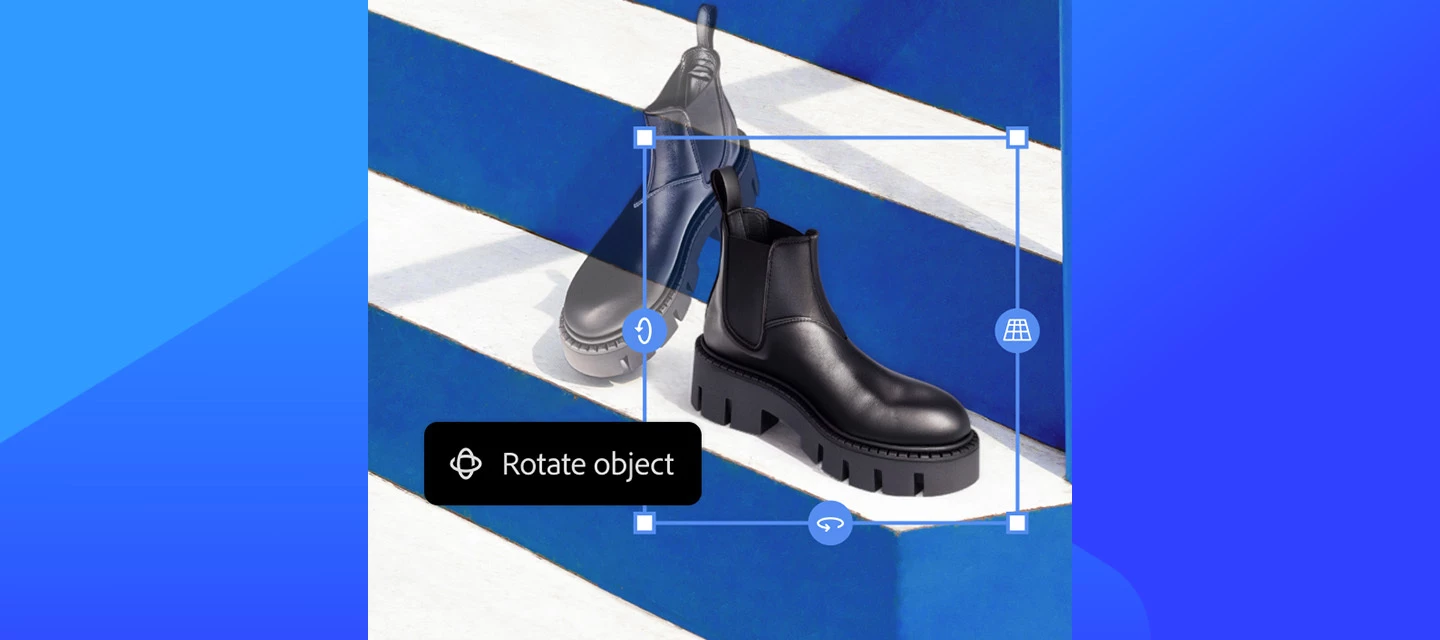
Have you tried Rotate Object in Photoshop 27.6 yet? If not, give it a try. It can turn flat pixel layers into rotatable 3D objects, right on your canvas. Getting Started Instead of imagining how an object might look from another perspective, you can now actually rotate it. Select a pixel layer or Smart Object, choose Rotate Object, and drag directly on the canvas to explore different angles, tilts, and orientations. Photoshop gives you a live, low‑resolution preview while you rotate, then renders the final result in full resolution when you’re done.This makes it easier to fine‑tune perspective without rebuilding your composition or duplicating layers, and because the rotation stays editable, you can always come back and adjust later. Here is a quick tutorial demonstrating the feature. Where this really shinesProduct mockups: Test multiple viewing angles without re‑creating assets Concept art & illustrations: Quickly explore depth and form Social & marketing visuals: Add subtle
The April 2026 release brings a strong mix of creative freedom, smarter AI workflows, and performance improvements, all designed to help you spend less time managing layers and settings, and more time creating. From more powerful generative AI controls to cleaner documents and better performance on modern hardware, this update focuses on clarity, speed, and control. What’s newPhotoshop v27.6 focuses on making editing more intuitive and efficient. You can now rotate objects directly on the canvas with real-time previews, giving flat elements a 3D feel. File organization is improved with automatic Layers panel cleanup and smarter layer naming, while tools like Find Distractions and enhanced reflection removal make image cleanup faster and more precise. Generative features have also expanded, with access to more AI models like Gemini 3.1 and Adobe Firefly Image Model 5. You can use multiple reference images for better consistency and even generate images from text prompts without leaving
As a Creative Cloud member, you have access to a host of membership benefits to keep you ahead of the curve and support your creative work. This month, we've added a powerful new partner perk and a curated collection of free design templates to help you do more with your membership. Here's what's new:New Partner Perk: 50% Off Hootsuite + 30-Day Free TrialWhether you're a freelancer, marketer, or creative professional, getting your work in front of the right audience matters just as much as making it look great. That's why we're excited to announce an exclusive Hootsuite offer for Creative Cloud members: 30 days free plus 50% off your first year of Hootsuite Standard.With Hootsuite, you can plan your content calendar, publish across multiple social networks from a single dashboard, engage with your audience, and measure what's working, all in one place. And because Hootsuite integrates with Adobe Express, you can design your visuals and schedule them without ever breaking your creative
A new workflow in Photoshop desktop makes it easier to explore, organize, and refine creative directions, without breaking your flow! What’s new With version 27.5, you can now open your cloud documents directly in Firefly Boards from Photoshop. This lets you quickly explore ideas, create and compare variations, and organize concepts visually before taking your preferred version back into Photoshop for detailed editing. The result is a smoother creative loop from ideation to refinement using the same cloud document throughout. You can start from an existing Photoshop cloud document, place it on a Firefly Board, experiment with variations, make adjustments, and keep everything neatly organized in one place. When you’re ready, simply open any variation back in Photoshop and continue editing with all the precision tools you already rely on. Learn more about Firefly Boards in Photoshop How to use it On the Photoshop desktop home screen, go to Your files. From the three‑dot menu next to a
We’ve rolled out a small but important update with Photoshop 27.3.1. This release addresses a key issue impacting working with Generative AI features. What’s FixedResolved an issue where upgraded installations continued using Firefly Image 3 as the default generative model after updating from earlier versions. The update now correctly switches the default to the latest Firefly Fill & Expand model, ensuring you get the newest and most accurate generative capabilities by default.How to updateUpdate to Photoshop v27.3.1 to experience these improvements and elevate your creativity! Update Photoshop
Big update for creators, Photoshop just got even more powerful inside ChatGPT.We’ve just rolled out new updates to Photoshop for ChatGPT, and this one is a game-changer! This feature is available to all ChatGPT users, including free users! What’s NewUntil now, you could make quick adjustments to color settings, making your pictures vibrant. You can now create complete generative edits with simple text prompts, adding, removing, or replacing elements, generating entirely new backgrounds, editing specific objects or people, and adjusting lighting or color, all with a small prompt! No more complex tools! No steep learning curve! You simply type your idea and watch it come to life. What makes this even more powerful is what happens next. Once you’re happy with your edit, you can take your image into Photoshop on web or mobile to keep refining and building on it. Let’s dive in!Getting started is straightforward. Open Photoshop for ChatGPT , connect your account, upload an image, and start
Photoshop 27.4 is now available, bringing improved generative results and fixes that came directly from your reports What’s New Generate Similar now uses the enhanced Firefly Fill & Expand model. Generate Similar lets you create new variations from an existing image. With this update, you should see higher-quality and more consistent results when using Generative Fill and Generative Expand. Learn more about Generate Similar in this article. If you use Generate Similar regularly, we’d love to hear how it’s working for you. Get started in PhotoshopBug Fixes — Thanks to You The following issues were identified and upvoted by members of this community. Thank you for flagging them and helping us prioritize: Gradient tool in Multiply mode on a layer mask not working as expected Floating tab documents jumping to the front after saving Select People not creating selections in CMYK documents Your reports and upvotes directly influence what gets addressed. Please keep them coming.
Looking for a fun way to give your photos a hand-crafted feel? Try turning them into pencil sketches using just a few tools in Photoshop. This simple technique is great for portraits, architecture, or even still life — and it works with any photo you already have. No tablet or drawing skills required. Try it in the Desktop App Download the latest version and dive into the new features offered in Adobe Photoshop. This step-by-step guide walks you through how to create a pencil sketch effect that mimics real graphite lines and paper texture. Once you’ve tried it, share your results here in the community — we’d love to see your take on it. Step-by-Step: Photo to Pencil Sketch 1. Duplicate Your Image: Duplicate your image layer and select the top layer and go to Image > Adjustments > Desaturate or use Command + Shift + U to make it black and white. 2. Invert Your Second Layer: Duplicate the desaturated layer. Then invert it using Command +
As a Creative Cloud member, you have access to a host of membership benefits to keep you ahead of the curve and support your creative work. Over the past month, we’ve added new benefits and enhanced others to make your membership more valuable. Here’s what’s new: Adobe Fonts: New Foundries and Sofia Update We know everyone has their own type – which is why we’re constantly adding to Adobe Fonts to make sure there’s something for every project. With this update, we’ve added new expressive/display fonts, as well as fonts that support Korean, Hebrew, and Arabic. Plus, we’ve expanded the iconic Sophia Pro font family.Click here to explore the new fonts and foundries. New Partner Perk: 25% off Flickr Pro Photographers, this one’s for you! We’ve heard a desire from Creative Cloud members in the photo space for partner perks designed for photo use cases. Look no further! We’re happy to announce that Creative Cloud members can take advantage of a 25% discount on various Flickr Pro plans. T
Start exploring new creative possibilities. Photoshop 27.3 brings powerful enhancements designed to give you more control, smoother workflows, and smarter AI-powered results. What’s NewWe’re excited to introduce several powerful updates designed to enhance your image editing workflow. With the new Clarity and Dehaze adjustment layers, you can easily boost mid-tone contrast and reduce haze while keeping your original image untouched. The latest Firefly models in Generative Fill and Generative Expand now deliver more accurate, higher-quality AI-generated results to help bring your ideas to life. Plus, the updated Remove tool makes it faster than ever to clean up your images by quickly removing unwanted objects or people. Read more about these and other new feature in this release here. Bug Fixes — Thanks to You The following issues were identified and upvoted by members of this community. Thank you for flagging them and helping us prioritize: When accessed via UXP, the new Clarity and
We're excited to help you take your next big step-creatively and professionally. With 3 free months of LinkedIn Premium, you can access powerful tools designed to help you grow your network, land your next opportunity, and build in-demand skills. LinkedIn Premium Career helps you find the right job, stand out to hiring managers, network with recruiters, and build skills to advance your career with over 24,000 LinkedIn Learning courses. Offer eligibilityThis exclusive offer is available to Adobe Creative Cloud customers who have never tried LinkedIn Premium before. Redeem your offerVisit adobe.com/benefits and log in to check your eligibility and to redeem your offer.
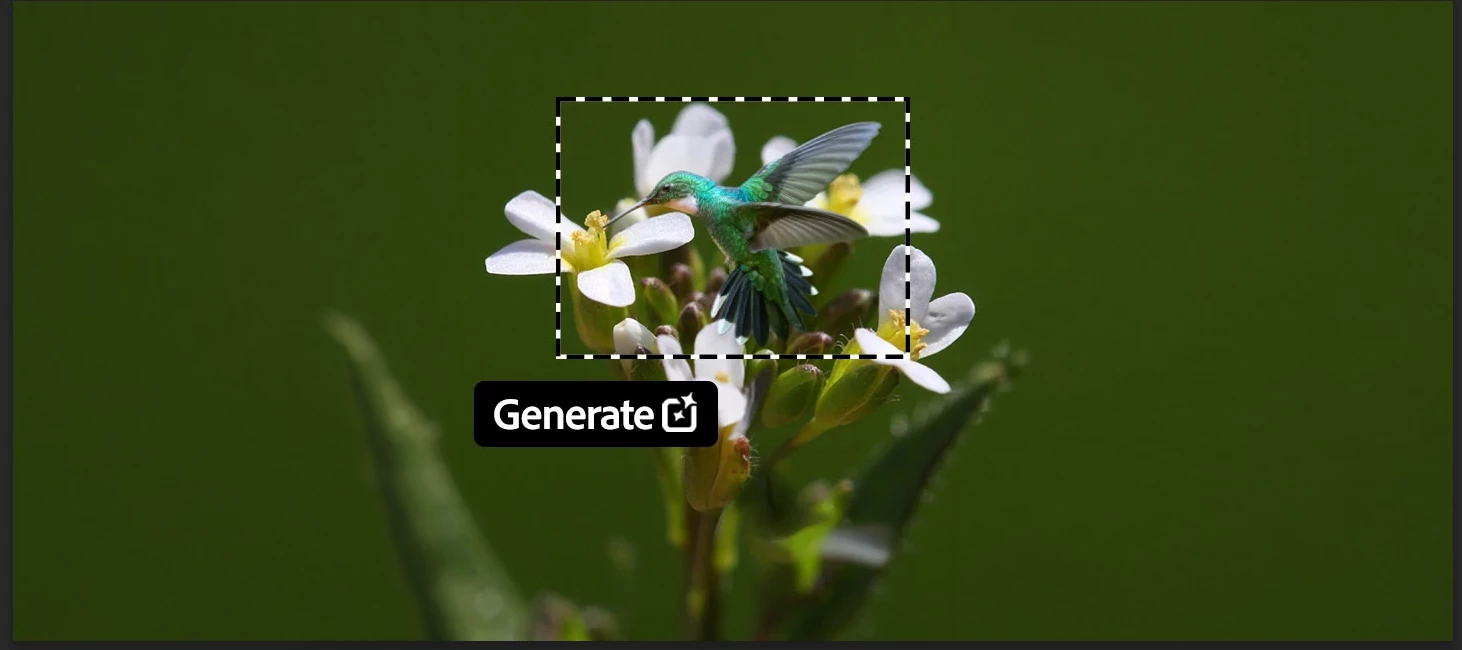
Big news for Photoshop creators! We’re excited to bring new AI models into Photoshop’s Generative Fill workflow, unlocking advanced creative tools like style transfer, text editing, object modification, and complex transformations—all non-destructively. How to use: Open a file → select an area (Select All or Selection Brush) Click Generative Fill → tap the Model Picker Choose your AI model → enter a prompt → generate! Check out this tutorial for more details. 💡 Pro Tip: Hover over any model in the picker to see additional details before selecting it. Generation Credits Summary: Adobe Firefly models (Firefly Image 5, Firefly Fill & Expand, Firefly Image 1) use 1 credit per generation. Partner AI models are premium and consume more credits: Gemini 3 (Nano Banana Pro) = 40 credits Gemini 2.5 (Nano Banana) = 10 credits FLUX.2 Pro = 20 credits FLUX.1 Kontext [Pro] = 10 credits Premium model usage and credits details are available in the Generative Credits FAQ.
Remix with Firefly Community Gallery
Thousands of free creations to fall in love with and remix in Firefly.
Already have an account? Login
No account yet? Create an account
Enter your E-mail address. We'll send you an e-mail with instructions to reset your password.