










『アドビコミュニティフォーラム』に質問/トピックを投稿する方法
Photoshop (Beta)
新着順
When logging a new bug report, it's helpful to the Photoshop team when the information in the report includes steps describing how they can reproduce the bug experience. Once we can reproduce an issue, then we can start to investigate a fix. Note: If after a bit of troubleshooting we find that the bug report is in-fact not a product bug, the bug report may be moved out of Bugs and over to Discussions. Use the template below as a guide for posting the most meaningful bug reports for the team. Bug report template: Issue: Photoshop version: OS: Steps to reproduce: ... ... ... Expected result: Actual result: Anatomy of a great bug report: Issue: Provide a succinct one-line issue statement (i.e. Photoshop beta does X when using a tool or plugin) Provide Photoshop version: Help>System Info>Copy the top line with Photoshop version Provide OS and version: macOS 11.4 Issue: Provide good steps
Hi Everyone, The Circle, Arch, and Bow styles of dynamic text are now available in Photoshop beta! Here’s how to use dynamic text circle, arch, and bowCreate a Point type or Paragraph type layer, and convert to dynamic circle, arch or bow using the dynamic text button menu found in the Options bar, Contextual Task Bar, or using the dynamic text section in the Properties panel. New dynamic text options For circle, arch, and bow, there are 4 options for Position (Above, Center, Below) or changing the direction of the text. Edit the start, middle, and end pointsOnce a circle, arch, or bow layer has been created, you can adjust the start, middle, and end points with the Path Selection tool. Customize your text to tasteWith dynamic text circle, arch, and bow, most other text attributes are still editable aside from Font Size. ProtipIf you know how to edit the anchor points on a path, once a dynamic text layer has been made circle, arch, or bow, you can manipulate the path with the Direct
Tried to open a sony raw file (.hif) into Photoshop beta and received the attached error message.
I tried to submit a bug report and after detailing the issue along with screenshots and step-by-step instructions. I got an error that said duplicate titles are not allowed. WHAT?? When I started the submission, it checked my title for related content and there were only four posts back on version 25 so I selected none related and continued filling out all the details.There was no way to move forward, I clicked on the edit description to see if changing the title would work and it started me over from the very beginning and hitting the back button landed me HERE where I am now submitting a question instead.This is incredibly frustrating since I spent the time to detail the issue and it’s all gone. I don’t have time to troubleshoot your guys’ bug reporting and frankly it makes me NOT want to submit reports.Either way, the XP-Pen shortcut remote works perfectly with the latest PS 2026 but when trying to import the settings to Photoshop Beta 27.8 the PS settings disappear from the config
ACR Lag Issues.ACR (Beta) and 18.3.0.2528Mac Studio M1. 128GB RAM. Tahoe 26.4.1When loading images from Bridge into PS (Beta) to straighten uprights the guides are slow and laggy. Masks do not show coloured overlay and the whole thing is laggy.This appears to have started from the last update.If the images are opened into PS (Beta) and then opened in filter / acr there is an improvement thou when using the sharpening mask the mask isn't shown when the ‘option’ key is held.Regards,Mark
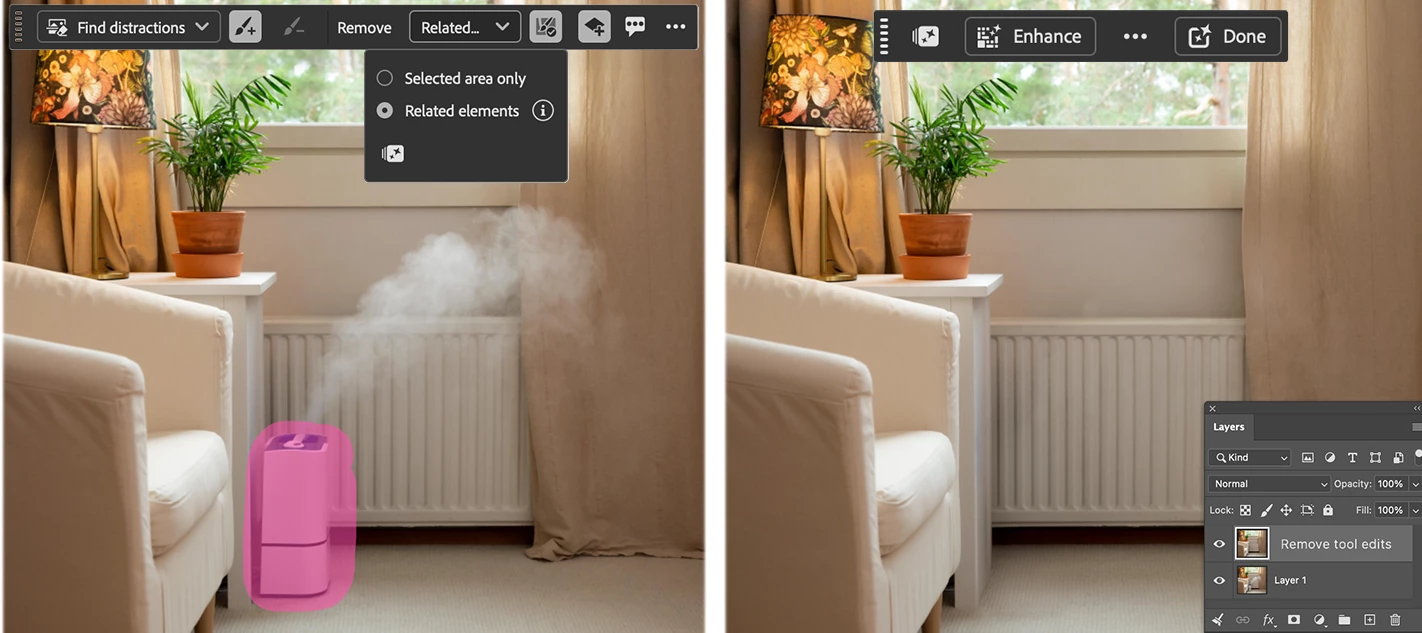
We are excited to announce the beta launch of an on-device generative AI model for the Remove Tool!You can now download the Generative AI model onto your personal device and work off-line and process locally - ideal when internet connections are unreliable or when cloud processing isn’t preferred. (It’s kind of a big deal!) How to:Select the Remove Tool. In the Options bar, open the Mode drop‑down (Auto / GenAI On / GenAI Off). In the Generative AI Processing section, choose Device.If the Device option is dimmed and unavailable, your system does not meet the minimum requirements to run the model. When prompted, click Download to start the download (approximately 5 GB). Once the download completes, the on‑device model will be used automatically. Switch between Cloud and Device processing at any time from the Mode drop‑down.Choose the Remove Tool, then visit the Mode drop-down in the Options Bar to find the Generative AI processing options.System RequirementsThis is a GPU‑intensive feat
Photoshop Beta 27.8 and XP-Pen shortcut remote v4.0.9(a349adf) The shortcut remote fails to import settings, and when keys are mapped manually the only keys that work are those that were part of the default config. (keys not yet mapped) The remote works perfectly with the non beta version of PS 2026. I export the config settings from the PS 2026 and when I try and import the config to PS beta, the PS beta disappears from the remote shortcut settings. I also experienced multiple crashes of the XP-Pen settings app while trying to manually map the keys. I’m attaching the shortcut config file in hopes it will help.I had to change the extension on the file because the .pcfg file extension couldn’t be attached. It’s just an XML file but it has to be changed to .pcfg in order for XP-Pen to import it. … Scott
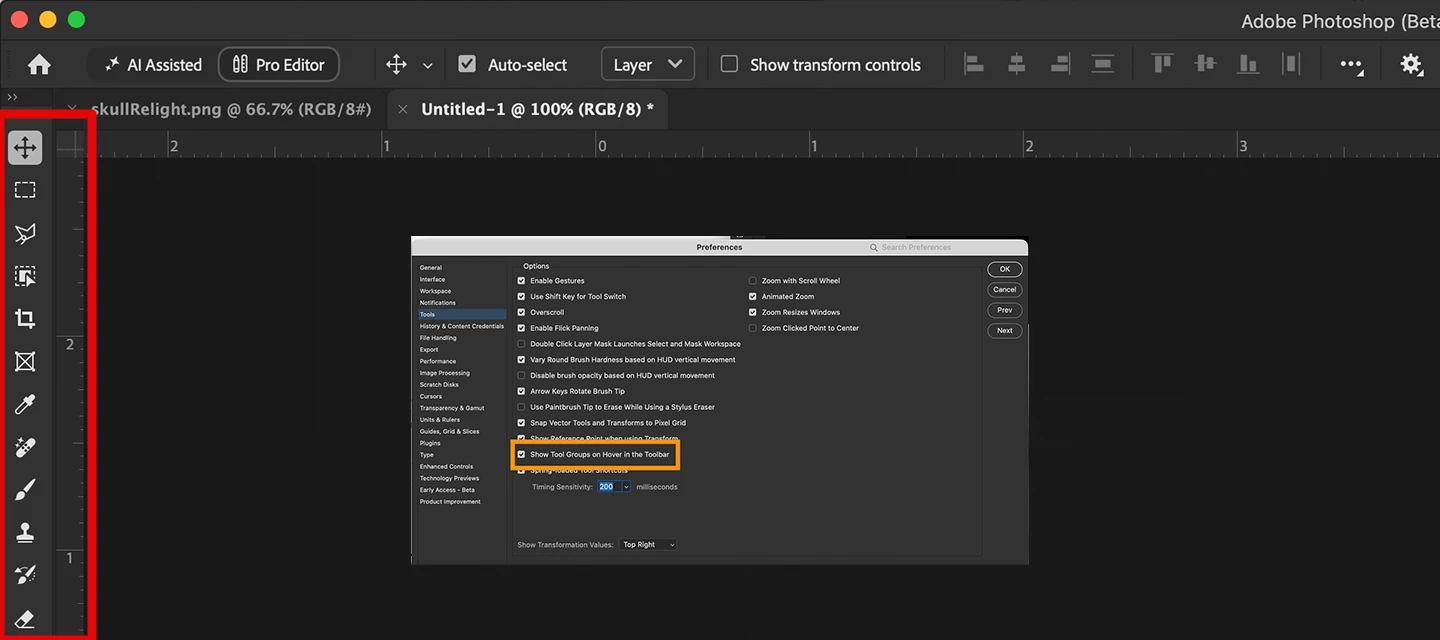
Preferences Update: April + MayApril focused heavily on preferences stability, fixing several crashes and session issues tied to the Modern UI framework. May brought a long-requested filter improvement and a toolbar reliability fix.What's newNew toggle to prevent accidental brush opacity changes while dragging the resize HUD (community-requested) Filters now remember your last-used settings when reapplying via Ctrl/Cmd+F, instead of resetting to defaults each timeBugs fixedFour crashes and UI issues caused by the Modern UI framework during preferences reset -- including black documents on launch, startup failures, and disappearing UI elements Object Selection Tool settings no longer revert between sessions Keyboard shortcuts for the modernized Toolbar no longer break after a clean preferences reset Thanks,Cory - Photoshop Product Manager
Windows Pro10.0.19045 Build 19045RAM 32 GBDisk space on C:\ 160 GB Beta Updates 27.6 & 27.7 fail at ~43% Troubleshooting I’ve Already Performed Ran Creative Cloud in Administrator mode — same crash at ~43%. Uninstalled Beta and reinstalled full 27.4, because complete installers for 27.5 and 27.6 both failed. Updated 27.4 > 27.5 using the standalone update (successful). Attempted 27.6 update again — still fails to update. Tried the Exit Code 127 fix, including granting full Admin permissions to the “adobeTemp” folder — no change. Around 03/31/26, I contacted Adobe Help for technical assistance with the Photoshop Beta update problem. I outlined every issue and every action I had already taken, all leading to the same result: the Photoshop Beta 27.6 update consistently crashes at ~43%.First Support SessionThe first agent (after taking control of my system) repeated most of the same troubleshooting steps I had already performed. After a reboot, he attempted a few additional
I'm running the latest available update of Photoshop Beta (27.4.0) on Windows 11. Starting with the last 2 or 3 updates, the contextual text bar disappears at random times. I've tried the suggested ways of restoring it, but nothing works other than shutting down & restarting Photoshop. I've never had this problem until the last few updates.
Hello.In the new Photoshop Beta update, the way OpenEXR files open has changed, and there are now many new options. I noticed a small issue that makes work a bit less convenient.There are still options to open a file “as transparency” or “as alpha channel”, but now when choosing “as alpha channel”, Photoshop automatically adds an alpha mask to the layer. This isn’t always needed, and when loading many layers into a stack, it takes extra time to delete all those masks one by one.It would be really helpful to have an option to open EXR files “as alpha channel” without adding a mask to the layer. Also now it takes much more time to open many filesIt would also be nice to have more control over how layers are opened when loading them into a stack using scripts. Sometimes it needed to open 1 layer “as transparency” and all other “as alpha channel” Thank you
merci
firmware .2727 when trying to have software select subject:error "can not complete your request a pop up says Subject classifier model not loaded correctly.
I have just updatet the regular Photoshop to version 27.6, but the new generative Credits Usage panel. isn´t there at all. According to severel Youtube channels (Julianne Kost for instance) there is such a new feature, but there isn´t. Why?
Created smart object in photoshop beta 27.7 then applied Topaz Studio → Photo filter. Topaz version 1.4 opens and works fine. Then save file and see the smart filter created - it says Topaz Photo AI. When I go to edit the smart filter it starts the wrong version of Topaz - it is using the old Photo AI version 4. Photoshop should reopen the studio version.Looks like photoshop is storing the incorrect filter program
Finally fix the bug where, when working with smart layers and going back to the main layer that contains the others, it doesn’t remember the changes made!
Hi, why can't I use removal tool on-device on Photoshop beta 27.7.0 Release (the device option is dimmed) even I meet the requirements, the GPU I currently used is Geforce RTX 5070 Ti 16GB and have enough HD space ?
Photoshop Beta v27.7 keeps crashing my computer (not just the app) during mask edits. I installed the previous version and issue goes away. After reinstalling 27.7 back the same issue occurs again. 4x and counting. This happens when I open the mask window to edit a selection for masking <ctrl><alt><r> in windows desktop (11), The mask edit window opens but as soon as I start trying to edit, my computer crashes. I’ve currently reverted back to version (v27.6). It is working fine so far as of today.
I can only get Generate Image to work with the latest Firefly Fill model. Not with any of the partner models (Win 11 desktop and laptop - the former running only the most current Ps production rel. 27.6 and the latter running only the latest Ps beta - not both on the same machine). Also, after trying to use reference image with a partner model it’s impossible to delete or remove the downloaded reference image. The trash can icon in the ref image dialog box doesn’t delete or eliminate the downloaded ref image. I’ve tried with multiple different base and reference images. And, I’ve tried by writing a prompt 1st (then the Generate button grays out) or making the selection and trying to establish object only and place in the selected area then choose the partner model. Neither approach works. It only works with the latest Firefly model - no partner models and I prefer working with Gemini and having the flexibility to use prompts.
Hi Adobe Team, I’m facing a small but very frustrating glitch in Photoshop, and I wanted to bring it to your attention. Whenever I’m using the Move Tool, and I try to switch to the Brush Tool by pressing B on my keyboard, Photoshop jumps to the Brush Tool for a split second and then immediately switches back to the Move Tool on its own. This keeps happening repeatedly, and only after trying 3–4 times does the tool finally switch properly.This issue is interrupting my workflow and becomes quite irritating, especially during long design sessions. I kindly request you to please look into this bug or guide me if there’s any fix or setting adjustment I should try from my side.
In Adobe Photoshop, the updated Canvas Size dialog fails to record relative dimensions when recording an Action. This works correctly in 27.3.1 (Release), but is broken in 27.4.0 (Beta). Steps to reproduce Open any document. Create a new Action (in the Actions panel). Click Record. Go to Image → Canvas Size… Change the units to millimeters (mm). Switch the size mode from Absolute to Relative. Enter values: Width: X mm Height: Z mm Click OK to apply. Stop recording. Expected resultThe Action records a Canvas Size step with parameters: With Relative Width: X mm Height: Z mm Horizontal: Center Vertical: Center Extension Color: Background Actual result (27.4.0 Beta)The Action records a Canvas Size step with: With Relative Width: (blank) Height: (blank) Horizontal: Center Vertical: Center The Width and Height fields exist in the recorded step, but their values are not saved (empty).Adobe Photoshop Version: 27.4.0 20260201.m.3398 df09e8f arm64 (b
Firefly 3 has been removed as an option in today’s beta. I would agree it’s not good for a whole lot, we find it demonstrably better with hair than Firefly 1 or Firefly Fill and Expand. Will it be removed from the release version as well? We are hoping not.
So as you can see, it's a PG-13 relatively inoffensive image of a woman in a bunny outfit. The top worked fine, and I was able to complete the top ear, which is cool. When I tried to extend the bottom with generative fill, though, I got this warning. They're just a pair of legs wearing stockings, and I wanted to extend it. It feels like a false flag - though I could be wrong? I find myself thinking it would do the same for women in swimsuits. Figured I'd share here.
In Photoshop 27.7.0 I can't select AI models. See attached images. None are available to select. Have the same problem on two different Mac's.
すでにアカウントをお持ちですか?ログイン
Enter your E-mail address. We'll send you an e-mail with instructions to reset your password.
申し訳ございません。このファイルは、ダウンロードしても安全かどうか、内容を確認中です。数分後にもう一度お試しください。
申し訳ございませんが、当社のウイルススキャナは、このファイルをダウンロードすることは安全ではないと検出しました。